Minecraft version
Back to mods 
CurseForge · Minecraft mod
Server Notify
Show notifications (images & more) to players that join your server!
Choose a version Pick your version below, then grab the matching file.
Quick answer
Which Server Notify release should I use?
Latest stable file [1.21] Server Notify - 1.0.4
Game version 1.21, 1.21.1
Loader Fabric
Server Notify [1.21] Server Notify - 1.0.4 targets 1.21, 1.21.1 with Fabric. The project page does not say whether this file belongs on the client, dedicated server, or both. No extra mods listed for this file.
Where it goes
Is Server Notify required on the client, server, or both?
The project page does not say whether this file belongs on the client, dedicated server, or both.
Client Source doesn’t say
Dedicated server Source doesn’t say
Loader for this release Fabric
Required install it here Optional supported, not mandatory Not supported do not install here Source doesn’t say do not assume
The source does not explicitly classify this release as client-only or server-only.
What else does Server Notify [1.21] Server Notify - 1.0.4 need?
[1.21] Server Notify - 1.0.4. Change the file and its required mods may change too.
This file does not list any required mods. Do not add a library just because a different file uses it.
This file does not list any required or optional mods.
Before you install it
Add Server Notify without breaking your instance.
Built for Server Notify [1.21] Server Notify - 1.0.4. Pick another file and the loader, install side or required mods may change.
- 01
Stick to this file
Use [1.21] Server Notify - 1.0.4. It targets 1.21, 1.21.1 with Fabric; another release may have different loader, side or dependency requirements.
- 02
Bring the mods it needs
This file does not list any required mods. Do not add a library just because a different file uses it.
- 03
Put it on the correct side
The project page does not say whether this file belongs on the client, dedicated server, or both.
- 04
Pick the file you checked
Use the “Get this file” button beside [1.21] Server Notify - 1.0.4. It opens that exact file at the source.
About this project
What does Server Notify add?
Server Notify
Server Notify is a Minecraft mod that lets you display notifications to players joining your Minecraft server. Easily set up notifications using commands, with options for texture, text, or URL-based notifications.
Required on Client and Server!
Notification Types
- Texture Notifications: Display textures from any loaded resource pack.
- Text-only Notifications: Display simple messages.
- Image from URL: Display images from a specified URL.
Getting Started
- Command-based: All features are accessed via commands in-game.
- Commands: Type
/server-notifyto view available options.
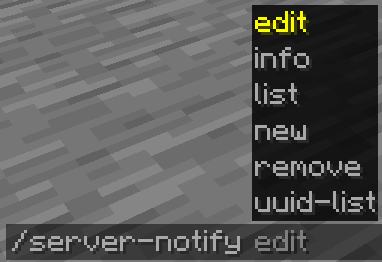
Command Options:
- Edit: Modify a notification's properties.
- Info: View details of a specific notification.
- List: Display all notifications.
- New: Create a new notification.
- Remove: Delete a notification.
- UUID-List: Show all notifications with their UUIDs.
Creating Notifications
Use the command /server-notify new type "Notification Name" to create a notification, replacing "Notification Name" with your preferred name and type with texture, text, or url.
Notification Types and Commands
Text-only Notification
A text notification lets you display any message as a notification.
An example command would be:
/server-notify new text "Notification Name" <sound_namespace> <sound_path> <message> <dismissButton> <dismissMessage> <alwaysShow>
"Notification Name" can be anything, however it must be in quotation marks. It is for you to identify the notification later on.
<sound_namespace> is the namespace of the sound you'd like to play when the notification is shown.
<sound_path> is the path of the sound you'd like to play when the notification is shown.
<message> is your message in quotation marks.
<dismissButton> displays a "Dismiss" button on the screen.
<dismissMessage> displays a "Press ESC to dismiss" text at the bottom of the screen.
<alwaysShow> shows the notification to a player when they join even if they have already seen it.
Another Text Notification example would be:
/server-notify new text "Notification Test" minecraft "ambient.cave" "hey, testing" false true true
Image from URL Notification
An image notification lets you display any image from a URL.
An example command would be:
/server-notify new url "Notification Name" <sound_namespace> <sound_path> <url> <width> <height> <dismissMessage> <alwaysShow>
"Notification Name" can be anything, however it must be in quotation marks. It is for you to identify the notification later on.
<sound_namespace> is the namespace of the sound you'd like to play when the notification is shown.
<sound_path> is the path of the sound you'd like to play when the notification is shown.
<url> is your image URL in quotation marks.
<width> is the width of your image (you might have to use a scaled down resolution to accomodate for Minecraft's GUI scale, for example for an image that's 1920x1080, scaled down while also keeping the aspect ratio would be 480 by 270).
<height> is the height of your image (you might have to use a scaled down resolution to accomodate for Minecraft's GUI scale, for example for an image that's 1920x1080, scaled down while also keeping the aspect ratio would be 480 by 270).
<dismissMessage> displays a "Press ESC to dismiss" text at the bottom of the screen.
<alwaysShow> shows the notification to a player when they join even if they have already seen it.
Another Image Notification example would be:
/server-notify new url "Image Test" minecraft "ambient.cave" "https://some_direct_image_url" 480 270 true true
Project description from CurseForge.
Pick your setup
Server Notify by Minecraft version and loader
Choose the version and loader you play, then open the matching release.
Minecraft version
1.21
1 loader buildMinecraft version
1.20.1
1 loader buildMinecraft version
1.19.2
1 loader buildCheck the dependencies, then try the file in a copied instance before changing a world you care about.
Recent files
Server Notify versions and loaders
[1.21] Server Notify - 1.0.4
server-notify-1.21-1.0.4.jar
12 Jan 2025
Client Source doesn’t say Server Source doesn’t say Dependencies No extras listed Listed on Release listing
Check the 1.21.1 · Fabric setup 1.21Fabric1.21.1 release
[1.20.1] Server Notify - 1.0.4
server-notify-1.20.1-1.0.4.jar
12 Jan 2025
Client Source doesn’t say Server Source doesn’t say Dependencies No extras listed Listed on Release listing
Check the 1.20.1 · Fabric setup Fabric1.20.1 release
[1.19.2] Server Notify - 1.0.4
server-notify-1.19.2-1.0.4.jar
12 Jan 2025
Client Source doesn’t say Server Source doesn’t say Dependencies No extras listed Listed on Release listing
Check the 1.19.2 · Fabric setup Fabric1.19.2 release
[1.21] Server Notify - 1.0.3
server-notify-1.21-1.0.3.jar
10 Jan 2025
Client Source doesn’t say Server Source doesn’t say Dependencies No extras listed Listed on Release listing
Check the 1.21.1 · Fabric setup 1.21Fabric1.21.1 release
[1.20.1] Server Notify - 1.0.3
server-notify-1.20.1-1.0.3.jar
10 Jan 2025
Client Source doesn’t say Server Source doesn’t say Dependencies No extras listed Listed on Release listing
Check the 1.20.1 · Fabric setup Fabric1.20.1 release
[1.19.2] Server Notify - 1.0.3
server-notify-fabric-1.19.2-1.0.3.jar
10 Jan 2025
Client Source doesn’t say Server Source doesn’t say Dependencies No extras listed Listed on Release listing
Check the 1.19.2 · Fabric setup Fabric1.19.2 release
1.0.2
server-notify-fabric-1.19.2-1.0.2.jar
6 May 2024
Client Optional Server Optional Dependencies No extras listed Listed on Release listing
Check the 1.19.2 · Fabric setup 1.19.2Fabric release
1.0.1
server-notify-fabric-1.19.2-1.0.1.jar
7 Apr 2024
Client Optional Server Optional Dependencies No extras listed Listed on Release listing
Check the 1.19.2 · Fabric setup 1.19.2Fabric release
1.0.0
server-notify-fabric-1.19.2-1.0.0.jar
6 Apr 2024
Client Optional Server Optional Dependencies No extras listed Listed on Release listing
Check the 1.19.2 · Fabric setup 1.19.2Fabric release
Looking for an older file? The official CurseForge project page is in Resources.
 mod
CurseForge + Modrinth · Minecraft
Plan | Player Analytics
The Ultimate Tool to monitor Minecraft player activity! Bukkit/Sponge/Bungee/Velocity support.
 mod
CurseForge + Modrinth · Minecraft
Mouse Wheelie (Fabric)
A "small" clientside mod featuring item scrolling, inventory sorting, item refilling and more!
 mod
CurseForge + Modrinth · Minecraft
GeckoLib
A 3D animation library for entities, blocks, items, armor, and more!