Minecraft version
Back to mods 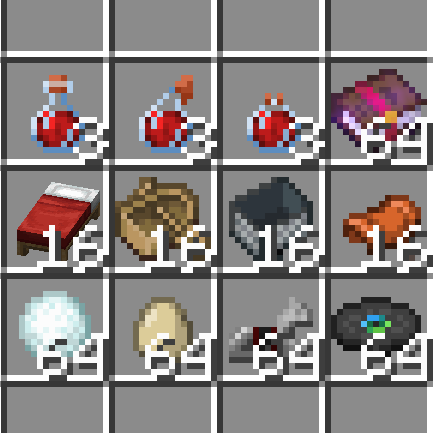
CurseForge · Minecraft mod
Sensible Stackables
Change and uncap stack sizes for any item, with sensible defaults
Choose a version Pick your version below, then grab the matching file.
Quick answer
Which Sensible Stackables release matches 1.21.7 NeoForge?
Best match for your filters 1.0.12 for NeoForge 1.21.6
Game version 1.21.8, 1.21.7, 1.21.6
Loader NeoForge
Sensible Stackables 1.0.12 for NeoForge 1.21.6 targets 1.21.8, 1.21.7, 1.21.6 with NeoForge. The project page does not say whether this file belongs on the client, dedicated server, or both. No extra mods listed for this file.
Where it goes
Is Sensible Stackables required on the client, server, or both?
The project page does not say whether this file belongs on the client, dedicated server, or both.
Client Source doesn’t say
Dedicated server Source doesn’t say
Loader for this release NeoForge
Required install it here Optional supported, not mandatory Not supported do not install here Source doesn’t say do not assume
The source does not explicitly classify this release as client-only or server-only.
What else does Sensible Stackables 1.0.12 for NeoForge 1.21.6 need?
1.0.12 for NeoForge 1.21.6 on 1.21.7 NeoForge. Every mod below is checked against that same setup.
This file does not list any required mods. Do not add a library just because a different file uses it.
This file does not list any required or optional mods.
Before you install it
Add Sensible Stackables without breaking your instance.
Built for Sensible Stackables 1.0.12 for NeoForge 1.21.6 on 1.21.7 NeoForge. Pick another file and the loader, install side or required mods may change.
- 01
Stick to this file
Use 1.0.12 for NeoForge 1.21.6. It targets 1.21.8, 1.21.7, 1.21.6 with NeoForge; another release may have different loader, side or dependency requirements.
- 02
Bring the mods it needs
This file does not list any required mods. Do not add a library just because a different file uses it.
- 03
Put it on the correct side
The project page does not say whether this file belongs on the client, dedicated server, or both.
- 04
Pick the file you checked
Use the “Get this file” button beside 1.0.12 for NeoForge 1.21.6. It opens that exact file at the source.
About this project
What does Sensible Stackables add?
Sensible Stackables
This mod allows increasing the stack size of items, while providing balanced defaults:
- Potions: 3
- Saddle: 16
- Harness: 16
- Boats: 16
- Minecarts: 16
- Beds: 16
- Stews and soups: 16
- Enchanted books: 64
- Ender pearls: 64
- Snowball: 64
- Egg: 64
- Horse armor: 64
- Music discs: 64
- Banner patterns: 64
- Cake: 16
Additionally, splash and lingering potions have a 1-second use cooldown to prevent potion throwing spam, and several menus have been patched to support stacks of items.
The mod can also be used to uncap the vanilla stack size limit and set any value you want, read below for instructions.
Configuration
It's recommended to use the in-game config screen to configure the mod, as there are item suggestions with auto-completion and most things are explained via tooltips.
The mod can also be configured manually by editing .toml files in inside the config/sensible_stackables folder.
The configuration supports defining stack sizes for either single items or item tags, for example:
- Adding
"minecraft:totem_of_undying"with value 16 will allow stacking totems up to 16 - Adding
"#minecraft:banners"with value 64 will allow stacking banners up to 64 (# indicates to the mod that this is an item tag) - Adding
"#c:buckets"with value 64 will allow stacking all types of buckets up to 64 (cis the namespace for conventional tags, see available conventional tags here) - Adding
"#sensible_stackables:all_block_items"with value 1 will make all blocks stack up to 1 only (dynamic tag provided by this mod, only in version 3.0.0 and above)
Uncapping max stack size
Setting uncapStackSize ("Uncap stack size" in GUI config) to true in the mod configuration will allow setting stack sizes above 64 to items and apply necessary patches to prevent bugs with large stack sizes. Item counts larger than 999 will be shortened in the GUI and the item tooltip will display the exact item count of the stack.
commonStackSize ("Common stack size" in GUI config) can then be increased from 64 to a higher value to set a "global" max stack size for all items which use the default stack size. Stack sizes for items which don't use the default stack size (such as potions, boats, enchanted books etc.) still need to be defined manually.
Item count display changes, such as shortening, scaling and the item count tooltip, can be toggled on and off for compatibility with mods like Reliable Recount.
WARNING: While theoretically you can set max stack sizes for everything up to around 2.1 billion, using sizes larger than 100000 can cause performance issues. For example crafting 100000+ items at the same time or taking out 100000+ items from the stonecutter will freeze the game for a while (5-20 seconds). I've tested the mod with common stack size set to 32768 and performance was still reasonable. USE HIGHER VALUES AT YOUR OWN RISK!
Project description from CurseForge.
Pick your setup
Sensible Stackables by Minecraft version and loader
Choose the version and loader you play, then open the matching release.
Minecraft version
26.1.2
2 loader buildsMinecraft version
26.1.1
2 loader buildsMinecraft version
26.1
2 loader buildsMinecraft version
1.21.11
2 loader buildsMinecraft version
1.21.10
2 loader buildsMinecraft version
1.21.9
2 loader buildsMinecraft version
1.21.8
2 loader buildsMinecraft version
1.21.7
2 loader buildsMinecraft version
1.21.6
2 loader buildsMinecraft version
1.21.5
2 loader buildsMinecraft version
1.21.4
2 loader buildsShowing the newest 12 of 16 game versions. Older files are in the list below.
Check the dependencies, then try the file in a copied instance before changing a world you care about.
Recent files
Sensible Stackables versions and loaders
1.0.12 for NeoForge 1.21.6
sensible_stackables-1.0.12+1.21.6.jar
24 Jul 2025
Client Source doesn’t say Server Source doesn’t say Dependencies No extras listed Listed on Release listing
Check the 1.21.7 · NeoForge setup 1.21.8NeoForge1.21.71.21.6 release
1.0.11 for NeoForge 1.21.6
sensible_stackables-1.0.11+1.21.6.jar
1 Jul 2025
Client Source doesn’t say Server Source doesn’t say Dependencies No extras listed Listed on Release listing
Check the 1.21.7 · NeoForge setup NeoForge1.21.71.21.6 release
Looking for an older file? The official CurseForge project page is in Resources.