Minecraft version
Back to mods 
CurseForge · Minecraft mod
JEAsync
An async version of JEI that loads faster
Choose a version Pick your version below, then grab the matching file.
Quick answer
Which JEAsync release matches 1.21 Forge?
beta file jei-1.21.1-forge-19.27.0.340-async-8.jar
Game version 1.21
Loader Forge
JEAsync jei-1.21.1-forge-19.27.0.340-async-8.jar targets 1.21 with Forge. The project page does not say whether it belongs on the client. The project page does not say whether it belongs on the dedicated server. No extra mods listed for this file.
Where it goes
Is JEAsync required on the client, server, or both?
The project page does not say whether it belongs on the client. The project page does not say whether it belongs on the dedicated server.
Client Source doesn’t say
Dedicated server Source doesn’t say
Loader for this release Forge
Required install it here Optional supported, not mandatory Not supported do not install here Source doesn’t say do not assume
The source does not explicitly classify this release as client-only or server-only.
What else does JEAsync jei-1.21.1-forge-19.27.0.340-async-8.jar need?
jei-1.21.1-forge-19.27.0.340-async-8.jar on 1.21 Forge. Every mod below is checked against that same setup.
This file does not list any required mods. Do not add a library just because a different file uses it.
This file does not list any required or optional mods.
Before you install it
Add JEAsync without breaking your instance.
Built for JEAsync jei-1.21.1-forge-19.27.0.340-async-8.jar on 1.21 Forge. Pick another file and the loader, install side or required mods may change.
- 01
Stick to this file
Use jei-1.21.1-forge-19.27.0.340-async-8.jar. It targets 1.21 with Forge; another release may have different loader, side or dependency requirements.
- 02
Bring the mods it needs
This file does not list any required mods. Do not add a library just because a different file uses it.
- 03
Put it on the correct side
The project page does not say whether it belongs on the client. The project page does not say whether it belongs on the dedicated server.
- 04
Pick the file you checked
Use the “Get this file” button beside jei-1.21.1-forge-19.27.0.340-async-8.jar. It opens that exact file at the source.
About this project
What does JEAsync add?
Welcome to
JEAsync
This is not an addon it is a fork of JEI under the MIT license the original is by Mezz
This is a version of JEI that multithread and async where possible
Support Versions:
1.20.1 (Forge)
1.21.1 (Neoforge)
all other versions are beta and my or my not work as intended and don't use Regular JEI with this it is a replacement for it!!!
I will link source at the top and the work has been PR'd to the original code, this project will be only maintain as long as the PR is open!
DO NOT report issue with this project on the original JEI unless it happens with the original too!
Original Description Below
Description
JEI is an item and recipe viewing mod for Minecraft, built from the ground up for stability and performance.
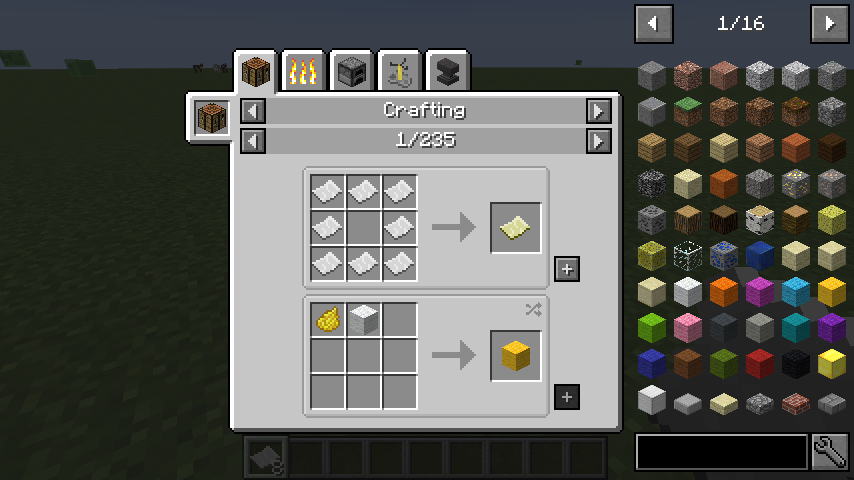
Basic Controls:
Inventory:(Minecraft Options -> Controls)
Show Recipes: Hover over item + R
Show Uses: Hover over item + U
Toggle Item List Overlay: Control + O
Item List:
Show Recipes Click Item or type R
Show Uses : Right-Click Item or type U
Next/Previous page: Scroll Wheel
Open Config Menu: Click Wrench at bottom-right
Toggle Cheat mode: Control-Click Wrench at bottom-right
Search:
Select Search Bar: Click or Control + F
Clear Search: Right ClickPrevious Search: Up Arrow
Search by Mod Name: Type @ in front of a word (@thaum)
Multiple terms work together (wand @thaum)
Exclude search terms: Type - in front of a word (@thaum -wand)
Search terms that have spaces in them: Type "" around the words ("two words")
**Recipe View:**Next/Previous page: Scroll WheelShow all Recipes: Click the recipe category's name
Move items into crafting area: Click the [+] button. Shift-Click to move multiple sets of items.
Advanced Controls:
Advanced Search:
Search by Tooltip Only: Type # in front of a word
Search by OreDict name: Type $ in front of a word
Search by Creative Tab: Type % in front of a word
Multiple Searches: Separate terms with | characters, like "wrench|hammer"
**With Cheat Mode Active:**Get a full stack of Items: Click ItemGet one Item: Right-Click ItemDelete Item: Drop an Item into the Item List
With Item List Edit Mode Active:*(These controls are shown in-game on the item tooltip)*Hide Item: Control-Click ItemHide Items and Sub-Items: Control-Right-Click ItemHide all Items from a mod: Control-Shift-Click Item
FAQ:
- Can I include JEI in my mod pack?
- Of course!
- Can JEI run client-only, or with a vanilla server?
- Yes, with some features disabled:
- The "Move items into crafting area" [+] buttons.
- Cheating in items that have lots of NBT data.
- Deleting items.
- Yes, with some features disabled:
- Where can I find the ___ feature from NEI?
- I have an issue / bug / crash / report / request, where can I send it?
- the issues page of the curseforge page :D
Link to Mezz's Patreon!
Project description from CurseForge.
Pick your setup
JEAsync by Minecraft version and loader
Choose the version and loader you play, then open the matching release.
Minecraft version
1.21
1 loader buildMinecraft version
1.20.1
2 loader buildsCheck the dependencies, then try the file in a copied instance before changing a world you care about.
Recent files
JEAsync versions and loaders
jei-1.21.1-forge-19.27.0.340-async-8.jar
23 Apr 2026
Client Source doesn’t say Server Source doesn’t say Dependencies No extras listed Listed on Release listing
Check the 1.21 · Forge setup 1.21Forge beta
Looking for an older file? The official CurseForge project page is in Resources.