Minecraft version
Back to mods 
CurseForge · Minecraft mod
Personal Cloud Storage
Create your own personal cloud storage with endless expansion and seamless item management
Choose a version Pick your version below, then grab the matching file.
Quick answer
Which Personal Cloud Storage release matches 1.20?
Best match for your filters [Forge 1.20-1.20.1] v1.0.2
Game version 1.20.1, 1.20
Loader Forge
Personal Cloud Storage [Forge 1.20-1.20.1] v1.0.2 targets 1.20.1, 1.20 with Forge. The project page does not say whether this file belongs on the client, dedicated server, or both. No extra mods listed for this file.
Where it goes
Is Personal Cloud Storage required on the client, server, or both?
The project page does not say whether this file belongs on the client, dedicated server, or both.
Client Source doesn’t say
Dedicated server Source doesn’t say
Loader for this release Forge
Required install it here Optional supported, not mandatory Not supported do not install here Source doesn’t say do not assume
The source does not explicitly classify this release as client-only or server-only.
What else does Personal Cloud Storage [Forge 1.20-1.20.1] v1.0.2 need?
[Forge 1.20-1.20.1] v1.0.2 on 1.20. Every mod below is checked against that same setup.
This file does not list any required mods. Do not add a library just because a different file uses it.
This file does not list any required or optional mods.
Before you install it
Add Personal Cloud Storage without breaking your instance.
Built for Personal Cloud Storage [Forge 1.20-1.20.1] v1.0.2 on 1.20. Pick another file and the loader, install side or required mods may change.
- 01
Stick to this file
Use [Forge 1.20-1.20.1] v1.0.2. It targets 1.20.1, 1.20 with Forge; another release may have different loader, side or dependency requirements.
- 02
Bring the mods it needs
This file does not list any required mods. Do not add a library just because a different file uses it.
- 03
Put it on the correct side
The project page does not say whether this file belongs on the client, dedicated server, or both.
- 04
Pick the file you checked
Use the “Get this file” button beside [Forge 1.20-1.20.1] v1.0.2. It opens that exact file at the source.
About this project
What does Personal Cloud Storage add?
Introduction
Each player will have an independent cloud storage space, which can be expanded using special items. Theoretically, there is no capacity limit.
Features
- Automatic Replenishment: Automatically withdraw items from the cloud storage space to ensure that the items in the inventory are always sufficient.
- Automatic Storage When Inventory is Full: When the inventory is full, items will be automatically stored in the cloud storage space.
- Prioritize storing into cloud storage: When items are added into the inventory, they will be prioritized for storage in the cloud storage space.
How to open
- Click the personal cloud storage button in the top right corner of the inventory.
- Use the hotkey (default is 'B').
Commands
/cloudstorage open [player/name/uuid]: Opens the cloud storage space for the specified target./cloudstorage rows [player/name/uuid] [rows]: Sets the number of rows in the cloud storage space for the specified target./cloudstorage pages [player/name/uuid] [pages]: Sets the number of pages in the cloud storage space for the specified target./cloudstorage reload: Reloads the configuration file.
About Configuration
When the Cloth Config API is installed, right-clicking the personal cloud storage button or the personal settings switch will open the configuration screen.
Recipes


Preview

Project description from CurseForge.
Pick your setup
Personal Cloud Storage by Minecraft version and loader
Choose the version and loader you play, then open the matching release.
Minecraft version
1.20
2 loader buildsCheck the dependencies, then try the file in a copied instance before changing a world you care about.
Recent files
Personal Cloud Storage versions and loaders
[Forge 1.20-1.20.1] v1.0.2
personalcloudstorage-forge-1.0.2.jar
22 Jan 2025
Client Source doesn’t say Server Source doesn’t say Dependencies No extras listed Listed on Release listing
Check the 1.20 · Forge setup 1.20.1Forge1.20 release
[Fabric 1.20-1.20.1] v1.0.2
personalcloudstorage-fabric-1.0.2.jar
22 Jan 2025
Client Source doesn’t say Server Source doesn’t say Dependencies No extras listed Listed on Release listing
Check the 1.20 · Fabric setup Fabric1.20.11.20 release
[Forge 1.20-1.20.1] v1.0.1
personalcloudstorage-forge-1.0.1.jar
21 Jan 2025
Client Source doesn’t say Server Source doesn’t say Dependencies No extras listed Listed on Release listing
Check the 1.20 · Forge setup 1.20.1Forge1.20 release
[Fabric 1.20-1.20.1] v1.0.1
personalcloudstorage-fabric-1.0.1.jar
21 Jan 2025
Client Source doesn’t say Server Source doesn’t say Dependencies No extras listed Listed on Release listing
Check the 1.20 · Fabric setup Fabric1.20.11.20 release
[Forge 1.20-1.20.1] v1.0.0
personalcloudstorage-forge-1.0.0.jar
19 Jan 2025
Client Source doesn’t say Server Source doesn’t say Dependencies No extras listed Listed on Release listing
Check the 1.20 · Forge setup 1.20.1Forge1.20 release
[Fabric 1.20-1.20.1] v1.0.0
personalcloudstorage-fabric-1.0.0.jar
19 Jan 2025
Client Source doesn’t say Server Source doesn’t say Dependencies No extras listed Listed on Release listing
Check the 1.20 · Fabric setup Fabric1.20.11.20 release
Looking for an older file? The official CurseForge project page is in Resources.
 mod
CurseForge · Minecraft
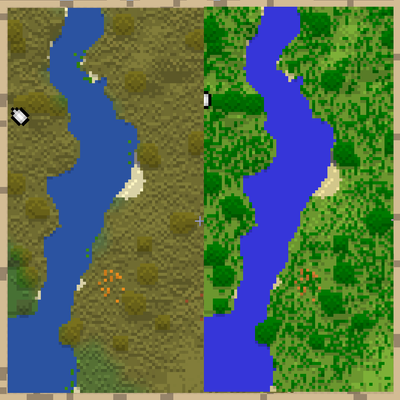
Color Accurate Maps
Lightweight Quality of Life mod that give maps a more color accurate to the minecraft world
 mod
CurseForge · Minecraft
No Trade Cycling, Just Pick
Stop rerolling villagers. Press Pick trade and select any 2 trades its profession can offer (max-level enchanted books included). Fast trade and saves time.
 mod
CurseForge · Minecraft
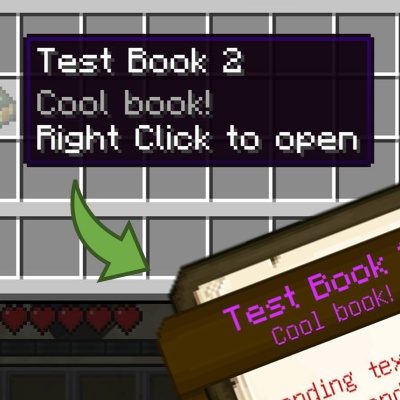
Open In Inventory
Open guidebooks, backpacks, handhelds and more with a single click in inventory