Fabric API Needed by SnakePlayer Fabric 26.2-v1.5.0
requiredMatching file found Matched file: [26.2] Fabric API 0.161.0+26.2
CurseForge · Minecraft mod
MOD that allows the player to become a snake
Quick answer
SnakePlayer Fabric 26.2-v1.5.0 targets 26.2 with Fabric. The project page does not say whether this file belongs on the client, dedicated server, or both. All 1 required mods have matching files.
Where it goes
The project page does not say whether this file belongs on the client, dedicated server, or both.
The source does not explicitly classify this release as client-only or server-only.
SnakePlayer Fabric 26.2-v1.5.0 on 26.2 Fabric. Every mod below is checked against that same setup.
Install Fabric API first. We found matching files for this game-version and loader setup.
We only count dependency files that match this setup. A file for another loader does not fill the gap.
Before you install it
Built for SnakePlayer Fabric 26.2-v1.5.0 on 26.2 Fabric. Pick another file and the loader, install side or required mods may change.
Use SnakePlayer Fabric 26.2-v1.5.0. It targets 26.2 with Fabric; another release may have different loader, side or dependency requirements.
Install Fabric API first. We found matching files for this game-version and loader setup.
The project page does not say whether this file belongs on the client, dedicated server, or both.
Use the “Get this file” button beside SnakePlayer Fabric 26.2-v1.5.0. It opens that exact file at the source.
About this project
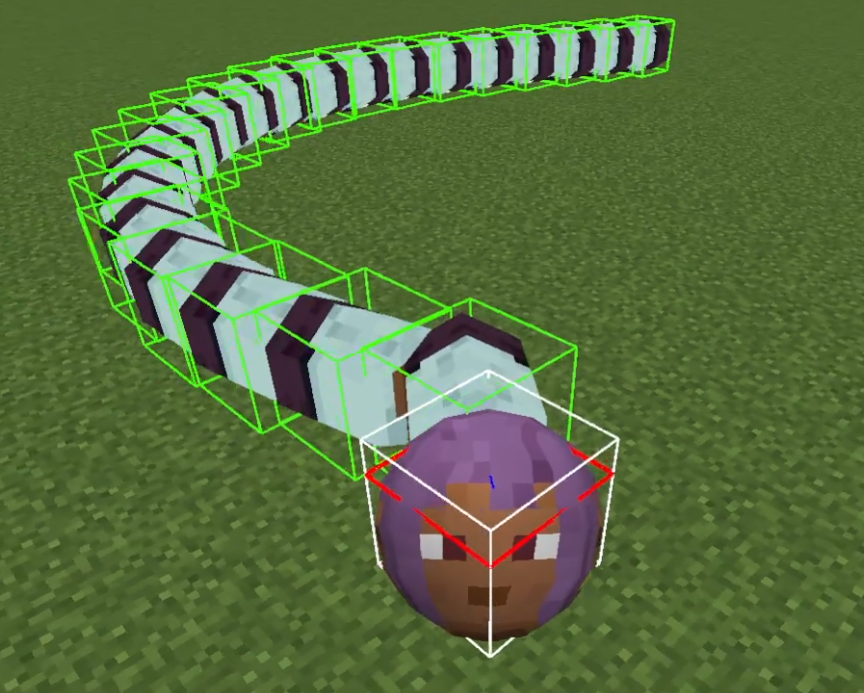
MOD that allows the player to become a snake.
The length of the player snake changes according to XpLevel.
The number of segments is XpLevel+1.
| NBT Key | Type | Purpose |
|---|---|---|
IsSnake |
Boolean | Indicates whether the player is in "snake mode." |
SnakeHeadSize |
Float | Stores the size of the player's head in snake mode. |
SnakeBodySegmentSize |
Float | Represents the size of the player's body segments in snake mode. |
SnakeDamage |
Float | Damage an entity suffers when it comes into contact with a player segment |
SnakeSpeed |
Float | Determines the automatic movement speed of the player in snake mode. |
You can use vanilla commands to modify the experience.
/experience set @s 100 levels
/snake <targets> <dataparameter_key> <value>isSnake: A boolean (true or false) that determines whether the targeted player(s) should be in "snake mode."
headSize: The size of the snake's head (float, range: 0.1 - 10.0).
bodySegmentSize: The size of each body segment (float, range: 0.1 - 10.0).
damage: The damage dealt by the snake's body segments (float, range: >= 0).
speed: The movement speed of the snake (float, range: 0.0 - 0.75).
Effect: Adjusts the corresponding attribute for the targeted players.
Each attribute has specific valid ranges, and attempting to set a value outside these ranges will result in an error.
/snake config <action> [parameters]Configuration to allow players to respawn avoiding other player positions already present.
Find the respawn position by partitioning the rectangular region with one side L centered at cx and cz into a grid with size r.
Enables or disables the spread functionality.
true: Enables spreading.
false: Disables spreading (default spawning).
Sets the spread position's center coordinates.
cx: X-coordinate (double)
cz: Z-coordinate (double)
L: (double, range: 0.1 - 10000.0)
r: (double, range: 0.1 - 100.0)
segment_experience: (int : 0 -)
Project description from CurseForge.
Pick your setup
Choose the version and loader you play, then open the matching release.
Check the dependencies, then try the file in a copied instance before changing a world you care about.
Recent files
snakeplayer-fabric-26.2-v1.5.0.jar
31 Oct 2026
snakeplayer-fabric-26.2-v1.4.1.jar
20 Jun 2026
Looking for an older file? The official CurseForge project page is in Resources.
 mod
modNatural Temperature is a mod that overhauls the way biomes are placed in the world, creating a layout that more closely resembles Earth’s climate zones with cold biomes in the north and warm biomes in the south.
 mod
modCustomize the Wardens health and attack damage. Get rewarded with loot.
 mod
modNext-Gen VR core mod for Minecraft. Based on OpenXR. Built as a platform. Supports addons, customizing your VR experience