Minecraft version
Back to mods 
CurseForge · Minecraft mod
Pepsi's Mining Quarries
Build quarries that mine cobblestone and ores!
Choose a version Pick your version below, then grab the matching file.
Quick answer
Which Pepsi's Mining Quarries release should I use?
Latest stable file mining-quarries-1.21.9-2.0.4
Game version 1.21.9, 1.21.10, 1.21.11
Loader Fabric, Forge, NeoForge
Pepsi's Mining Quarries mining-quarries-1.21.9-2.0.4 targets 1.21.9, 1.21.10, 1.21.11 with Fabric, Forge, NeoForge. The project page does not say whether this file belongs on the client, dedicated server, or both. No extra mods listed for this file.
Where it goes
Is Pepsi's Mining Quarries required on the client, server, or both?
The project page does not say whether this file belongs on the client, dedicated server, or both.
Client Source doesn’t say
Dedicated server Source doesn’t say
Loader for this release Fabric, Forge, NeoForge
Required install it here Optional supported, not mandatory Not supported do not install here Source doesn’t say do not assume
The source does not explicitly classify this release as client-only or server-only.
What else does Pepsi's Mining Quarries mining-quarries-1.21.9-2.0.4 need?
mining-quarries-1.21.9-2.0.4. Change the file and its required mods may change too.
This file does not list any required mods. Do not add a library just because a different file uses it.
This file does not list any required or optional mods.
Before you install it
Add Pepsi's Mining Quarries without breaking your instance.
Built for Pepsi's Mining Quarries mining-quarries-1.21.9-2.0.4. Pick another file and the loader, install side or required mods may change.
- 01
Stick to this file
Use mining-quarries-1.21.9-2.0.4. It targets 1.21.9, 1.21.10, 1.21.11 with Fabric, Forge, NeoForge; another release may have different loader, side or dependency requirements.
- 02
Bring the mods it needs
This file does not list any required mods. Do not add a library just because a different file uses it.
- 03
Put it on the correct side
The project page does not say whether this file belongs on the client, dedicated server, or both.
- 04
Pick the file you checked
Use the “Get this file” button beside mining-quarries-1.21.9-2.0.4. It opens that exact file at the source.
About this project
What does Pepsi's Mining Quarries add?
Mining Quarries Mod
Overview
- Adds a new block called the Quarry.
- Crafting Recipe:
- 3 × Cobblestone
- 1 × Water Bucket
- 1 x Redstone
- 1 × Lava Bucket
- 2 × Cauldrons
- 1 × Hopper
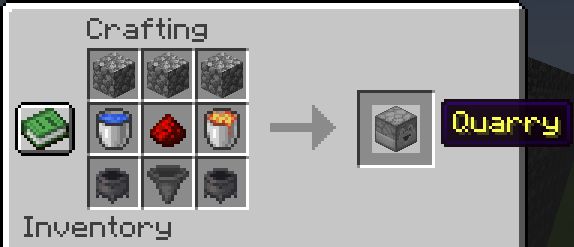
Quarry Block Mechanics
- Directional block with a 9×9 inventory.
- Supports multiple container outputs by facing multiple Quarries into the same container.
- Loot generation occurs only when:
- The chunk is loaded.
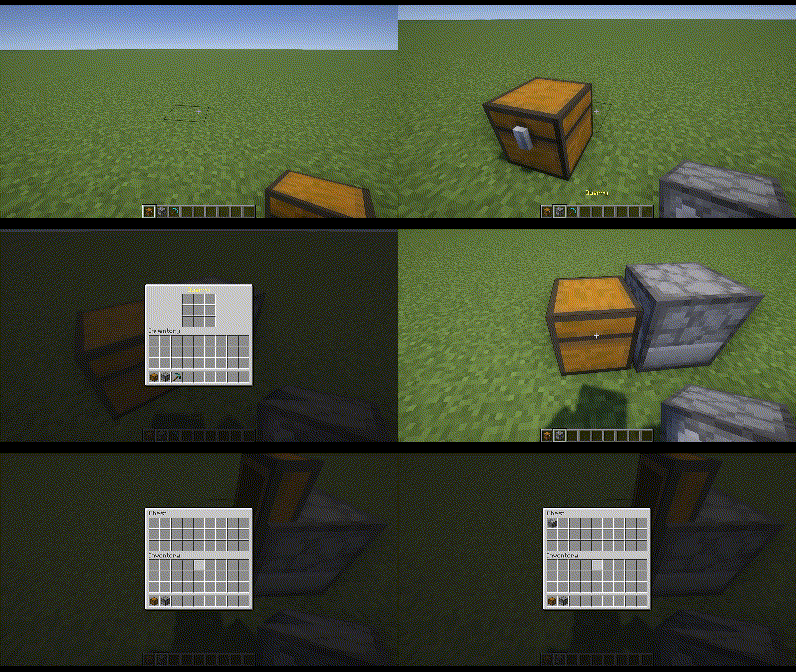
- The Quarry is facing into a valid container (e.g., Chest, Barrel).
- The pickaxe has more than 1 durability left.
Usage Steps
- Place the Quarry in the desired orientation, making sure it faces a container.
- Insert a pickaxe in the center slot of the Quarry’s 9×9 inventory.
- (Optional) Place desired items in any other slot(s) to whitelist them.
- Or place a Redstone Torch below the pickaxe to blacklist those items instead.
- Monitor pickaxe durability; replace or repair it before it drops to 1 to keep the Quarry running.
Pickaxe Behavior & Drops
- Pickaxes never fully break; it stops the Quarry when the pickaxe reaches 1 durability.
- Base drops; Cobblestone, Granite, Andesite, Diorite
- Different pickaxes affect:
- Cooldown (delay between loot generation).
- Additional loot types (beyond the base drops).
- Cooldown and Drops Table:
| Pickaxe | Cooldown (s) | Additional Drops |
|---|---|---|
| Gold | 1.0 | (None beyond base drops) |
| Wood | 7.0 | + Coal |
| Stone | 6.0 | + Lapis |
| Copper | 5.0 | + Copper |
| Iron | 4.0 | + Iron, + Redstone |
| Diamond | 3.0 | + Diamond, + Emerald |
| Netherite | 2.0 | + Rare chance of Ancient Debris |
Pickaxe Enchantments
- Efficiency: Each level reduces the Quarry’s cooldown by 0.1s.
- Unbreaking: Functions like vanilla Unbreaking, slowing durability loss.
- Fortune: Each level adds 1 extra loot roll per Quarry cycle.
- Silk Touch: Drops become their silk-touch variants (e.g., Stone instead of Cobblestone).
- Mending: No durability loss (effectively infinite uses).
Filtering System
- In the 9×9 Quarry inventory, all slots except the center are filtering slots.
- Whitelist Mode (default): Only items matching what’s in those filter slots will drop.
- Blacklist Mode: Placing a Redstone Torch in the slot below the center pickaxe slot switches all filtering slots into a blacklist.
- Important: If you are using Silk Touch, use silk-touched variants in the filter slots to match those exact drops.
For versions prior to 2.0.0 (or mc versions 1.21.1 and below) the mod works very differently. See the spoiler in the description of this webpage: Modrinth Listing
Looking to automate tree farming? Check out Potted Farms
And my other mods
Logo gifted by Mechanary
Project description from CurseForge.
Pick your setup
Pepsi's Mining Quarries by Minecraft version and loader
Choose the version and loader you play, then open the matching release.
Minecraft version
26.1.2
4 loader buildsMinecraft version
26.1.1
4 loader buildsMinecraft version
26.1
4 loader buildsMinecraft version
1.21.11
4 loader buildsMinecraft version
1.21.10
4 loader buildsMinecraft version
1.21.9
4 loader buildsMinecraft version
1.21.8
4 loader buildsMinecraft version
1.21.7
4 loader buildsMinecraft version
1.21.6
4 loader buildsMinecraft version
1.21.5
4 loader buildsMinecraft version
1.21.4
4 loader buildsForge mining-quarries-2.0.1 (1.21.2-1.21.4) 6
stable files
· 6 total · 14 Apr 2025Fabric mining-quarries-2.0.1 (1.21.2-1.21.4) 6
stable files
· 6 total · 14 Apr 2025Quilt mining-quarries-2.0.1 (1.21.2-1.21.4) 6
stable files
· 6 total · 14 Apr 2025NeoForge mining-quarries-2.0.1 (1.21.2-1.21.4) 6
stable files
· 6 total · 14 Apr 2025
Showing the newest 12 of 16 game versions. Older files are in the list below.
Check the dependencies, then try the file in a copied instance before changing a world you care about.
Recent files
Pepsi's Mining Quarries versions and loaders
mining-quarries-1.21.9-2.0.4
mining-quarries-2.0.4.jar
16 Oct 2025
Client Source doesn’t say Server Source doesn’t say Dependencies No extras listed Listed on Release listing
Check the 26.2 · Fabric setup FabricForgeNeoForgeQuilt release
mining-quarries-1.21.5-2.0.3
mining-quarries-2.0.3.jar
17 May 2025
Client Source doesn’t say Server Source doesn’t say Dependencies No extras listed Listed on Release listing
Check the 1.21.8 · Fabric setup 1.21.5Fabric1.21.8NeoForge release
mining-quarries-1.21.5-2.0.2
mining-quarries-2.0.2.jar
12 May 2025
Client Source doesn’t say Server Source doesn’t say Dependencies No extras listed Listed on Release listing
Check the 1.21.5 · Fabric setup 1.21.5FabricNeoForgeForge release
mining-quarries-2.0.1 (1.21.5)
mining-quarries-2.0.1.jar
14 Apr 2025
Client Source doesn’t say Server Source doesn’t say Dependencies No extras listed Listed on Release listing
Check the 1.21.5 · Fabric setup 1.21.5FabricNeoForgeForge release
mining-quarries-2.0.1 (1.21.2-1.21.4)
mining-quarries-2.0.1.jar
14 Apr 2025
Client Source doesn’t say Server Source doesn’t say Dependencies No extras listed Listed on Release listing
Check the 1.21.4 · Fabric setup Fabric1.21.4NeoForgeForge release
mining-quarries-2.0.0 (1.21.5)
mining-quarries-2.0.0 (1.21.5).jar
27 Mar 2025
Client Source doesn’t say Server Source doesn’t say Dependencies No extras listed Listed on Release listing
Check the 1.21.5 · Fabric setup 1.21.5FabricNeoForgeForge release
mining-quarries-2.0.0 (1.21.2-1.21.4)
mining-quarries-2.0.0.jar
27 Mar 2025
Client Source doesn’t say Server Source doesn’t say Dependencies No extras listed Listed on Release listing
Check the 1.21.4 · Fabric setup Fabric1.21.4NeoForgeForge release
mining-quarries-1.1.2
mining-quarries-1.1.2.jar
19 Feb 2025
Client Source doesn’t say Server Source doesn’t say Dependencies No extras listed Listed on Release listing
Check the 1.21.5 · Fabric setup 1.211.21.5Fabric1.21.4 release
mining-quarries-1.1.1
mining-quarries-1.1.1.jar
9 Feb 2025
Client Source doesn’t say Server Source doesn’t say Dependencies No extras listed Listed on Release listing
Check the 1.21.4 · Fabric setup 1.21Fabric1.21.4NeoForge release
mining-quarries-1.1.0
mining-quarries-1.1.0.jar
8 Feb 2025
Client Source doesn’t say Server Source doesn’t say Dependencies No extras listed Listed on Release listing
Check the 1.21.4 · Fabric setup 1.21Fabric1.21.4NeoForge release
mining-quarries-1.0.1
mining-quarries-1.0.1.jar
26 Jan 2025
Client Source doesn’t say Server Source doesn’t say Dependencies No extras listed Listed on Release listing
Check the 1.21.4 · Fabric setup 1.21Fabric1.21.4NeoForge release
Looking for an older file? The official CurseForge project page is in Resources.
 mod
CurseForge + Modrinth · Minecraft
JAOPCA
Just A Ore Processing Compatibility Attempt
 mod
CurseForge + Modrinth · Minecraft
Insane's Experience Tweaks
Enhanced Experience with better Player xp, more experience dropped and better anvils.
 mod
CurseForge + Modrinth · Minecraft
KubeJS TFC
KubeJS integration for TFC