Pixelmon Needed by Dialogue Utils dialogueutil-1.2.2.jar
requiredMatching file found Matched file: Pixelmon 9.4.2

CurseForge · Minecraft mod
A side mod that allows you to easily create helpful menus using Pixelmon's Dialogue, Choice Dialogue, and Input Dialogue screens
Quick answer
Dialogue Utils dialogueutil-1.2.2.jar targets 1.21.1 with NeoForge. The project page does not say whether this file belongs on the client, dedicated server, or both. All 1 required mods have matching files.
Where it goes
The project page does not say whether this file belongs on the client, dedicated server, or both.
The source does not explicitly classify this release as client-only or server-only.
dialogueutil-1.2.2.jar. Change the file and its required mods may change too.
Install Pixelmon first. We found matching files for this game-version and loader setup.
We only count dependency files that match this setup. A file for another loader does not fill the gap.
Before you install it
Built for Dialogue Utils dialogueutil-1.2.2.jar. Pick another file and the loader, install side or required mods may change.
Use dialogueutil-1.2.2.jar. It targets 1.21.1 with NeoForge; another release may have different loader, side or dependency requirements.
Install Pixelmon first. We found matching files for this game-version and loader setup.
The project page does not say whether this file belongs on the client, dedicated server, or both.
Use the “Get this file” button beside dialogueutil-1.2.2.jar. It opens that exact file at the source.
About this project
This mod does not modify Pixelmon or its behavior.
@infidelrick on DiscordDialogue Utils is a server-side mod using the PixelmonAPI for generating dialogues, choice menus, input screens, and notice overlays in-game.
/dutil simple <player> <title> <message>Description: Display a simple dialogue box to the player.
Permissions Required: dialogueutil.simple
Example:
/dutil simple PlayerName "&eSafari Zone" &eGood Luck {player} &aCatch what you can before your timer runs out. Add more time with &e/safari buy #
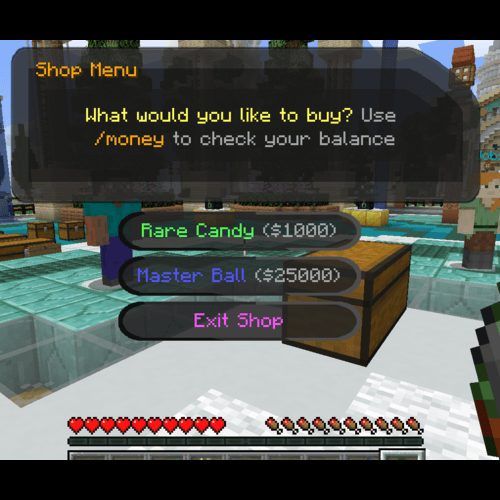
/dutil choice <player> <configId>Description: Send a choice menu to a player using a pre-configured dialogue in dialogues.yml. Choices can be configured to run commands, have pokedollar costs, and/or permission requirements.
Permissions Required: dialogueutil.choice
Example:
/dutil choice PlayerName shop
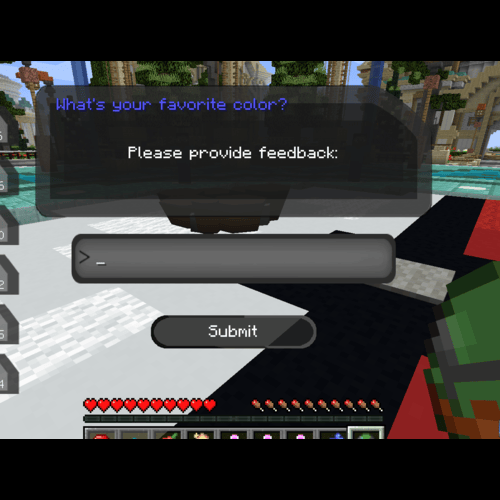
/dutil input player|console escape|stay <targetPlayer> <title> <message> <command>Description: Create an input dialogue for the target player, allowing them to input text.
Options:
player|console: Execute the command as the player or the consoleescape|stay: Determine whether the menu closes when "Escape" is pressedtitle & message: Put in quotes if more than 1 wordcommand: Can use {player} and {input} for placeholdersdialogueutil.input.player or dialogueutil.input.console/dutil input player escape Player123 "&9What's your favorite color?" "Please provide feedback:" msg {player} {input} is a good choice!
The notice system allows you to display overlays with various types of content.
/dnotice direct text <player> <duration> <lines>Description: Display a text-based notice overlay
Permissions Required: dialogueutil.notice.text
Example:
/dnotice direct text PlayerName 10 "&6Welcome!\n&eEnjoy your stay"
/dnotice direct pokemon <player> <layout> <duration> <pokemon> <use3d> <lines>Description: Display a notice with a Pokémon sprite or 3D model
Permissions Required: dialogueutil.notice.pokemon
Example:
/dnotice direct pokemon PlayerName LEFT_AND_RIGHT 10 "pikachu growth:ginormous" true "&6Special Pikachu!\n&eCheck it out"
/dnotice direct item <player> <layout> <duration> <lines> <itemWithNbt>Description: Display a notice with an item
Permissions Required: dialogueutil.notice.item
Example:
/dnotice direct item PlayerName LEFT_AND_RIGHT 10 "&6Master Ball\n&eUltimate catching power" "pixelmon:poke_ball{PokeBallID:\"master_ball\"}"
/dnotice config <player> <configId>Description: Display a pre-configured notice from notices.yml
Permissions Required: dialogueutil.notice.config
Example:
/dnotice config PlayerName welcome
/dnotice hide - Hide the current notice/dnotice list - List available notice configurations/dnotice reload - Reload notice configurations/dnotice help - Show notice command help/dutil reload - Reload dialogue configurations/dnotice reload - Reload notice configurationsconfig.ymlControls general settings and default messages.
# Enable/Disable Debug messages
debug: false
messages:
  noMoney:
    title: "§cNot Enough Money"
    message: "§cYou need {price} to select this option!"
  noPermission:
    title: "§cPermission Error"
    message: "§cYou don't have permission: {permission}"
dialogues.ymlDefine configurations for choice menus.
dialogues:
  shop:
    title: "&6Shop Menu"
    message: "&eWhat would you like to buy? &7Use &6/money &7to check your balance"
    choices:
      - text: "&aRare Candy &7($1000)"
        commands:
          - "[console]broadcast {player} got some candy"
          - "[console]give {player} pixelmon:rare_candy 1"
        price: 1000
        permission: "shop.rare_candy"
        failureTitle: "&cNo Permission"
        failureMessage: "&cYou need the &6shop.rare_candy &cpermission!"
notices.ymlConfigure different types of notices.
notices:
  welcome:
    type: text
    duration: 10
    lines:
      - "&6&lWelcome to the server!"
      - "&eThank you for joining us"
      - "&aEnjoy your stay"

  professor_pikachu:
    type: pokemon
    layout: LEFT_AND_RIGHT
    duration: 12
    pokemon: "pikachu growth:ginormous form:phd"
    use3d: true
    lines:
      - "&6&lBalance:"
      - "&e%vault_eco_balance%"

  master_ball:
    type: item
    layout: LEFT_AND_RIGHT
    duration: 8
    item: "pixelmon:poke_ball"
    nbt: "{PokeBallID:\"master_ball\"}"
    name: "&dMaster Ball"
    lines:
      - "&6&lMaster Ball"
      - "&eThe ultimate Pokeball"
dialogueutil.simple - Use simple dialoguesdialogueutil.choice - Use choice dialoguesdialogueutil.input.player - Use input dialogues as playerdialogueutil.input.console - Use input dialogues as consoledialogueutil.admin - Access administrative commandsdialogueutil.notice.text - Use text noticesdialogueutil.notice.pokemon - Use Pokémon noticesdialogueutil.notice.item - Use item noticesdialogueutil.notice.config - Use configured noticesdialogueutil.notice.admin - Access notice admin commandsProject description from CurseForge.
Pick your setup
Choose the version and loader you play, then open the matching release.
Check the dependencies, then try the file in a copied instance before changing a world you care about.
Recent files
28 Jun 2026
26 Jun 2026
22 Jun 2026
23 Feb 2025
1 Feb 2025
27 Jan 2025
Looking for an older file? The official CurseForge project page is in Resources.
 mod
Simple automated turrets for TACZ guns!
 mod
A lightweight and highly extensible alternative to Ex Nihilo, allowing players to transform stone into ores through a customizable identification system. Simple, convenient, and ideal for skyblock modpacks.
 mod
Add 4 tiers of utility rings to Botania