Dynamic Lights Needed by Muttnes's Flashlight muttnesflaslight-2.1.0.jar
requiredMatching file found Matched file: DynamicLights 1.20.1.3

CurseForge · Minecraft mod
A simple mod that aims to add a flashlight to the game.
Quick answer
Muttnes's Flashlight muttnesflaslight-2.1.0.jar targets 1.20.1 with Forge. The project page does not say whether this file belongs on the client, dedicated server, or both. All 1 required mods have matching files.
Where it goes
The project page does not say whether this file belongs on the client, dedicated server, or both.
The source does not explicitly classify this release as client-only or server-only.
muttnesflaslight-2.1.0.jar. Change the file and its required mods may change too.
Install Dynamic Lights first. We found matching files for this game-version and loader setup.
We only count dependency files that match this setup. A file for another loader does not fill the gap.
Before you install it
Built for Muttnes's Flashlight muttnesflaslight-2.1.0.jar. Pick another file and the loader, install side or required mods may change.
Use muttnesflaslight-2.1.0.jar. It targets 1.20.1 with Forge; another release may have different loader, side or dependency requirements.
Install Dynamic Lights first. We found matching files for this game-version and loader setup.
The project page does not say whether this file belongs on the client, dedicated server, or both.
Use the “Get this file” button beside muttnesflaslight-2.1.0.jar. It opens that exact file at the source.
About this project
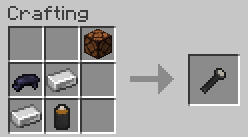
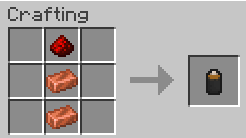
A simple mod that adds a functional flashlight and batteries to your game!
You can craft them or find them in chests—perfect for a zombie apocalypse modpack!
⚡ AtomicStryker’s Dynamic Lights is mandatory for the mod to work. Make sure it's installed!
🛠️ Flashlight Recipe:
🛠️ Battery Recipe:
📜 A TOML config file will be generated automatically.
You can configure how loot injection behaves:
VANILLA_ONLY → injects flashlight items only into vanilla Minecraft chests.ALL_CHESTS → injects items into vanilla and modded chest loot tables (e.g Lost Cities).DISABLED → completely disables loot injection.⚠️ Use the ALL_CHESTS option at your own risk! This feature may or may not break some mods!
💬 Found a bug? Have suggestions? Open an issue on the GitHub repository!
🤝 This is my first mod, so any feedback is welcome!
Project description from CurseForge.
Pick your setup
Choose the version and loader you play, then open the matching release.
Check the dependencies, then try the file in a copied instance before changing a world you care about.
Recent files
16 May 2026
muttnesflaslight-2.0.0.jar
8 Feb 2025
muttnesflaslight-1.0.0.jar
5 Feb 2025
Looking for an older file? The official CurseForge project page is in Resources.
 mod
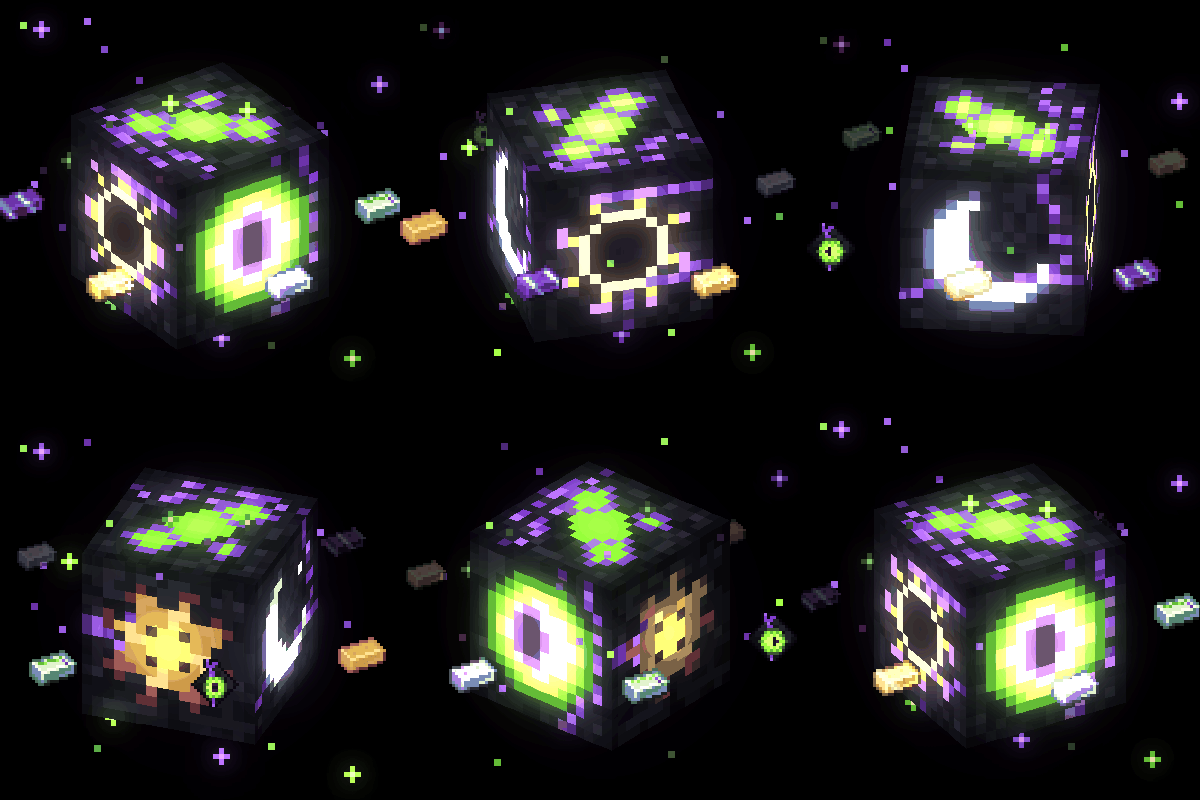
Kryzenth expands your Minecraft adventure with rare ores, cosmic materials, unique 3D armor, mythical creatures, mysterious biomes, and powerful bosses. Explore the unknown, uncover ancient secrets, and forge legendary equipment.
 mod
Introduces a multiblock structure that keeps monsters from spawning in inside the defined area.
 mod
A simple and easy to use VeinMiner mod with powerful config and ingame settings.