FTB Quests (NeoForge) Optional for Team Stages 1.2.0 for 1.20.1
optionalMatching file found Matched file: ftb-quests-forge-2001.4.22.jar

CurseForge · Minecraft mod
Team Stages is an addon for Game Stages, allowing stages to be given to both players and teams.
Quick answer
Team Stages 1.2.0 for 1.20.1 targets 1.20.1 with Forge. The project page does not say whether this file belongs on the client, dedicated server, or both. All 3 required mods have matching files.
Where it goes
The project page does not say whether this file belongs on the client, dedicated server, or both.
The source does not explicitly classify this release as client-only or server-only.
Team Stages 1.2.0 for 1.20.1. Change the file and its required mods may change too.
Install FTB Teams (NeoForge), Game Stages, Bookshelf first. We found matching files for this game-version and loader setup. 15 come through another mod in the chain.
15 extra mods were pulled in by other dependencies. Indented rows show who needs each one. We only count dependency files that match this setup. A file for another loader does not fill the gap.
Before you install it
Built for Team Stages 1.2.0 for 1.20.1. Pick another file and the loader, install side or required mods may change.
Use Team Stages 1.2.0 for 1.20.1. It targets 1.20.1 with Forge; another release may have different loader, side or dependency requirements.
Install FTB Teams (NeoForge), Game Stages, Bookshelf first. We found matching files for this game-version and loader setup. 15 come through another mod in the chain.
The project page does not say whether this file belongs on the client, dedicated server, or both.
Use the “Get this file” button beside Team Stages 1.2.0 for 1.20.1. It opens that exact file at the source.
About this project
Team Stages is an addon for Game Stages, allowing stages to be given to both players and teams.
Team Stages adds a new command, /teamstage, which can be used to give stages to and remove stages from the specified player or team. The Game Stages API and the /gamestage command by default only affects the player's team but this can be changed in the config to affect just the player or both the player and the team.
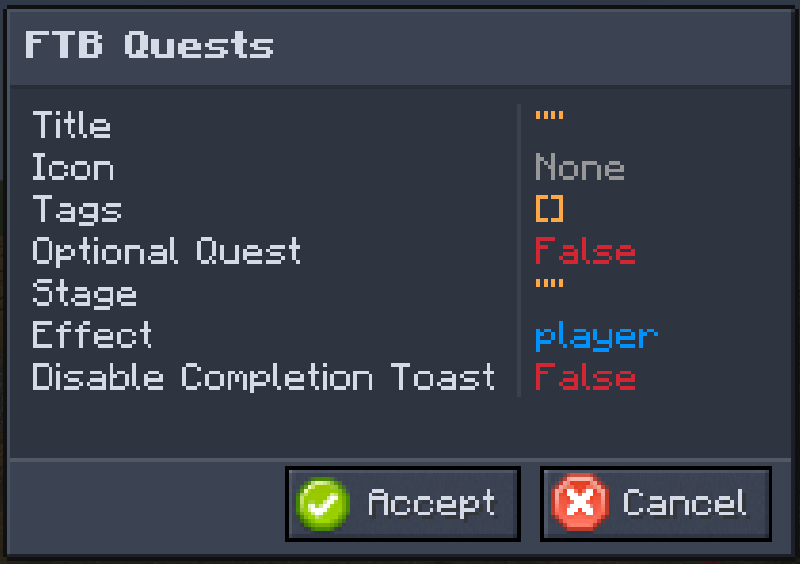
Team Stages integrates with FTB Quests adding one new task and reward.
The stage task has 2 settings, stage, and effect.
Stage is the stage you want to check for.
Effect is one of three options and changes whose stages are being checked. Allowed options: player, team, or both. If set to both either the player or the team has to have the stage.
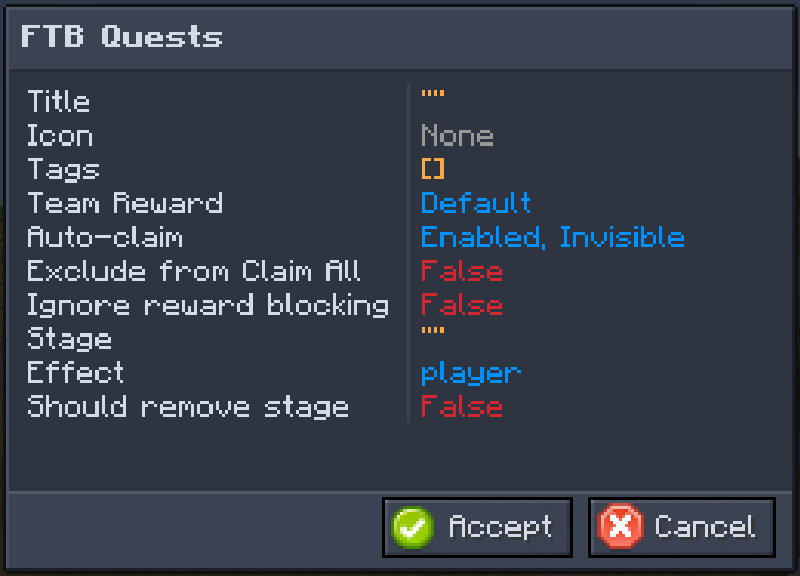
The stage reward has 3 settings, stage, effect, and remove.
Stage is the stage you want to grant or remove.
Effect is one of three options and changes who stages are granted to or removed from. Allowed options: player, team, or both.
Remove determines whether stages will be granted or removed, with true removing a stage.
To start using the Team Stages API in your mod add the following to your build script (build.gradle):
repositories {
    maven {
        url "https://maven.scsupercraft.dev"
    }
}
dependencies {
    implementation fg.deobf("dev.scsupercraft.teamstages:teamstages-${minecraft_version}:${teamstages_version}")
}
For a list of available versions, see CurseForge.
In your gradle.properties file add the following:
teamstages_version = 1.2.0
The TeamStageHelper class contains all the APIs you'll need.
It has two static methods called player and team, which you call to get either the player stage helper or the team stage helper.
These helpers send events and sync data for you, so you don't have to.
Project description from CurseForge.
Pick your setup
Choose the version and loader you play, then open the matching release.
Check the dependencies, then try the file in a copied instance before changing a world you care about.
Recent files
teamstages-1.20.1-1.2.0.jar
1 Jan 2026
teamstages-1.20.1-1.1.0.jar
17 Feb 2025
teamstages-1.20.1-1.0.0.jar
14 Feb 2025
Looking for an older file? The official CurseForge project page is in Resources.
 mod
A data-driven enchantment component and utility library.
 mod
Create: Food is an add-on based on expanding food content found in Minecraft.
 mod
An addon for the popular minecraft 1.7.10 mod Thaumcraft 4. Patch some bugs native to the mod.