Minecraft version
Back to mods 
CurseForge · Minecraft mod
Sculk Microphone (Fork)
Fork of the Sculk Microphone Mod that doesn't crash on dedicated servers with no audio devices.
Choose a version Pick your version below, then grab the matching file.
Quick answer
Which Sculk Microphone (Fork) release should I use?
beta file sculkmic-1.0.0-beta.4.jar
Game version 1.19.2, 1.19.1, 1.19
Loader Forge
Sculk Microphone (Fork) sculkmic-1.0.0-beta.4.jar targets 1.19.2, 1.19.1, 1.19 with Forge. The project page does not say whether this file belongs on the client, dedicated server, or both. No extra mods listed for this file.
Where it goes
Is Sculk Microphone (Fork) required on the client, server, or both?
The project page does not say whether this file belongs on the client, dedicated server, or both.
Client Source doesn’t say
Dedicated server Source doesn’t say
Loader for this release Forge
Required install it here Optional supported, not mandatory Not supported do not install here Source doesn’t say do not assume
The source does not explicitly classify this release as client-only or server-only.
What else does Sculk Microphone (Fork) sculkmic-1.0.0-beta.4.jar need?
sculkmic-1.0.0-beta.4.jar. Change the file and its required mods may change too.
This file does not list any required mods. Do not add a library just because a different file uses it.
This file does not list any required or optional mods.
Before you install it
Add Sculk Microphone (Fork) without breaking your instance.
Built for Sculk Microphone (Fork) sculkmic-1.0.0-beta.4.jar. Pick another file and the loader, install side or required mods may change.
- 01
Stick to this file
Use sculkmic-1.0.0-beta.4.jar. It targets 1.19.2, 1.19.1, 1.19 with Forge; another release may have different loader, side or dependency requirements.
- 02
Bring the mods it needs
This file does not list any required mods. Do not add a library just because a different file uses it.
- 03
Put it on the correct side
The project page does not say whether this file belongs on the client, dedicated server, or both.
- 04
Pick the file you checked
Use the “Get this file” button beside sculkmic-1.0.0-beta.4.jar. It opens that exact file at the source.
About this project
What does Sculk Microphone (Fork) add?
A fork of the Sculk Microphone Mod by Towo, but patched to not crash on most dedicated servers due to there being 0 audio devices.
Credit to Towo for the mod, all I did was fix a bug.
https://www.curseforge.com/minecraft/mc-mods/sculk-microphone
Description

A Minecraft Forge mod by Towo.
Current Features
- Sculk Sensor activation when talking into your microphone.
- A Warden will be alerted when you speak.
- Comparators linked to Sculk Sensors will output a redstone signal (1 to 15) based on the input volume.
- Customisable options.
- Configurable with commands.
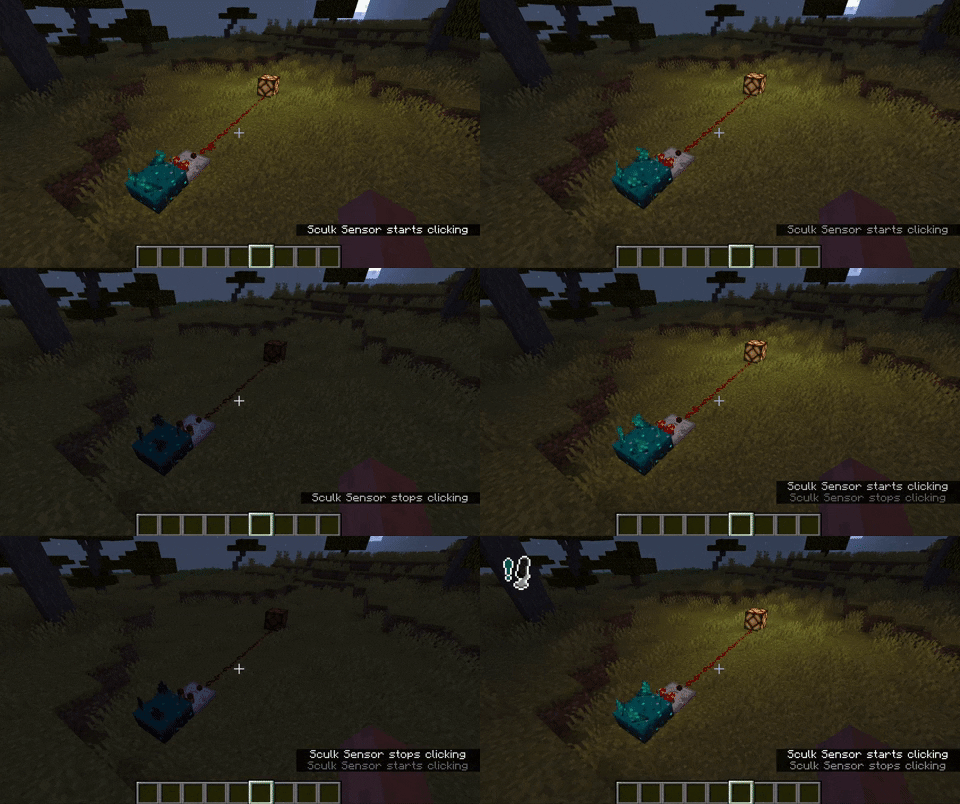

How it works
Simply run the mod, and talk into your microphone! Any nearby sculk sensor should activate. If not, try editing your settings.
Settings
- Microphone This options simply allows you to disable the microphone whenever you wish.
- Sculk Threshold This value will determine at what volume level a sculk sensor will activate / a Warden will hear you. Below the button you can see a moving bar; this is your volume level.
- Icon Whenever your volume is above the given threshold, an icon will appear on-screen. The position of the icon is configurable. This can also be disabled.
- Input Device The device used for recording your voice.
Commands
Somethings are only configurable with commands. These are often things that affect all players in a server.
/sculkmicrophone set ...
/sculkmicrophone set distance [value]will set the maximum distance at which a player will have to be to voice-activate a vibration listener./sculkmicrophone set doDynamicRedstone [true|false]will enable or disable whether a redstone comparator should output a signal depending on the volume of an incoming (microphone) vibration./sculkmicrophone set defaultRedstoneSignal [value]will set the value a comparator outputs if it will not dynamically do so.
Any bug you may find or suggestion you might have, can be reported as an issue here.
Project description from CurseForge.
Pick your setup
Sculk Microphone (Fork) by Minecraft version and loader
Choose the version and loader you play, then open the matching release.
Minecraft version
1.19.1
1 loader buildMinecraft version
1.19
1 loader buildCheck the dependencies, then try the file in a copied instance before changing a world you care about.
Recent files
Sculk Microphone (Fork) versions and loaders
sculkmic-1.0.0-beta.4.jar
16 Feb 2025
Client Source doesn’t say Server Source doesn’t say Dependencies No extras listed Listed on Release listing
Check the 1.19.2 · Forge setup 1.19.2Forge1.19.11.19 beta
Looking for an older file? The official CurseForge project page is in Resources.
 mod
CurseForge · Minecraft
Realm Gym
Build your own gym with animated workout machines, skill-based exercise minigames, permanent attribute bonuses, custom training plans and physical leaderboard boards.
 mod
CurseForge · Minecraft
Flowcraft
Makes the world behave more like real life, starting with water that actually flows, splashes and floods.
 mod
CurseForge + Modrinth · Minecraft
Easy NPC
Create easily NPCs with dialogs for your world or for your mods.