Minecraft version
Back to mods 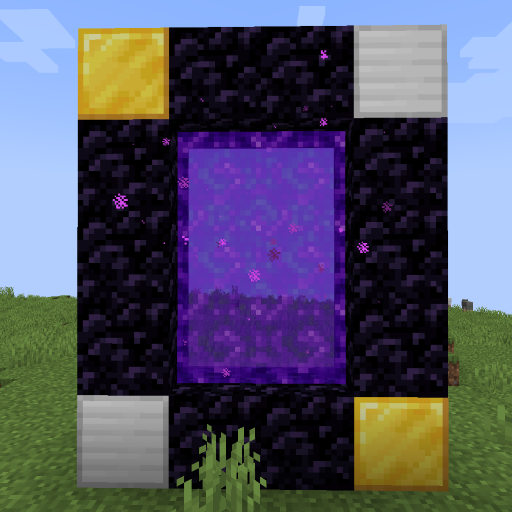
CurseForge · Minecraft mod
World Portal
Create custom world portal to travel between dimensions.
Choose a version Pick your version below, then grab the matching file.
Quick answer
Which World Portal release should I use?
Latest stable file worldportal-neoforge-0.0.11+26.3.jar
Game version 26.3
Loader NeoForge
World Portal worldportal-neoforge-0.0.11+26.3.jar targets 26.3 with NeoForge. The project page does not say whether this file belongs on the client, dedicated server, or both. No extra mods listed for this file.
Where it goes
Is World Portal required on the client, server, or both?
The project page does not say whether this file belongs on the client, dedicated server, or both.
Client Source doesn’t say
Dedicated server Source doesn’t say
Loader for this release NeoForge
Required install it here Optional supported, not mandatory Not supported do not install here Source doesn’t say do not assume
The source does not explicitly classify this release as client-only or server-only.
What else does World Portal worldportal-neoforge-0.0.11+26.3.jar need?
worldportal-neoforge-0.0.11+26.3.jar. Change the file and its required mods may change too.
This file does not list any required mods. Do not add a library just because a different file uses it.
This file does not list any required or optional mods.
Before you install it
Add World Portal without breaking your instance.
Built for World Portal worldportal-neoforge-0.0.11+26.3.jar. Pick another file and the loader, install side or required mods may change.
- 01
Stick to this file
Use worldportal-neoforge-0.0.11+26.3.jar. It targets 26.3 with NeoForge; another release may have different loader, side or dependency requirements.
- 02
Bring the mods it needs
This file does not list any required mods. Do not add a library just because a different file uses it.
- 03
Put it on the correct side
The project page does not say whether this file belongs on the client, dedicated server, or both.
- 04
Pick the file you checked
Use the “Get this file” button beside worldportal-neoforge-0.0.11+26.3.jar. It opens that exact file at the source.
About this project
What does World Portal add?
World Portal
World Portal can create custom world portal to travel between dimensions. With this, you can make your own custom portal for your custom dimension via config or datapack and it is server-side.
This mod are made for personal gameplay tinkering, server customization, and modpack creation.
Important
- [0.0.8] Portal frame corner left and right will be swapped.
- [0.0.10] Client side issue fix and data migration.
- [0.0.11] Config file migrated from "worldportal.json" to "worldportal-common.toml".
This mod can only create a custom portal. To make a new dimension, you need datapack or another mod to do it.
Features
- No client needed custom portal.
- Transform nether portal to custom portal by changing it's frame corners.
- Horizontal portal (>=0.0.8).
- Simple configuration and datapack support.
Can be added to existing world or modpack and can be removed from existing world easily. Please make sure to backup your world first.
Planned
- End portal mode.
- Customized portal frame.
- Customized portal spawned mobs not just piglin or disable it.
- Customized portal minimum spawn height.
- Customized portal particles.
- Command or function execution when entering and exiting portal.
- Destination based on biome, dimension, height, moon phase, time, and weather.
- Destination based on player level, saturation, or even economy and mana.
- Destination based on executed command or function.
- Destination restricted by dimension and player permissions.
- Destination override gamerule.
- Support for economy, permission, and quest mods.
- And many more including compat mods in the way.
Suggest new features for World Portal on GitHub Discussion or Discord would be appreciated.
Usage
You can configure this mod by config or data driven by using datapack.
- Config
Portal id "minecraft:example" can be anything as long as it is unique.
worldportal-common.toml
[portals]

    [portals."minecraft:example"]
        frame_top_right = "minecraft:gold_block"
        frame_top_left = "minecraft:iron_block"
        frame_bottom_right = "minecraft:iron_block"
        frame_bottom_left = "minecraft:gold_block"
        mode = "worldportal:default"
        destination = "customdimension:dimension"

    [portals."minecraft:example_horizontal"]
        frame_top_right = "minecraft:gold_block"
        frame_top_left = "minecraft:iron_block"
        frame_bottom_right = "minecraft:iron_block"
        frame_bottom_left = "minecraft:gold_block"
        mode = "worldportal:horizontal"
        destination = "customdimension:dimension_flat"
worldportal.json (OLD)
{
    "portals": {
        "minecraft:example": {
            "frame_top_right": "minecraft:gold_block",
            "frame_top_left": "minecraft:iron_block",
            "frame_bottom_right": "minecraft:iron_block",
            "frame_bottom_left": "minecraft:gold_block",
            "mode": "worldportal:default",
            "destination": "customdimension:dimension"
        },
        "minecraft:example_horizontal": {
            "frame_top_right": "minecraft:gold_block",
            "frame_top_left": "minecraft:iron_block",
            "frame_bottom_right": "minecraft:iron_block",
            "frame_bottom_left": "minecraft:gold_block",
            "mode": "worldportal:horizontal",
            "destination": "customdimension:dimension_flat"
        }
    }
}
- Datapack
In your datapack namespace folder, create "worldportal" folder with "portal" folder inside. In portal folder create json file with any name with content:
{
    "frame_top_right": "minecraft:gold_block",
    "frame_top_left": "minecraft:iron_block",
    "frame_bottom_right": "minecraft:iron_block",
    "frame_bottom_left": "minecraft:gold_block",
    "mode": "worldportal:default",
    "destination": "testdimension:dimension"
}
-> data{namespace}\worldportal\portal{name}.json
Portal id consist of {namespace}:{name}. Portal mode can be "worldportal:default" for normal portal or "worldportal:horizontal" for horizontal portal.
Compatibility
- Passengers Portal Fix
- Create Addons: Create: Portal Integration
Issues
- [Radium] Use Canary instead for better mod compatibility or manually disable "mixin.ai.poi.fast_portals" on its config.
Check other issues or report new issues on GitHub Issues is recommended.
Support
🟩 26.1-26.3 / 🟩 1.21.1 / 🟥 1.21-1.21.11 / 🟩 1.20.1 / 🟪 1.16.5 / 🟪 1.12.2
🟩 Supported
🟥 Support Dropped
🟨 In Progress
🟪 Considered
Permissions
Feel free to use in modpacks, videos, stream, or similar media without need for attribution or ask permission.


Consider to help me financially if you like my mods, I will be really grateful.


Project description from CurseForge.
Pick your setup
World Portal by Minecraft version and loader
Choose the version and loader you play, then open the matching release.
Minecraft version
26.2
2 loader buildsMinecraft version
26.1.2
2 loader buildsMinecraft version
26.1.1
2 loader buildsMinecraft version
26.1
2 loader buildsMinecraft version
1.21.11
2 loader buildsMinecraft version
1.21.10
2 loader buildsMinecraft version
1.21.9
2 loader buildsMinecraft version
1.21.8
2 loader buildsMinecraft version
1.21.7
2 loader buildsMinecraft version
1.21.6
2 loader buildsMinecraft version
1.21.5
2 loader buildsShowing the newest 12 of 18 game versions. Older files are in the list below.
Check the dependencies, then try the file in a copied instance before changing a world you care about.
Recent files
World Portal versions and loaders
worldportal-neoforge-0.0.11+26.3.jar
9 Oct 2026
Client Source doesn’t say Server Source doesn’t say Dependencies No extras listed Listed on Release listing
Check the 26.3 · NeoForge setup NeoForge26.3 release
worldportal-fabric-0.0.11+26.3.jar
9 Oct 2026
Client Source doesn’t say Server Source doesn’t say Dependencies 2 required · 2 unchecked Listed on Release listing
Check the 26.3 · Fabric setup Fabric26.3 release
worldportal-neoforge-0.0.11+26.1.jar
9 Oct 2026
Client Source doesn’t say Server Source doesn’t say Dependencies No extras listed Listed on Release listing
Check the 26.2 · NeoForge setup NeoForge26.126.1.126.1.2 release
worldportal-fabric-0.0.11+26.1.jar
9 Oct 2026
Client Source doesn’t say Server Source doesn’t say Dependencies 2 required · 2 unchecked Listed on Release listing
Check the 26.2 · Fabric setup Fabric26.126.1.126.1.2 release
worldportal-neoforge-0.0.11+1.21.1.jar
9 Oct 2026
Client Source doesn’t say Server Source doesn’t say Dependencies No extras listed Listed on Release listing
Check the 1.21.1 · NeoForge setup 1.21.1NeoForge release
worldportal-fabric-0.0.11+1.21.1.jar
9 Oct 2026
Client Source doesn’t say Server Source doesn’t say Dependencies 2 required · 2 unchecked Listed on Release listing
Check the 1.21.1 · Fabric setup Fabric1.21.1 release
worldportal-neoforge-0.0.11+1.20.1.jar
9 Oct 2026
Client Source doesn’t say Server Source doesn’t say Dependencies No extras listed Listed on Release listing
Check the 1.20.1 · NeoForge setup 1.20.1NeoForge release
worldportal-forge-0.0.11+1.20.1.jar
9 Oct 2026
Client Source doesn’t say Server Source doesn’t say Dependencies No extras listed Listed on Release listing
Check the 1.20.1 · Forge setup 1.20.1Forge release
worldportal-fabric-0.0.11+1.20.1.jar
9 Oct 2026
Client Source doesn’t say Server Source doesn’t say Dependencies 2 required · 2 unchecked Listed on Release listing
Check the 1.20.1 · Fabric setup Fabric1.20.1 release
worldportal-fabric-0.0.10+26.1.jar
22 Jul 2026
Client Source doesn’t say Server Source doesn’t say Dependencies 2 required · 2 unchecked Listed on Release listing
Check the 26.2 · Fabric setup Fabric26.2 release
worldportal-neoforge-0.0.10+26.1.jar
27 Apr 2026
Client Source doesn’t say Server Source doesn’t say Dependencies No extras listed Listed on Release listing
Check the 26.2 · NeoForge setup NeoForge26.126.1.126.1.2 release
worldportal-fabric-0.0.10+26.1.jar
27 Apr 2026
Client Source doesn’t say Server Source doesn’t say Dependencies 2 required · 2 unchecked Listed on Release listing
Check the 26.1.2 · Fabric setup Fabric26.126.1.126.1.2 release
Looking for an older file? The official CurseForge project page is in Resources.
 mod
mod CurseForge + Modrinth · Minecraft
Ragium
Ragium is a tech mod based on vanilla materials. This mod aims to expand vanilla features and automate many work.
 mod
mod CurseForge + Modrinth · Minecraft
ModernFix-mVUS
A fork of ModernFix that adds minor version update support.
 mod
mod CurseForge · Minecraft
AOE Hammer
Upgradeable AOE pickaxes and shovels that mine 3x3, 5x5, and 9x9 areas. Hold Shift to mine a single block.