ProjectE Needed by Hoth's ProjectE Utilities hoths_projecte_utilities-1.0.0-neoforge-1.21.1.jar
requiredMatching file found Matched file: ProjectE-1.21.1-PE1.1.0.jar
CurseForge · Minecraft mod
A collection of additions for the Project E mod
Quick answer
Hoth's ProjectE Utilities hoths_projecte_utilities-1.0.0-neoforge-1.21.1.jar targets 1.21.1 with NeoForge. The project page does not say whether this file belongs on the client, dedicated server, or both. All 1 required mods have matching files.
Where it goes
The project page does not say whether this file belongs on the client, dedicated server, or both.
The source does not explicitly classify this release as client-only or server-only.
hoths_projecte_utilities-1.0.0-neoforge-1.21.1.jar. Change the file and its required mods may change too.
Install ProjectE first. We found matching files for this game-version and loader setup.
We only count dependency files that match this setup. A file for another loader does not fill the gap.
Before you install it
Built for Hoth's ProjectE Utilities hoths_projecte_utilities-1.0.0-neoforge-1.21.1.jar. Pick another file and the loader, install side or required mods may change.
Use hoths_projecte_utilities-1.0.0-neoforge-1.21.1.jar. It targets 1.21.1 with NeoForge; another release may have different loader, side or dependency requirements.
Install ProjectE first. We found matching files for this game-version and loader setup.
The project page does not say whether this file belongs on the client, dedicated server, or both.
Use the “Get this file” button beside hoths_projecte_utilities-1.0.0-neoforge-1.21.1.jar. It opens that exact file at the source.
About this project
Hoth's ProjectE Utilities is a collection of additions to the ProjectE mod by SinKillerJ
If you have any suggestions for additional features, please post a comment.
Batch Transmuters
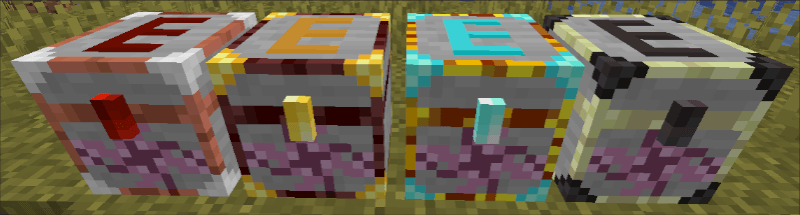
Comming in 4 tiers batch transmuters allow players to convert items into EMC in bulk with the intended use as a psudo-trashcan in the early game but a decent EMC farming tool in the higher tiers.
(Note: players will still learn any item converted this way but any item that enters a batch transmuter can't be taken out)
EMC Bottle
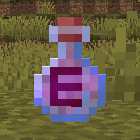
A consumable item that grants 1-10 EMC upon use.
(Note: no default method to gain in survival and is ment as a fun tool for modpacking without using commands)
Transmutation Table Keybind

(Note: only works if the Keybind Transmutaiton gamerule is set to True)
Gamerules for Modpack customization:
EMC Fishing Bonus [] Default Value: 0 [] When a player fishs an item and a random number between 1 to 100 is equal to or lesser then this gamerules value, that player obtains a EMC Bottle.
EMC Slaying Bonus [] Default Value: 0 [] When an entity dies and a random number between 1 to 100 is equal to or lesser then this gamerules value, a EMC Bottle is dropped where that entity died.
Experience EMC [] Default Value: false [] Whenever a player gains vanilla experience, they gain that much EMC.
Experience Level EMC [] Default Value: false [] Whenever a player gains an amount of levels of vanilla experience, they gain that much EMC.
Keybind Transmutation [] Default Value: false [] Players can open the projecte transmutation table's gui using the Transmutaiton Table keybind
Loss EMC Upon Death [] Default Value: false [] When a player dies, their EMC is set to 0.
Loss Knowledge Upon Death [] Default Value: false [] When a player dies, their Transmutation Table knowledge is cleared.
Obtain Knowledge Upon Obtain [] Default Value: false [] When a player picks up or crafts an item, they gain the Transmutation Table knowledge of that item.
Project description from CurseForge.
Pick your setup
Choose the version and loader you play, then open the matching release.
Check the dependencies, then try the file in a copied instance before changing a world you care about.
Recent files
11 Apr 2025
hoths_projecte_utilities-1.0.0-forge-1.16.5.jar
22 Feb 2025
hoths_projecte_utilities-1.0.0-forge-1.19.2.jar
22 Feb 2025
hoths_projecte_utilities-1.0.0-forge-1.20.1.jar
22 Feb 2025
Looking for an older file? The official CurseForge project page is in Resources.
 mod
A Minecraft mod that adds giant swords and shields to the game. A re-make of the original Asgard Shield, made popular by the 1.5 modpack Hexxit.
 mod
A simple and easy to use VeinMiner mod with powerful config and ingame settings.
 mod
Adds various items and blocks across different crafts.