Curios API Optional for Extreme Monsters (EM) extreme_monsters-1.12.6.1-neoforge-1.21.1.jar
optionalMatching file found Matched file: curios-neoforge-9.5.1+1.21.1.jar

CurseForge · Minecraft mod
Think Minecraft was too easy? This mod cranks up the challenge and pushes your survival skills to the limit!
Quick answer
Extreme Monsters (EM) extreme_monsters-1.12.6.1-neoforge-1.21.1.jar targets 1.21.1 with NeoForge. The project page does not say whether this file belongs on the client, dedicated server, or both. All 1 required mods have matching files.
Where it goes
The project page does not say whether this file belongs on the client, dedicated server, or both.
The source does not explicitly classify this release as client-only or server-only.
extreme_monsters-1.12.6.1-neoforge-1.21.1.jar. Change the file and its required mods may change too.
Install GeckoLib first. We found matching files for this game-version and loader setup. 2 come through another mod in the chain.
2 extra mods were pulled in by other dependencies. Indented rows show who needs each one. We only count dependency files that match this setup. A file for another loader does not fill the gap.
Before you install it
Built for Extreme Monsters (EM) extreme_monsters-1.12.6.1-neoforge-1.21.1.jar. Pick another file and the loader, install side or required mods may change.
Use extreme_monsters-1.12.6.1-neoforge-1.21.1.jar. It targets 1.21.1 with NeoForge; another release may have different loader, side or dependency requirements.
Install GeckoLib first. We found matching files for this game-version and loader setup. 2 come through another mod in the chain.
The project page does not say whether this file belongs on the client, dedicated server, or both.
Use the “Get this file” button beside extreme_monsters-1.12.6.1-neoforge-1.21.1.jar. It opens that exact file at the source.
About this project
Official Downloads The only two platforms where I officially publish this mod are CurseForge and Modrinth. Downloads from other websites don't really support me, so please download the mod from one of the official pages if possible. :') Any listings on websites other than CurseForge and Modrinth are not uploaded or managed by me.
⚠️ WARNING ⚠️
Do NOT install this mod carelessly! If you haven’t made a backup, a Flying Tracker may hunt you down and ruin your precious world. It’s strongly recommended to either:
-Start in a new world, or
-If you want to keep play in your current world, disable Flying Tracker spawns in the config first.
This mod no longer supports version 1.20.1.
Previous 1.20.1 builds made before the migration no longer include the latest features.
This mod places emphasis not only on combat but also on technology, so be sure to keep that in mind as you play.
E xtreme Monsters takes Minecraft survival to the next level with a full progression system built around powerful new materials, deadly Hyper mobs, and massive late-game challenges.
Your journey begins simple: gather resources, build your first industrial machines, and prepare yourself for what’s coming. But danger is always close—linger too long in one spot, and Trackers will find you. Defeat them to earn the mysterious Black Hole Matter, the very first step in a chain of progression that changes everything.
From there, you’ll unlock new tiers of Matter by taking down increasingly dangerous Hyper bosses:
Every victory opens the door to stronger gear, more advanced machines, and incredible automation. Collect souls, power up your Simulation Chamber, and push toward the ultimate goal: forging the near-mythical Perfect Matter. With it, you can craft devastating weapons, unbreakable armor, and legendary machines like the Infinity Matrix—capable of replicating entire Matters.
Extreme Monsters isn’t just about survival—it’s about escalation. Each step forward unlocks new dangers, bigger rewards, and a sense of power unlike any
You need help? Join our Discord sever!
Note1: Perfect Matter is optional. That’s why its recipe is extremely difficult. so no complaining!
Note2: We highly recommend using AE2 and Pipez mods when playing this mod.(I’m sure they’ll install JEI on their own, right?)
Note 3: Some items have multiple modes or extra functions.
Press C to use an Extra Function.
Press V to switch between modes.
Note 4: How to use Multi-Blocks?
-Fictional Planet Miner
How to build Fictional Planet Miner Multi-block?
How to work Fictional Planet Miner?
-Matter Catalyst BoilerHow to build and use Matter Catalyst Boiler?
-QSS (Quantum Superposition Simulation)How to build and use QSS Chamber?
-NSDR (Neutron Star Dyson Ring
How to build and use NSDR?
-MVS (Microverse Simulator)
How to build and use MVS
Project description from CurseForge.
Pick your setup
Choose the version and loader you play, then open the matching release.
Check the dependencies, then try the file in a copied instance before changing a world you care about.
Recent files
21 Feb 2026
4 Jan 2026
27 Dec 2025
19 Dec 2025
18 Dec 2025
11 Dec 2025
2 Dec 2025
2 Dec 2025
1 Dec 2025
30 Nov 2025
29 Nov 2025
26 Nov 2025
Looking for an older file? The official CurseForge project page is in Resources.
 mod
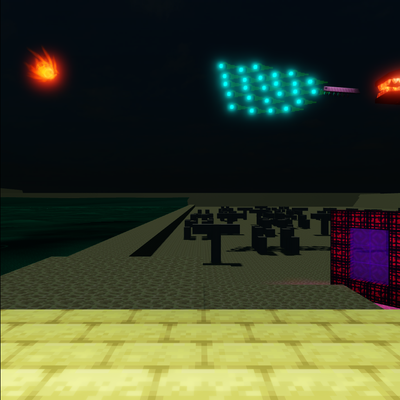
Adds a neon VoidFish swarm to the End surface that relentlessly tracks down players and your precious Chorus Fruit farms.
 mod
Adds snow under trees in snowy biomes
 mod
Heavy rain can turn into a flood! Rivers, lakes and oceans overflow their banks, then drain away when the storm passes.