Minecraft version
Back to mods 
CurseForge · Minecraft mod
Rubiks Cube
Working Rubik's Cube in Minecraft
Choose a version Pick your version below, then grab the matching file.
Quick answer
Which Rubiks Cube release matches 26.2 Forge?
Best match for your filters rubiks-cube-v1.5.jar
Game version 1.21.2-Snapshot, 1.21, 1.21.6-snapshot
Loader Fabric, Forge, NeoForge
Rubiks Cube rubiks-cube-v1.5.jar targets 1.21.2-Snapshot, 1.21, 1.21.6-snapshot with Fabric, Forge, NeoForge. The project page does not say whether this file belongs on the client, dedicated server, or both. No extra mods listed for this file.
Where it goes
Is Rubiks Cube required on the client, server, or both?
The project page does not say whether this file belongs on the client, dedicated server, or both.
Client Source doesn’t say
Dedicated server Source doesn’t say
Loader for this release Fabric, Forge, NeoForge
Required install it here Optional supported, not mandatory Not supported do not install here Source doesn’t say do not assume
The source does not explicitly classify this release as client-only or server-only.
What else does Rubiks Cube rubiks-cube-v1.5.jar need?
rubiks-cube-v1.5.jar on 26.2 Forge. Every mod below is checked against that same setup.
This file does not list any required mods. Do not add a library just because a different file uses it.
This file does not list any required or optional mods.
Before you install it
Add Rubiks Cube without breaking your instance.
Built for Rubiks Cube rubiks-cube-v1.5.jar on 26.2 Forge. Pick another file and the loader, install side or required mods may change.
- 01
Stick to this file
Use rubiks-cube-v1.5.jar. It targets 1.21.2-Snapshot, 1.21, 1.21.6-snapshot with Fabric, Forge, NeoForge; another release may have different loader, side or dependency requirements.
- 02
Bring the mods it needs
This file does not list any required mods. Do not add a library just because a different file uses it.
- 03
Put it on the correct side
The project page does not say whether this file belongs on the client, dedicated server, or both.
- 04
Pick the file you checked
Use the “Get this file” button beside rubiks-cube-v1.5.jar. It opens that exact file at the source.
About this project
What does Rubiks Cube add?

Description
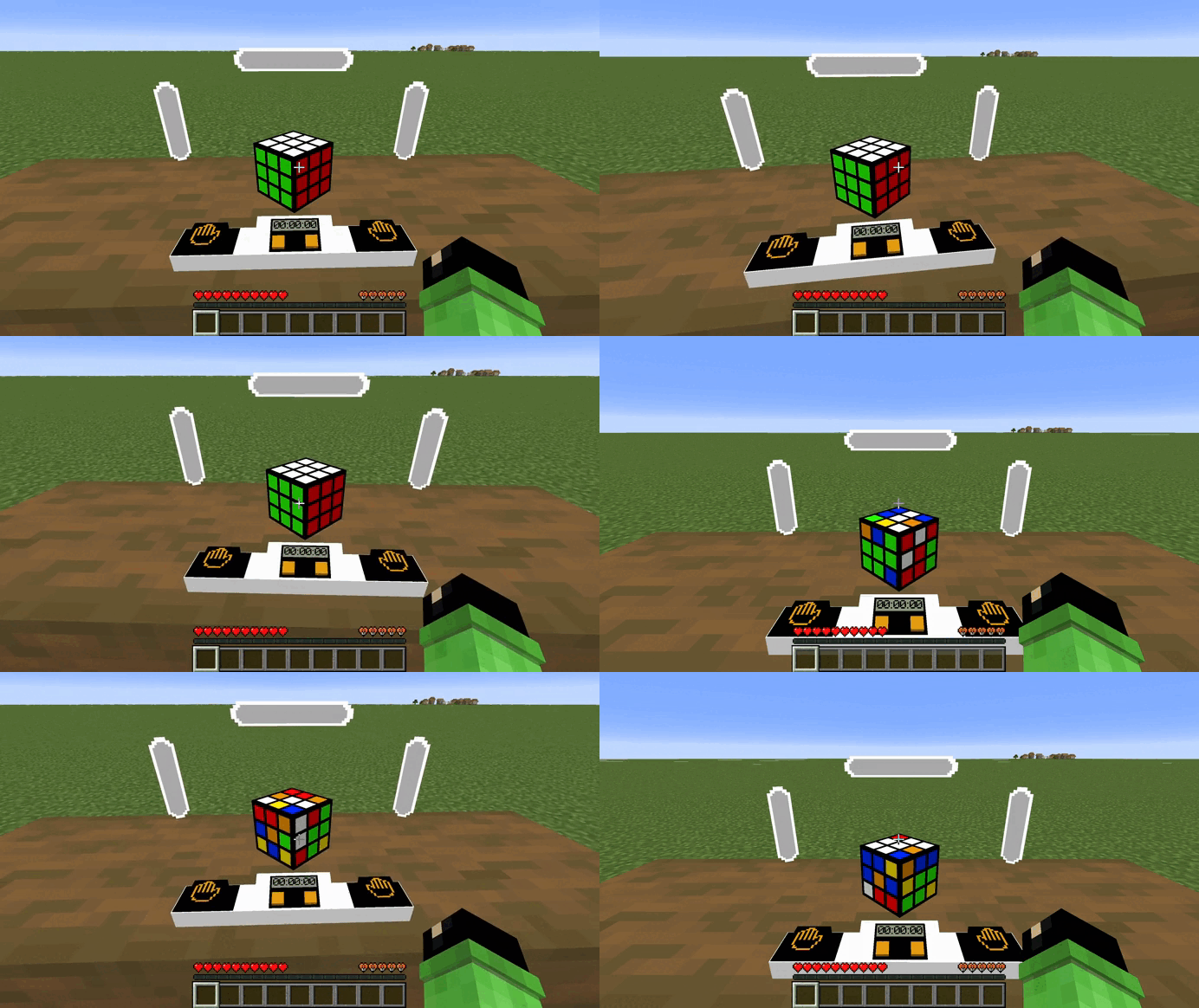
Mod/datapack adds a working Rubik's cube.
How to use
In order for the cube to appear or assemble, you need to use this command.
/function cube:cube
To make the cube colored you need to use this command.
/function cube:color_cube
To make a cube with stickers you need to use this command.
/function cube:stiker_cube
To rotate the edges, you need to sit on the seat (in order for the hitboxes to work correctly), hold down the left mouse button and turn in the direction where you want to scroll the edge. To start the timer you need to press the left button with the image of a palm, to stop it - on the right. To disassemble the cube you need to press the right orange button or the left one. The result is the same, but not the process.
Dependencies
- Fabric loader requires Fabric API
Project description from CurseForge.
Pick your setup
Rubiks Cube by Minecraft version and loader
Choose the version and loader you play, then open the matching release.
Minecraft version
26.1.2
4 loader buildsMinecraft version
26.1.1
4 loader buildsMinecraft version
26.1
4 loader buildsMinecraft version
1.21.11-snapshot
4 loader buildsMinecraft version
1.21.11
4 loader buildsMinecraft version
1.21.10
4 loader buildsMinecraft version
1.21.9-snapshot
4 loader buildsMinecraft version
1.21.9
4 loader buildsMinecraft version
1.21.8
4 loader buildsMinecraft version
1.21.7
4 loader buildsMinecraft version
1.21.6-snapshot
4 loader buildsShowing the newest 12 of 32 game versions. Older files are in the list below.
Check the dependencies, then try the file in a copied instance before changing a world you care about.
Recent files
Rubiks Cube versions and loaders
rubiks-cube-v1.5.jar
10 Dec 2025
Client Source doesn’t say Server Source doesn’t say Dependencies No extras listed Listed on Release listing
Check the 26.2 · Forge setup 1.21.2-Snapshot1.211.21.6-snapshot1.20.2-Snapshot release
Looking for an older file? The official CurseForge project page is in Resources.
 mod
CurseForge · Minecraft
ConfigGuard
Automatic snapshots of your config folder with a line-by-line diff and one-click restore. Undo any config change, on the client or on a server.
 mod
CurseForge · Minecraft
GearDiff
Compare armor, weapons and tools with your equipped gear right in the tooltip: stat changes, damage per second, durability and enchantments.
 mod
CurseForge · Minecraft
OG'S Backpacks
Backpack mod on all versions