Minecraft version
Back to mods 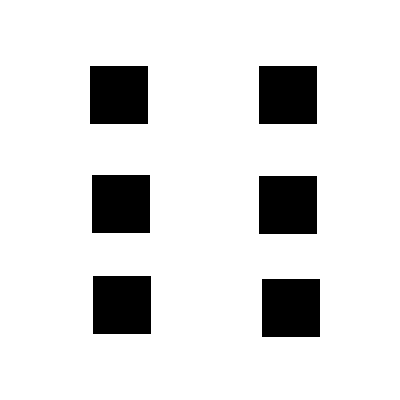
CurseForge · Minecraft mod
Dice-Blocks by Limo4317
There are just blocks here, one for each of the numbers 1 to 6. And then you can simply build a dice machine with a redstone mechanism.
Choose a version Pick your version below, then grab the matching file.
Quick answer
Which Dice-Blocks by Limo4317 release should I use?
Latest stable file Dice-Blocks 2.1.1
Game version 1.21.1
Loader NeoForge
Dice-Blocks by Limo4317 Dice-Blocks 2.1.1 targets 1.21.1 with NeoForge. The project page does not say whether this file belongs on the client, dedicated server, or both. No extra mods listed for this file.
Where it goes
Is Dice-Blocks by Limo4317 required on the client, server, or both?
The project page does not say whether this file belongs on the client, dedicated server, or both.
Client Source doesn’t say
Dedicated server Source doesn’t say
Loader for this release NeoForge
Required install it here Optional supported, not mandatory Not supported do not install here Source doesn’t say do not assume
The source does not explicitly classify this release as client-only or server-only.
What else does Dice-Blocks by Limo4317 Dice-Blocks 2.1.1 need?
Dice-Blocks 2.1.1. Change the file and its required mods may change too.
This file does not list any required mods. Do not add a library just because a different file uses it.
This file does not list any required or optional mods.
Before you install it
Add Dice-Blocks by Limo4317 without breaking your instance.
Built for Dice-Blocks by Limo4317 Dice-Blocks 2.1.1. Pick another file and the loader, install side or required mods may change.
- 01
Stick to this file
Use Dice-Blocks 2.1.1. It targets 1.21.1 with NeoForge; another release may have different loader, side or dependency requirements.
- 02
Bring the mods it needs
This file does not list any required mods. Do not add a library just because a different file uses it.
- 03
Put it on the correct side
The project page does not say whether this file belongs on the client, dedicated server, or both.
- 04
Pick the file you checked
Use the “Get this file” button beside Dice-Blocks 2.1.1. It opens that exact file at the source.
About this project
What does Dice-Blocks by Limo4317 add?
Welcome to Dice-Blocks
After spending ten minutes searching in vain for a mod that simply adds a block for every number from 1 - 6,
I just made it myself.
This mod adds 6 dice blocks and their crafting recipes, so you can easily build a redstone mechanism that works like dice rolling in real life and looks good.
There are also two blocks called Black Dice and White Dice. They are normal dice with all 6 numbers.
Credits for these two go to my friend NXDrystanThor!
*This Mod is made with MCreator!*
Report Issues on my Discord!
Have fun!😄
Project description from CurseForge.
Pick your setup
Dice-Blocks by Limo4317 by Minecraft version and loader
Choose the version and loader you play, then open the matching release.
Check the dependencies, then try the file in a copied instance before changing a world you care about.
Recent files
Dice-Blocks by Limo4317 versions and loaders
Dice-Blocks 2.1.1
diceblocks-2.1.1-neoforge-1.21.1.jar
20 Jul 2026
Client Source doesn’t say Server Source doesn’t say Dependencies No extras listed Listed on Release listing
Check the 1.21.1 · NeoForge setup 1.21.1NeoForge release
Dice-Blocks 2.1.0
diceblocks-2.1.0-neoforge-1.21.1.jar
4 Jul 2025
Client Source doesn’t say Server Source doesn’t say Dependencies No extras listed Listed on Release listing
Check the 1.21.1 · NeoForge setup 1.21.1NeoForge release
Dice-Blocks 2.0.0
diceblocks-2.0.0-neoforge-1.21.1.jar
18 Mar 2025
Client Source doesn’t say Server Source doesn’t say Dependencies No extras listed Listed on Release listing
Check the 1.21.1 · NeoForge setup NeoForge1.21.1 release
Dice-Blocks 1.0.0
diceblocks-1.0.0-neoforge-1.21.1.jar
3 Mar 2025
Client Source doesn’t say Server Source doesn’t say Dependencies No extras listed Listed on Release listing
Check the 1.21.1 · NeoForge setup NeoForge1.21.1 release
Looking for an older file? The official CurseForge project page is in Resources.
 mod
CurseForge + Modrinth · Minecraft
Modern Morph
A modern port of iChun's iconic Morph mod
 mod
CurseForge · Minecraft
Ranks
Automatic rank progression mod with 30 grades, 12 tracked stats, admin-validated community objectives, custom chat & tab formatting, GUI interface, rewards system, and AFK detection. Fully configurable grades, thresholds, and objectives.
 mod
CurseForge · Minecraft
ZacsRevenge
Zacs Revenge adds 8 new mobs, a new dimension and new tools and ways to find zac!