Minecraft version
Back to mods 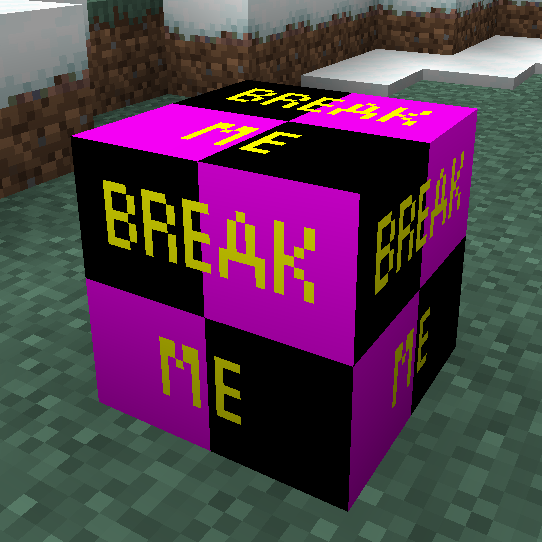
CurseForge · Minecraft mod
Storage No Poof
Preserves items stored in containers of removed mods
Choose a version Pick your version below, then grab the matching file.
Quick answer
Which Storage No Poof release should I use?
Latest stable file storagenopoof-1.0.1.jar
Game version 1.21.4, 1.21.3, 1.21.1
Loader NeoForge
Storage No Poof storagenopoof-1.0.1.jar targets 1.21.4, 1.21.3, 1.21.1 with NeoForge. The project page does not say whether this file belongs on the client, dedicated server, or both. No extra mods listed for this file.
Where it goes
Is Storage No Poof required on the client, server, or both?
The project page does not say whether this file belongs on the client, dedicated server, or both.
Client Source doesn’t say
Dedicated server Source doesn’t say
Loader for this release NeoForge
Required install it here Optional supported, not mandatory Not supported do not install here Source doesn’t say do not assume
The source does not explicitly classify this release as client-only or server-only.
What else does Storage No Poof storagenopoof-1.0.1.jar need?
storagenopoof-1.0.1.jar. Change the file and its required mods may change too.
This file does not list any required mods. Do not add a library just because a different file uses it.
This file does not list any required or optional mods.
Before you install it
Add Storage No Poof without breaking your instance.
Built for Storage No Poof storagenopoof-1.0.1.jar. Pick another file and the loader, install side or required mods may change.
- 01
Stick to this file
Use storagenopoof-1.0.1.jar. It targets 1.21.4, 1.21.3, 1.21.1 with NeoForge; another release may have different loader, side or dependency requirements.
- 02
Bring the mods it needs
This file does not list any required mods. Do not add a library just because a different file uses it.
- 03
Put it on the correct side
The project page does not say whether this file belongs on the client, dedicated server, or both.
- 04
Pick the file you checked
Use the “Get this file” button beside storagenopoof-1.0.1.jar. It opens that exact file at the source.
About this project
What does Storage No Poof add?
This mod preserves the items inside block containers from removed mods, and turns the removed block into a special block which, when broken will drop all items the container used to have. Alternatively if the container had many items and you do not want to potentially cause server lag, you can extract the items out of the block until it's empty, in which case it will automatically self-destruct.
Right now only mods which stored their items in a top-level Items tag can have their data preserved (this tag is used by vanilla containers too). In the future, options for modpacks to define rules to keep items from specific tags and inventories will be added.
Project description from CurseForge.
Pick your setup
Storage No Poof by Minecraft version and loader
Choose the version and loader you play, then open the matching release.
Minecraft version
1.21.3
1 loader buildMinecraft version
1.21.2
1 loader buildMinecraft version
1.21.1
1 loader buildCheck the dependencies, then try the file in a copied instance before changing a world you care about.
Recent files
Storage No Poof versions and loaders
storagenopoof-1.0.1.jar
4 Mar 2025
Client Source doesn’t say Server Source doesn’t say Dependencies No extras listed Listed on Release listing
Check the 1.21.4 · NeoForge setup 1.21.4NeoForge1.21.31.21.1 release
storagenopoof-1.0.0.jar
4 Mar 2025
Client Source doesn’t say Server Source doesn’t say Dependencies No extras listed Listed on Release listing
Check the 1.21.4 · NeoForge setup 1.21.4NeoForge1.21.31.21.1 release
Looking for an older file? The official CurseForge project page is in Resources.
 mod
CurseForge · Minecraft
Touhou Little Maid: Beacon
A addon mod for Touhou Little Maid which makes your maid a mobile beacon.
 mod
CurseForge · Minecraft
Ore Vein Tweaker
Control the large ore veins: turn iron or copper veins off, resize them, make them richer or poorer, rebuild them from any block - or add as many new kinds of veins as you want. Plain config files, server-side only.
 mod
CurseForge · Minecraft
Savaru's Dungeonology
A Savaru roguelike dungeon system with level-gated entries, difficulty tiers, dungeon objectives, rule-card buffs, party runs, external dungeon integration, and Affixology-linked rewards.