Minecraft version
Back to mods 
CurseForge · Minecraft mod
Automatic Sorter
Mod where you can sort your items easily and more certain than your redstone sorter.
Choose a version Pick your version below, then grab the matching file.
Quick answer
Which Automatic Sorter release matches 1.21 Forge?
Best match for your filters automaticsorter-1.3.0-1.21-forge.jar
Game version 1.21
Loader Forge
Automatic Sorter automaticsorter-1.3.0-1.21-forge.jar targets 1.21 with Forge. The project page does not say whether this file belongs on the client, dedicated server, or both. No extra mods listed for this file.
Where it goes
Is Automatic Sorter required on the client, server, or both?
The project page does not say whether this file belongs on the client, dedicated server, or both.
Client Source doesn’t say
Dedicated server Source doesn’t say
Loader for this release Forge
Required install it here Optional supported, not mandatory Not supported do not install here Source doesn’t say do not assume
The source does not explicitly classify this release as client-only or server-only.
What else does Automatic Sorter automaticsorter-1.3.0-1.21-forge.jar need?
automaticsorter-1.3.0-1.21-forge.jar on 1.21 Forge. Every mod below is checked against that same setup.
This file does not list any required mods. Do not add a library just because a different file uses it.
This file does not list any required or optional mods.
Before you install it
Add Automatic Sorter without breaking your instance.
Built for Automatic Sorter automaticsorter-1.3.0-1.21-forge.jar on 1.21 Forge. Pick another file and the loader, install side or required mods may change.
- 01
Stick to this file
Use automaticsorter-1.3.0-1.21-forge.jar. It targets 1.21 with Forge; another release may have different loader, side or dependency requirements.
- 02
Bring the mods it needs
This file does not list any required mods. Do not add a library just because a different file uses it.
- 03
Put it on the correct side
The project page does not say whether this file belongs on the client, dedicated server, or both.
- 04
Pick the file you checked
Use the “Get this file” button beside automaticsorter-1.3.0-1.21-forge.jar. It opens that exact file at the source.
About this project
What does Automatic Sorter add?
Why?
Hi, I created mod for easy sorting items in your storage. It is primarily personal mod. I wanted to create sorting system with redstone but that was too much work for me so I programmed something and here we are. If you wanna edit my mod, feel free to use it. I linked my github repository.
What this mod does?
- Provides a simple, fully customizable item-sorting system without needing complex redstone contraptions.
- Automatically distributes items into connected storage chests based on filter rules (whitelist, inventory-based, rejects).
- Allows speed upgrades via Sorter Amplifiers or commands for faster item processing.
How it's working?
There are 4 new items and 4 new commands
Items
- Sorter Controller (Block)
- Filter (Block)
- Pipe (Block)
- Sorter Amplifier (Item)
You need Sorter Controller put under your chest, where you put not sorted items. Then you connect Sorter Controller and Filter by pipes. Filter must facing chest in your storage. Pipes MUST be visually connected to Sorter controller and to filter.
Filter has three modes:
- Whitelist
- Filtering by items in Filter block inventory
- In inventory
- Filtering by items in storage chest where Filter is facing
- Rejects
- Accepting items which were rejected by other Filters (more or less like trash bin)
- Also accepting items which have active filtering but not enough room in chest
You can change Filter mode by clicking on icon in Filter menu. You can open Filter menu by right clicking on Filter block.
Items are transported via air, pipes don't have inventories or something like hoppers do. You can UPGRADE sorting speed by putting Sorter Amplifier item into Sorter Controller.
How to craft new items?
There are 4 new recepies:
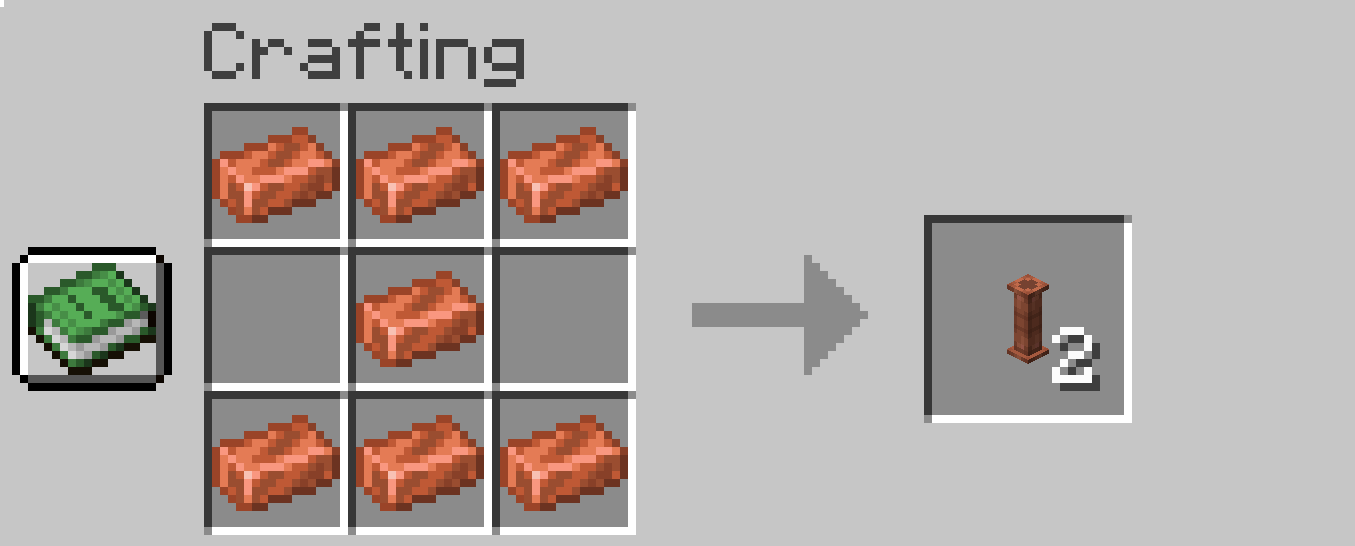
Pipe:
- 7x Copper Ingot
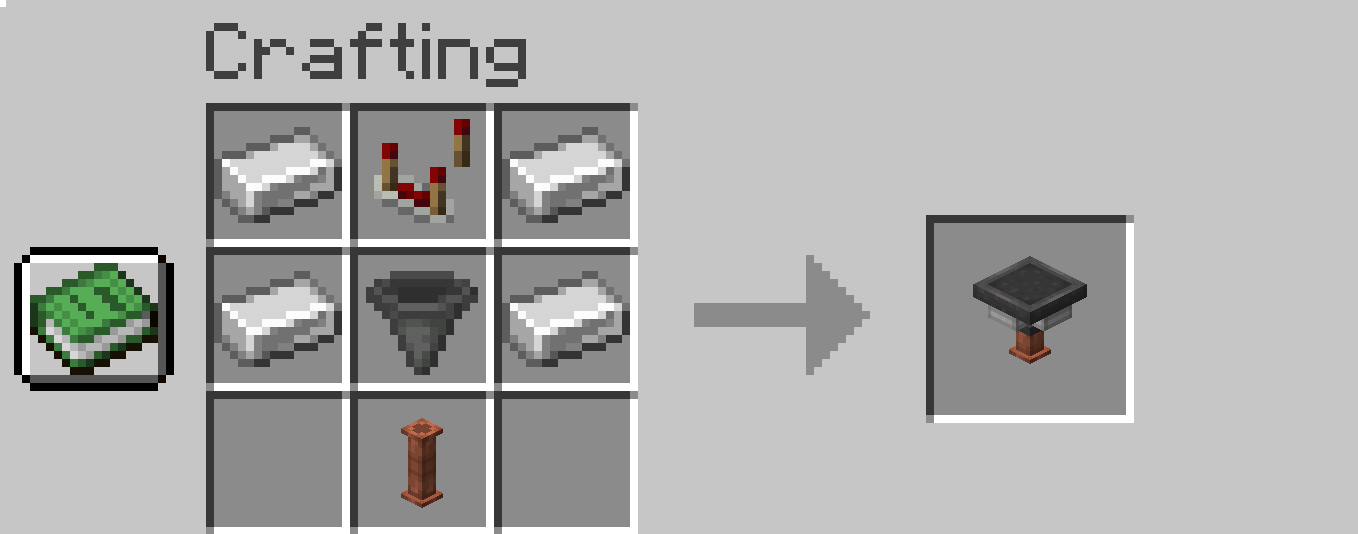
Sorting Controller:
- 4x Iron Ingot
- 1x Redstone comparator
- 1x Hopper
- 1x Pipe
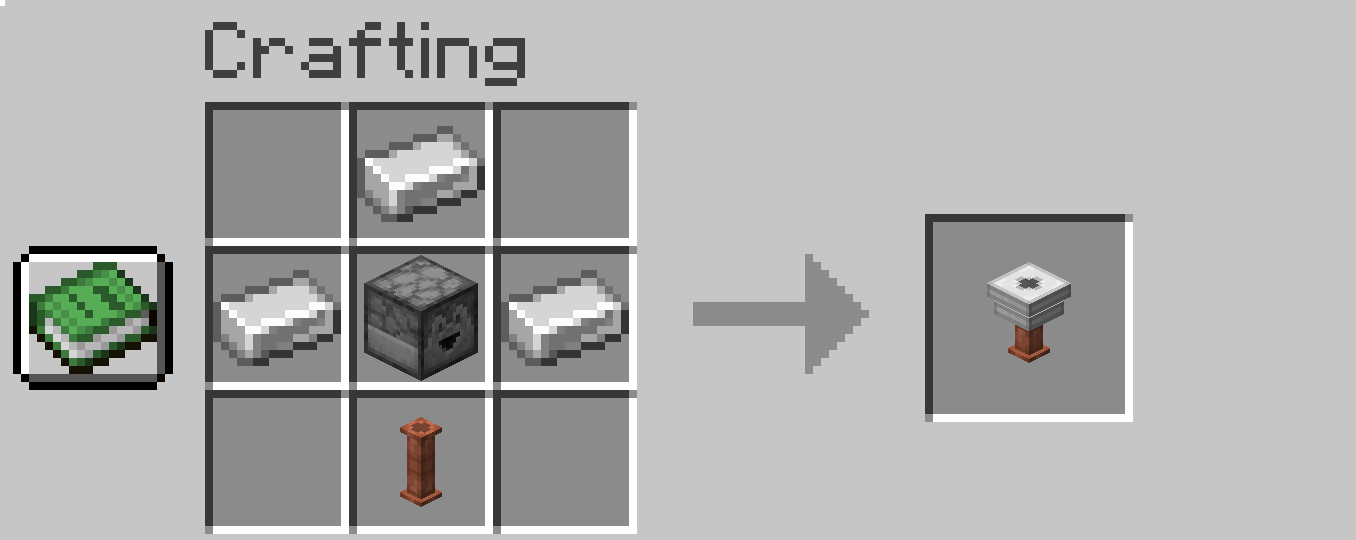
Filter:
- 3x Iron Ingot
- 1x Dropper
- 1x Pipe
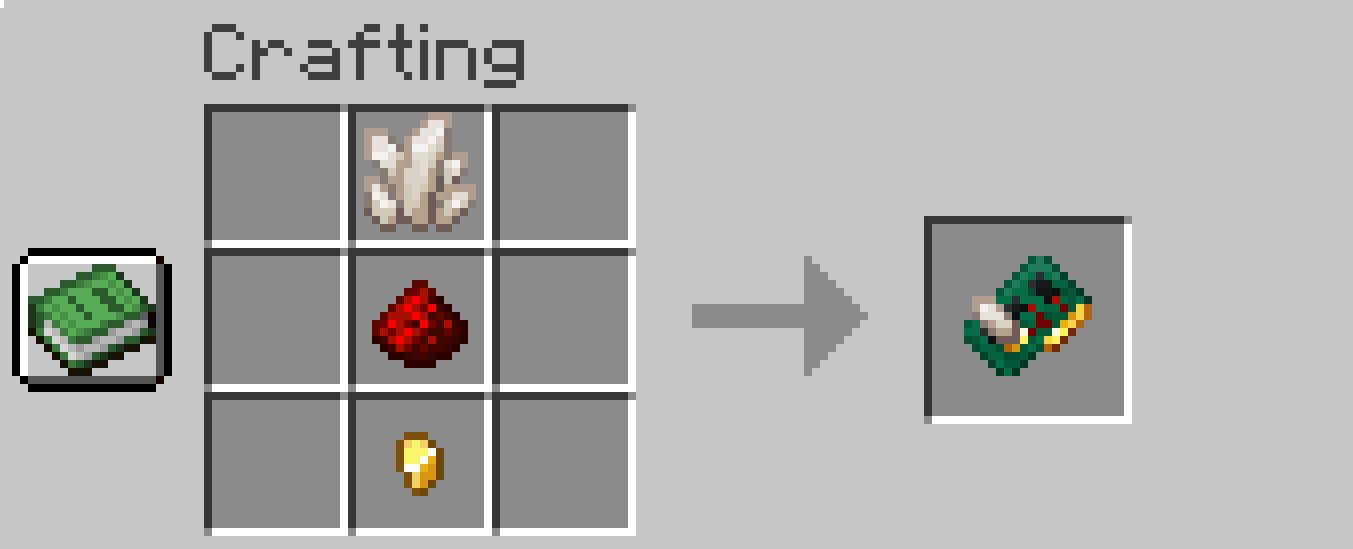
Sorter Amplifier:
- 1x Nether Quartz
- 1x Redstone Dust
- 1x Gold Nugget
Commands
Sorting is triggering 4 times per second (just hardcoded that way). All new commands are for admins only and starts with as_
- as_basespeed
- Changing base speed of sorting (default 4 = 4 items per second)
- For example: /as_basespeed 4
- as_basespeedboostperupgrade
- Changing upgrade speed boost from Sorter Amplifier (default 0.4)
- For example: /as_basespeedboostperupgrade 0.4
- as_instantsort
- If you don't want to wait just set it to true (default false)
- For example: /as_instantsort false
- as_exportModBlocks
- Purely for debug only. This command saves all mod blocks (only from my mod) to the file sorter_controller_export.json in your minecraft folder in config folder. It saves position and properties of blocks and items in range of the player.
- For example this command saves all blocks in range of 118 from the player
- /as_exportModBlocks 118
- This will help me find the answer about your sorting setup and its much quicker solution than questions like "How your Filters are setup? Do you have screenshots of each one?"
What to do when you encounter a bug?
I need information of your:
- Minecraft version
- Mod loader and it's version (fabric/forge)
- Mod version
- automatic_sorter_export.json (from 1.4.0 - see Commands chapter)
What is meaning behind version numbers?
The version consists of three numbers separated by a dot. For example, 1.3.4.
The first number (1) is the major version of the mod. This number changes when the mod undergoes significant changes. (This is unlikely to happen.)
The second number (3) indicates new features, such as support for new storage mods or general improvements to the mod (new blocks, new items, etc.).
The third number (4) indicates a hotfix. When releasing a version, I might miss a bug during development. When I release a fix, I only increase this number. It is purely a bug fix—no other improvements are included.
Brief Changelog
1.4 - Added Sorter Amplifier and improved Sorter Controller capability
1.3 – Added support for the Assorted Storage mod
1.2 – Filter block upgrade (Rejects mod and quick move support)
1.1 – Added support for the Expanded Storage mod
1.0 - Mod release
Final words
So there it is. Enjoy sorting your loot ^^
Project description from CurseForge.
Pick your setup
Automatic Sorter by Minecraft version and loader
Choose the version and loader you play, then open the matching release.
Minecraft version
1.21.10
2 loader buildsMinecraft version
1.21.9
2 loader buildsMinecraft version
1.21.8
2 loader buildsMinecraft version
1.21.7
2 loader buildsMinecraft version
1.21.6
2 loader buildsMinecraft version
1.21.5
2 loader buildsMinecraft version
1.21.4
2 loader buildsMinecraft version
1.21.3
2 loader buildsMinecraft version
1.21.2
1 loader buildMinecraft version
1.21.1
2 loader buildsMinecraft version
1.21
1 loader buildShowing the newest 12 of 17 game versions. Older files are in the list below.
Check the dependencies, then try the file in a copied instance before changing a world you care about.
Recent files
Automatic Sorter versions and loaders
automaticsorter-1.3.0-1.21-forge.jar
8 Sept 2025
Client Source doesn’t say Server Source doesn’t say Dependencies No extras listed Listed on Release listing
Check the 1.21 · Forge setup 1.21Forge release
Looking for an older file? The official CurseForge project page is in Resources.
 mod
CurseForge · Minecraft
Novaris
A technic mod with energy production, machinery and more!
 mod
CurseForge + Modrinth · Minecraft
Traveler's Backpack
Unique and upgradeable backpacks with customisation, Curios API/Trinkets integration and more!
 mod
Modrinth · Minecraft
Shulkerception: Carry More
Shulkerception introduces the Super Shulker, a new Shulker Box variant that can store vanilla Shulker Boxes inside itself. Expand your portable storage while keeping the vanilla Minecraft experience intact.