Minecraft version
Back to mods 
CurseForge · Minecraft mod
World Guard
Mod that prevents your world from loading if its generator settings changed between now and the last time you loaded your world.
Choose a version Pick your version below, then grab the matching file.
Quick answer
Which World Guard release should I use?
Latest stable file World_Guard-neoforge-1.21.1-1.0.1.jar
Game version 1.21.1
Loader NeoForge
World Guard World_Guard-neoforge-1.21.1-1.0.1.jar targets 1.21.1 with NeoForge. The project page does not say whether this file belongs on the client, dedicated server, or both. No extra mods listed for this file.
Where it goes
Is World Guard required on the client, server, or both?
The project page does not say whether this file belongs on the client, dedicated server, or both.
Client Source doesn’t say
Dedicated server Source doesn’t say
Loader for this release NeoForge
Required install it here Optional supported, not mandatory Not supported do not install here Source doesn’t say do not assume
The source does not explicitly classify this release as client-only or server-only.
What else does World Guard World_Guard-neoforge-1.21.1-1.0.1.jar need?
World_Guard-neoforge-1.21.1-1.0.1.jar. Change the file and its required mods may change too.
This file does not list any required mods. Do not add a library just because a different file uses it.
This file does not list any required or optional mods.
Before you install it
Add World Guard without breaking your instance.
Built for World Guard World_Guard-neoforge-1.21.1-1.0.1.jar. Pick another file and the loader, install side or required mods may change.
- 01
Stick to this file
Use World_Guard-neoforge-1.21.1-1.0.1.jar. It targets 1.21.1 with NeoForge; another release may have different loader, side or dependency requirements.
- 02
Bring the mods it needs
This file does not list any required mods. Do not add a library just because a different file uses it.
- 03
Put it on the correct side
The project page does not say whether this file belongs on the client, dedicated server, or both.
- 04
Pick the file you checked
Use the “Get this file” button beside World_Guard-neoforge-1.21.1-1.0.1.jar. It opens that exact file at the source.
About this project
What does World Guard add?

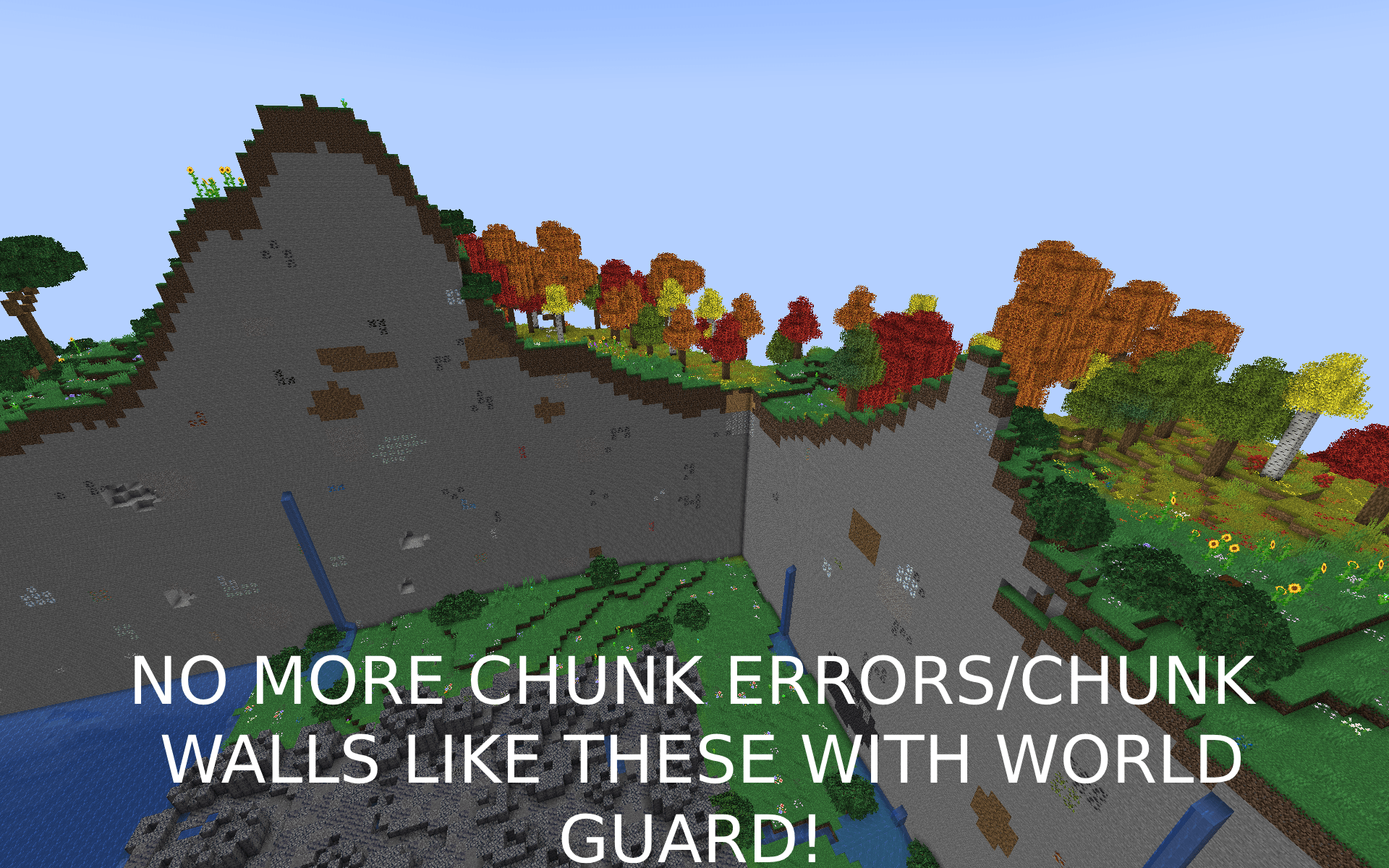
What is this?
- World Guard is a mod that aims at preventing you from corrupting your world with awful chunk walls and missing biomes due to a changing seed or world generator or missing biomes.
How does it work?
- Between world loads, World Guard locally saves basic information about your world's generator settings, dimensions, biomes installed mods, and installed datapacks. With this basic information stored, everytime the server starts, World Guard will run various checks including:
- World Seed is the exact same. (config=
crash_when_mismatched_seed=true) - Chunk generator settings and type are the exact same. (config=
crash_when_mismatched_chunk_generator=true) - Ensuring no biomes have been removed from your server. (config=
crash_when_removed_biome=true) - Ensuring no dimension were removed from your server. (config=
crash_when_missing_dimension=true) - Ensuring the biome source used to sample biomes matches (config=
crash_when_mismatched_biome_source=true)
What happens if it catches any of those errors?
- World Guard will crash your game with the goal of preventing data corruption to your world's chunks by not letting the chunk's generate at all. The created crash report will give you very detailed information in regards to the before and after.
I am convinced my world will be fine!
- Ensure you back up your world before deleting the
<yourgameinstance>/config/worldguard/backup.datfile which will allow you to load into your world.
How do I configure this?
- Config file for this mod can be found at
<yourgameinstance>/config/worldguard/config.json

Project description from CurseForge.
Pick your setup
World Guard by Minecraft version and loader
Choose the version and loader you play, then open the matching release.
Check the dependencies, then try the file in a copied instance before changing a world you care about.
Recent files
World Guard versions and loaders
World_Guard-neoforge-1.21.1-1.0.1.jar
18 Mar 2025
Client Source doesn’t say Server Source doesn’t say Dependencies No extras listed Listed on Release listing
Check the 1.21.1 · NeoForge setup NeoForge1.21.1 release
World_Guard-forge-1.21.1-1.0.1.jar
18 Mar 2025
Client Source doesn’t say Server Source doesn’t say Dependencies No extras listed Listed on Release listing
Check the 1.21.1 · Forge setup Forge1.21.1 release
World_Guard-fabric-1.21.1-1.0.1.jar
18 Mar 2025
Client Source doesn’t say Server Source doesn’t say Dependencies No extras listed Listed on Release listing
Check the 1.21.1 · Fabric setup Fabric1.21.1 release
World_Guard-neoforge-1.21.1-1.0.0.jar
18 Mar 2025
Client Source doesn’t say Server Source doesn’t say Dependencies No extras listed Listed on Release listing
Check the 1.21.1 · NeoForge setup NeoForge1.21.1 release
World_Guard-fabric-1.21.1-1.0.0.jar
18 Mar 2025
Client Source doesn’t say Server Source doesn’t say Dependencies No extras listed Listed on Release listing
Check the 1.21.1 · Fabric setup Fabric1.21.1 release
World_Guard-forge-1.21.1-1.0.0.jar
18 Mar 2025
Client Source doesn’t say Server Source doesn’t say Dependencies No extras listed Listed on Release listing
Check the 1.21.1 · Forge setup Forge1.21.1 release
Looking for an older file? The official CurseForge project page is in Resources.
 mod
CurseForge + Modrinth · Minecraft
Keeper Wisps
Cute creatures that guard your items and experience after you die.
 mod
CurseForge · Minecraft
Multiverse Heroes: Rise of Doom
Play as 70+ superheroes, villains, anime and movie characters with ability wheels, cinematic ultimates, planets and boss lairs.
 mod
CurseForge · Minecraft
Lazy's Library
Includes features for things such as smart creatures and procedural structures