Minecraft version
Back to mods 
CurseForge · Minecraft mod
Sleep Timelapse
Smooth timelapse when players sleep!
Choose a version Pick your version below, then grab the matching file.
Quick answer
Which Sleep Timelapse release should I use?
Latest stable file Sleep Timelapse 1.21.x-1.0.0.jar
Game version 1.21, 1.21.4, 1.21.3
Loader Fabric, Quilt
Sleep Timelapse 1.21.x-1.0.0.jar targets 1.21, 1.21.4, 1.21.3 with Fabric, Quilt. The project page does not say whether this file belongs on the client, dedicated server, or both. No extra mods listed for this file.
Where it goes
Is Sleep Timelapse required on the client, server, or both?
The project page does not say whether this file belongs on the client, dedicated server, or both.
Client Source doesn’t say
Dedicated server Source doesn’t say
Loader for this release Fabric, Quilt
Required install it here Optional supported, not mandatory Not supported do not install here Source doesn’t say do not assume
The source does not explicitly classify this release as client-only or server-only.
What else does Sleep Timelapse 1.21.x-1.0.0.jar need?
Sleep Timelapse 1.21.x-1.0.0.jar. Change the file and its required mods may change too.
This file does not list any required mods. Do not add a library just because a different file uses it.
This file does not list any required or optional mods.
Before you install it
Add Sleep Timelapse without breaking your instance.
Built for Sleep Timelapse 1.21.x-1.0.0.jar. Pick another file and the loader, install side or required mods may change.
- 01
Stick to this file
Use Sleep Timelapse 1.21.x-1.0.0.jar. It targets 1.21, 1.21.4, 1.21.3 with Fabric, Quilt; another release may have different loader, side or dependency requirements.
- 02
Bring the mods it needs
This file does not list any required mods. Do not add a library just because a different file uses it.
- 03
Put it on the correct side
The project page does not say whether this file belongs on the client, dedicated server, or both.
- 04
Pick the file you checked
Use the “Get this file” button beside Sleep Timelapse 1.21.x-1.0.0.jar. It opens that exact file at the source.
About this project
What does Sleep Timelapse add?
Sleep Timelapse is designed to create a smoother and faster night experience while keeping the vanilla feel intact. It leverages the integrated tick rate command to ensure compatibility and performance across various hardware configurations. With this mod, when time speeds up, every aspect of the game—including movement, mining, and swimming—accelerates in tandem, offering a truly immersive time-lapse experience.
Customizable Settings: Adjust variables such as the acceleration curve, maximum speed, and mid-point directly in the "Sleep_Timelapse.yaml" configuration file available for both client and server.
Player-Centric Flexibility: Optionally skip the night entirely when every player is sleeping, making it ideal for servers with heavy usage or lower-end machines.
Dynamic Gameplay Acceleration: Unlike other timelapse mods, Sleep Timelapse synchronizes all gameplay elements. When the night speeds up, so do your actions—ensuring movement, mining, and swimming keep pace with the accelerated environment.
Compatibility: Sleep Timelapse works on client, LAN and Server.
KOTLIN REQUEIRED
This is a screenshot of the sleeping UI: 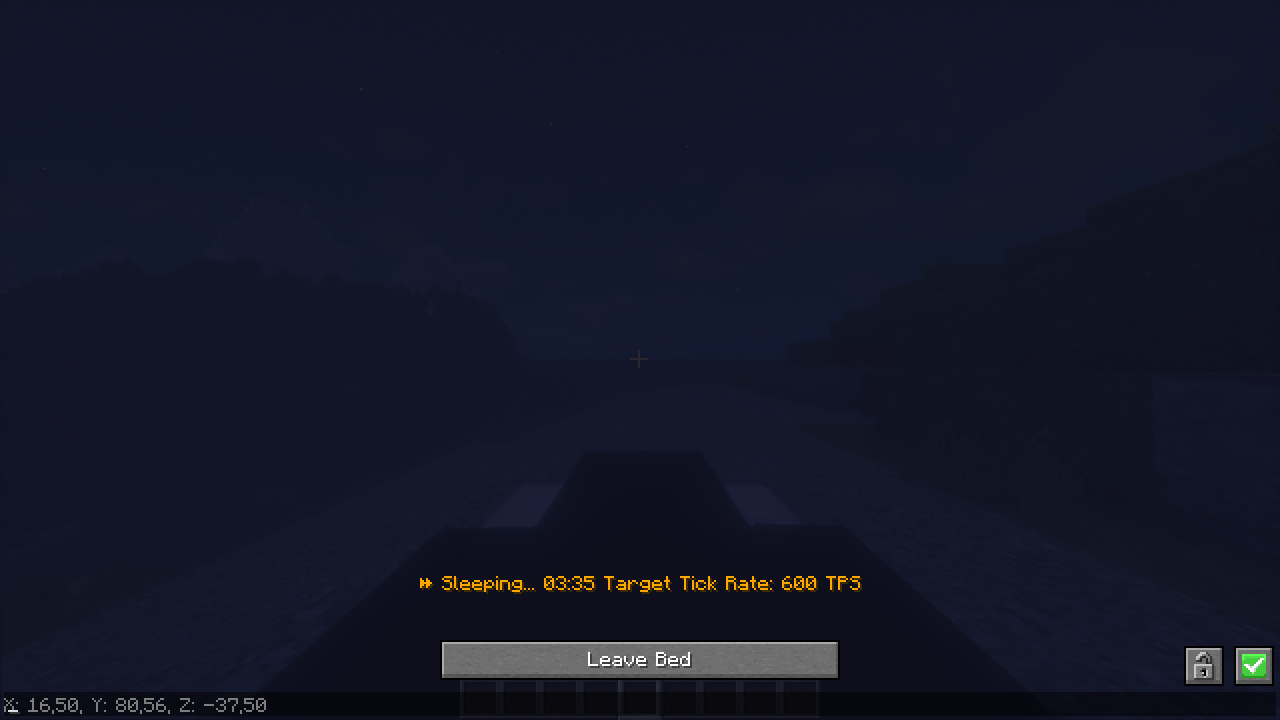
Project description from CurseForge.
Pick your setup
Sleep Timelapse by Minecraft version and loader
Choose the version and loader you play, then open the matching release.
Minecraft version
1.21.3
2 loader buildsMinecraft version
1.21.2
2 loader buildsMinecraft version
1.21.1
2 loader buildsMinecraft version
1.21
2 loader buildsMinecraft version
1.20.6
2 loader buildsMinecraft version
1.20.5
2 loader buildsMinecraft version
1.20.4
2 loader buildsCheck the dependencies, then try the file in a copied instance before changing a world you care about.
Recent files
Sleep Timelapse versions and loaders
Sleep Timelapse 1.21.x-1.0.0.jar
24 Mar 2025
Client Source doesn’t say Server Source doesn’t say Dependencies No extras listed Listed on Release listing
Check the 1.21.4 · Fabric setup 1.21Fabric1.21.41.21.3 release
Sleep Timelapse 1.20.4-1.20.6-1.0.0.jar
24 Mar 2025
Client Source doesn’t say Server Source doesn’t say Dependencies No extras listed Listed on Release listing
Check the 1.20.6 · Fabric setup 1.20.5Fabric1.20.61.20.4 release
Looking for an older file? The official CurseForge project page is in Resources.
 mod
mod CurseForge + Modrinth · Minecraft
Golden Age Combat
Classic combat has returned! Get ready for some fast-paced combat action and lots of fun!
 mod
mod CurseForge + Modrinth · Minecraft
Arcane Lanterns
Imbue a lantern with different catalysts to manipulate its effects!
 mod
mod CurseForge · Minecraft
SlashBlade Resharped Recipe Fix
SlashBlade Resharped Recipe Fix,it is a old bug,the mod fixed it!