Minecraft version
Back to mods 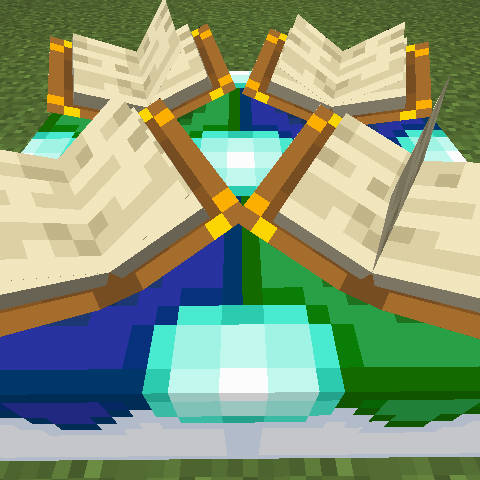
CurseForge · Minecraft mod
Enchantment Custom Table
A Minecraft block allowing players to customize enchantments on items freely.
Choose a version Pick your version below, then grab the matching file.
Quick answer
Which Enchantment Custom Table release should I use?
Latest stable file 2.0.1
Game version 1.18.2
Loader Fabric
Enchantment Custom Table 2.0.1 targets 1.18.2 with Fabric. Installation on the client is optional. Installation on the dedicated server is optional. No extra mods listed for this file.
Where it goes
Is Enchantment Custom Table required on the client, server, or both?
Installation on the client is optional. Installation on the dedicated server is optional.
Client Optional
Dedicated server Optional
Loader for this release Fabric
Required install it here Optional supported, not mandatory Not supported do not install here Source doesn’t say do not assume
The source marks this as usable on both the client and server.
What else does Enchantment Custom Table 2.0.1 need?
2.0.1. Change the file and its required mods may change too.
This file does not list any required mods. Do not add a library just because a different file uses it.
This file does not list any required or optional mods.
Before you install it
Add Enchantment Custom Table without breaking your instance.
Built for Enchantment Custom Table 2.0.1. Pick another file and the loader, install side or required mods may change.
- 01
Stick to this file
Use 2.0.1. It targets 1.18.2 with Fabric; another release may have different loader, side or dependency requirements.
- 02
Bring the mods it needs
This file does not list any required mods. Do not add a library just because a different file uses it.
- 03
Put it on the correct side
Installation on the client is optional. Installation on the dedicated server is optional.
- 04
Pick the file you checked
Use the “Get this file” button beside 2.0.1. It opens that exact file at the source.
About this project
What does Enchantment Custom Table add?
Enchantment Custom Table
Tired of grinding the vanilla enchanting table, building libraries, and hoarding XP just to land the enchantments you actually want? This mod gives you two new workstations that let you rearrange enchantments as freely as you sort your inventory.
- Enchanting Custom Table lets you "mod" the enchantments on a tool or enchanted book directly — add one, remove one, split a high-level enchantment into lower ones, or merge two matching books into something stronger.
- Enchantment Conversion Table turns plain books plus a few emeralds into the enchanted books you want — and can even "photocopy" an exact duplicate of a book you give it.
Out of the box, this mod is intentionally generous and easy to play with. If you (or a modpack you're building) want something more balanced and challenging, you can flip on a few stricter switches in the config — more on that below.
Grab a release from CurseForge or Modrinth. Found a bug or have an idea? Let us know on GitHub Issues.
Supported Versions
There are builds for both the NeoForge and Fabric loaders, covering Minecraft 1.21.1 through 1.21.11, plus 26.1, 26.1.1, and 26.1.2, also legacy 1.20.1.
Tip: when you download, make sure two things line up — your loader (NeoForge or Fabric) and your Minecraft version. Both have to match the jar, or the game won't load it.
Enchanting Custom Table: rearrange your enchantments
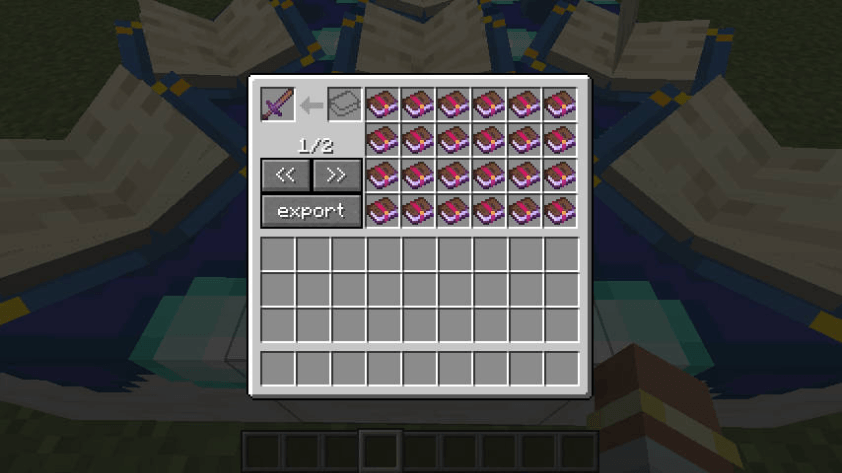
Drop a tool or an enchanted book into the top-left slot, and the table lays out every enchantment on it as a separate enchanted book on the right. From there you can:
- Want to remove an enchantment? Just take that book from the right side — the matching enchantment comes off the item.
- Want to add one? Put an enchanted book in the input slot, or into any empty slot on the right, and it gets applied to the item.
- Want to strengthen an enchantment you already have? Stack a book onto the matching one on the right and the two merge together.
- Want to break a high-level book apart? Put a book that holds a single enchantment into the top-left slot, and it splits into a few lower-level books to choose from.
- Want to clear everything at once? Hit the export button — all enchantments come off the item and are bundled into a single enchanted book for you.
By default, two of the same enchantment add their levels together when merged. So Sharpness IV + Sharpness IV becomes Sharpness VIII. (If that feels too strong, the stricter config options below can rein it in.)
Enchantment Conversion Table: trade plain books for enchanted ones
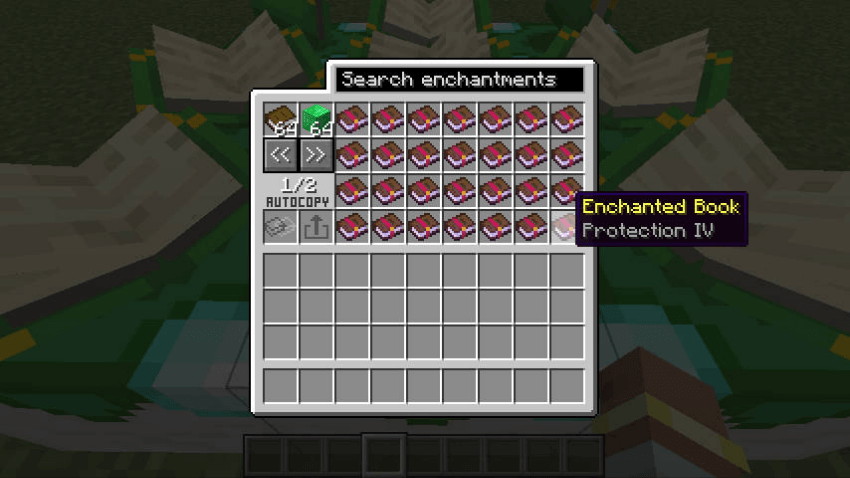
Normal trade mode is straightforward: add some plain books, then add enough emeralds or emerald blocks as the "fee." Once you've got enough, the right side lists the enchanted books you can get. Every book you take costs one plain book plus the emerald payment.
Too many books to scroll through? Use the search box at the top to filter by enchantment name.
What level you get is controlled by the convertOnlyLevelOneBook option: by default you get the highest available level; flip it on and you only get level-one books.
Copy Template Mode: photocopy a book
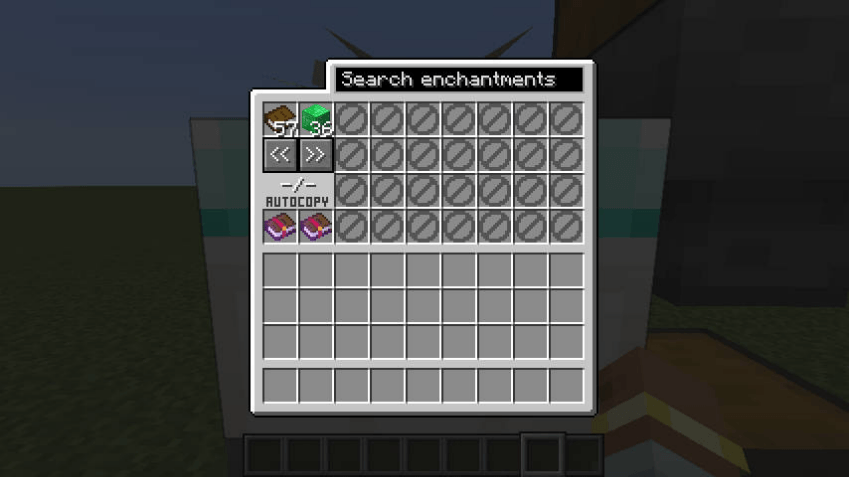
Put an enchanted book into the template slot and the table switches to copy mode. The right-side trade list turns off, and instead: as long as the table holds one plain book plus enough emeralds, the output slot produces an exact copy of your template.
A book can only be used as a template if it meets these rules:
- It must be an enchanted book (not a tool).
- It must hold exactly one enchantment, not several at once.
- The enchantment level must be greater than 0.
- The level must not exceed that enchantment's normal maximum.
Automation (hoppers, pipes, and the like)
Whatever you put in either table is really stored there — it stays put, and drops back out if the block is broken. Nothing disappears.
To keep hoppers and logistics mods from sneaking around the rules you'd follow by hand, automation is deliberately limited:
- Enchanting Custom Table: a hopper can feed enchanted books into the input slot, and they merge onto whatever item is already in the table — but the main tool/book inside can't be pulled out by automation.
- Enchantment Conversion Table: you can auto-feed plain books and emerald payment, but you can only pull items out of the copy output slot.
- The template slot must be set by a player by hand — automation can't insert or swap it.
- The trade books on the right are just on-screen choices for players, not real items, so automation can't touch them.
- To auto-produce the same book over and over, use Copy Template Mode rather than the right-side trade list.
The one rule worth memorizing: a template book must hold a single enchantment whose level doesn't go above that enchantment's normal maximum.
Configuration: tune it to be more balanced
- On NeoForge: edit it right in-game through the Mod config screen, or in the loader-managed common config file.
- On Fabric: the config file lives in your Fabric
configfolder, namedenchantment_custom_table.json.
| Option | Default | What it does |
|---|---|---|
minimumEmeraldCost |
36 |
How many emeralds the conversion table charges. Set it to 0 to drop the emerald cost entirely. |
minimumEmeraldBlockCost |
4 |
How many emerald blocks it charges. Set it to 0 to drop the emerald-block cost. |
enforceEnchantmentLevelLimit |
false |
When on, merging duplicate enchantments can't go above that enchantment's normal max level. Note: adding a brand-new enchantment isn't limited by this, so over-level books made by other mods still work. |
incrementalSameLevelMerge |
false |
A more balanced merge rule. When on, two same-name books only merge if their levels match exactly, and a merge bumps the level by just +1. So Sharpness V + Sharpness V becomes Sharpness VI instead of Sharpness X. |
convertOnlyLevelOneBook |
false |
When on, the conversion table only produces level-one books instead of max-level ones. |
A couple of things to know:
enforceEnchantmentLevelLimitandincrementalSameLevelMergeare independent — turn on either or both. With both on, same-level merges still won't exceed the normal max.- Turning on
incrementalSameLevelMergealso changes how books split: a Sharpness V book splits into two Sharpness IV books, instead of the default "split in half" options.
Retired (deprecated) options
These are old option names that no longer do anything. If your old config file still has them, regenerate the file or rename them by hand:
ignoreEnchantmentLevelLimit→ nowenforceEnchantmentLevelLimit(the meaning is reversed).convert_max_level_book→ nowconvertOnlyLevelOneBook(the meaning is reversed).enableXpRequirement→ removed, with no replacement.
How to craft the two tables
In both recipes, the starred (*) slots accept any kind of quartz block — specifically these (the enchantment_custom_table:quartz_blocks item tag):
- Quartz Block
- Chiseled Quartz Block
- Smooth Quartz Block
- Quartz Pillar
- Quartz Bricks
Enchanting Custom Table recipe
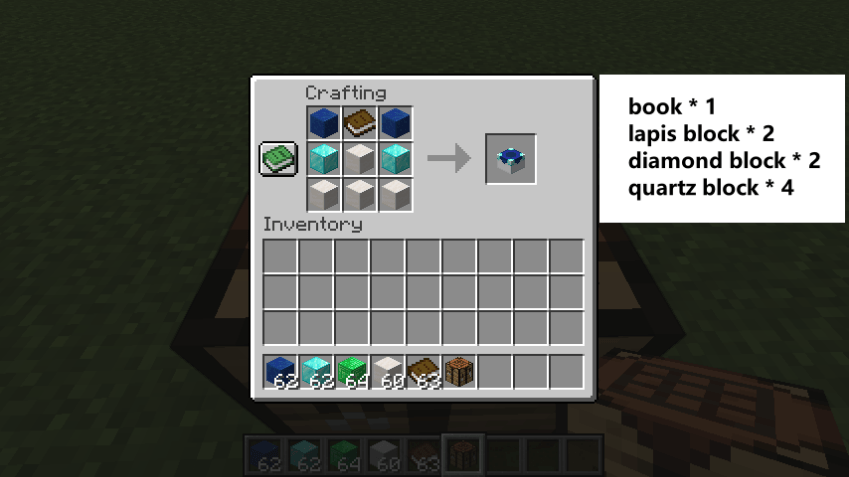
Lay it out on the 3×3 crafting grid like this:
| Left | Middle | Right |
|---|---|---|
| Lapis Block | Book | Lapis Block |
| Diamond Block | Quartz Block* | Diamond Block |
| Quartz Block* | Quartz Block* | Quartz Block* |
* Starred slots take any of the quartz blocks listed above.
Enchantment Conversion Table recipe
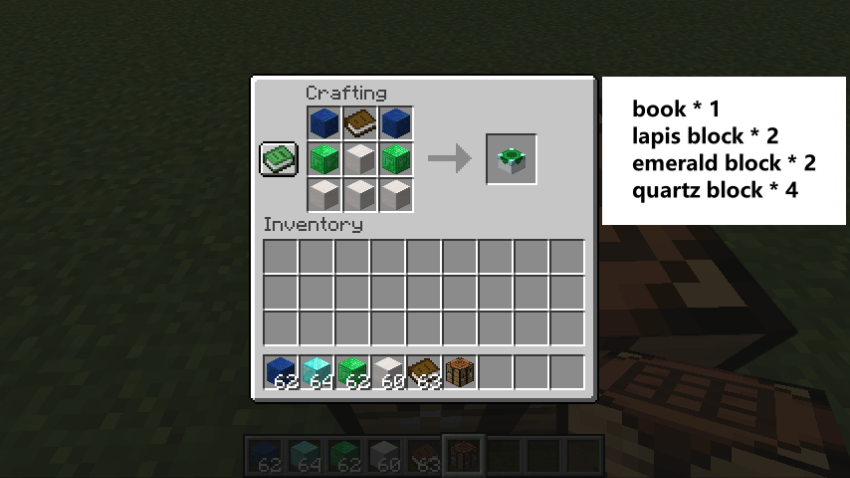
Lay it out on the 3×3 crafting grid like this:
| Left | Middle | Right |
|---|---|---|
| Lapis Block | Book | Lapis Block |
| Emerald Block | Quartz Block* | Emerald Block |
| Quartz Block* | Quartz Block* | Quartz Block* |
* Starred slots take any of the quartz blocks listed above.
Project description from CurseForge.
Pick your setup
Enchantment Custom Table by Minecraft version and loader
Choose the version and loader you play, then open the matching release.
Minecraft version
26.1.2
2 loader buildsMinecraft version
26.1.1
2 loader buildsMinecraft version
26.1
2 loader buildsMinecraft version
1.21.11
2 loader buildsMinecraft version
1.21.10
2 loader buildsMinecraft version
1.21.9
2 loader buildsMinecraft version
1.21.8
2 loader buildsMinecraft version
1.21.7
2 loader buildsMinecraft version
1.21.6
2 loader buildsMinecraft version
1.21.5
2 loader buildsMinecraft version
1.21.4
2 loader buildsShowing the newest 12 of 18 game versions. Older files are in the list below.
Check the dependencies, then try the file in a copied instance before changing a world you care about.
Recent files
Enchantment Custom Table versions and loaders
2.0.1
enchantment_custom_table-2.0.1-fabric-mc1.18.2.jar
19 Jul 2026
Client Optional Server Optional Dependencies No extras listed Listed on Release listing
Check the 1.18.2 · Fabric setup 1.18.2Fabric release
2.0.1
enchantment_custom_table-2.0.1-fabric-mc1.19.2.jar
19 Jul 2026
Client Optional Server Optional Dependencies No extras listed Listed on Release listing
Check the 1.19.2 · Fabric setup 1.19.2Fabric release
2.0.1
enchantment_custom_table-2.0.1-fabric-mc1.20.1.jar
19 Jul 2026
Client Optional Server Optional Dependencies No extras listed Listed on Release listing
Check the 1.20.1 · Fabric setup 1.20.1Fabric release
2.0.1
enchantment_custom_table-2.0.1-forge-mc1.18.2.jar
19 Jul 2026
Client Optional Server Optional Dependencies No extras listed Listed on Release listing
Check the 1.18.2 · Forge setup 1.18.2Forge release
2.0.1
enchantment_custom_table-2.0.1-forge-mc1.19.2.jar
19 Jul 2026
Client Optional Server Optional Dependencies No extras listed Listed on Release listing
Check the 1.19.2 · Forge setup 1.19.2Forge release
2.0.1
enchantment_custom_table-2.0.1-forge-mc1.20.1.jar
19 Jul 2026
Client Optional Server Optional Dependencies No extras listed Listed on Release listing
Check the 1.20.1 · Forge setup 1.20.1Forge release
enchantment_custom_table-2.0.1-fabric-mc1.18.2.jar
19 Jul 2026
Client Source doesn’t say Server Source doesn’t say Dependencies No extras listed Listed on Release listing
Check the 1.18.2 · Fabric setup Fabric1.18.2 release
enchantment_custom_table-2.0.1-forge-mc1.18.2.jar
19 Jul 2026
Client Source doesn’t say Server Source doesn’t say Dependencies No extras listed Listed on Release listing
Check the 1.18.2 · Forge setup Forge1.18.2 release
enchantment_custom_table-2.0.1-fabric-mc1.19.2.jar
19 Jul 2026
Client Source doesn’t say Server Source doesn’t say Dependencies No extras listed Listed on Release listing
Check the 1.19.2 · Fabric setup Fabric1.19.2 release
enchantment_custom_table-2.0.1-forge-mc1.19.2.jar
19 Jul 2026
Client Source doesn’t say Server Source doesn’t say Dependencies No extras listed Listed on Release listing
Check the 1.19.2 · Forge setup Forge1.19.2 release
enchantment_custom_table-2.0.1-fabric-mc1.20.1.jar
19 Jul 2026
Client Source doesn’t say Server Source doesn’t say Dependencies No extras listed Listed on Release listing
Check the 1.20.1 · Fabric setup Fabric1.20.1 release
enchantment_custom_table-2.0.1-forge-mc1.20.1.jar
19 Jul 2026
Client Source doesn’t say Server Source doesn’t say Dependencies No extras listed Listed on Release listing
Check the 1.20.1 · Forge setup 1.20.1Forge release
Looking for an older file? The official CurseForge project page is in Resources.
 mod
mod CurseForge · Minecraft
Bye?Pregen!
Reduce MSPT spikes and server freezes caused by chunk generation and speed it up.
 mod
mod CurseForge · Minecraft
Phrix, Phrox
A mod about curses and the like.
 mod
mod CurseForge · Minecraft
CobbleGacha Expanded (Cobblemon Gacha System)
CobbleGacha Expanded is a Cobblemon gacha mod featuring rotating limited banners, rate-up Pokémon, pity and 50/50 guarantees, pull history, and configurable server-side banner management.