Goety - The Dark Arts Optional for dreamtinker-2.2.9.1-fix-1.20.1-SNAPSHOT.jar
optionalMatching file found Matched file: Goety - 2.5.59.2

CurseForge · Minecraft mod
An expansion for tinker`s construct aiming to bring 'effective' ones
Quick answer
dreamtinker-2.2.9.1-fix-1.20.1-SNAPSHOT.jar targets 1.20.1 with Forge. The project page does not say whether this file belongs on the client, dedicated server, or both. All 3 required mods have matching files.
Where it goes
The project page does not say whether this file belongs on the client, dedicated server, or both.
The source does not explicitly classify this release as client-only or server-only.
dreamtinker-2.2.9.1-fix-1.20.1-SNAPSHOT.jar. Change the file and its required mods may change too.
Install EsotericismTinker, Mantle, Tinkers Construct first. We found matching files for this game-version and loader setup. 8 come through another mod in the chain.
8 extra mods were pulled in by other dependencies. Indented rows show who needs each one. We only count dependency files that match this setup. A file for another loader does not fill the gap.
Before you install it
Built for dreamtinker-2.2.9.1-fix-1.20.1-SNAPSHOT.jar. Pick another file and the loader, install side or required mods may change.
Use dreamtinker-2.2.9.1-fix-1.20.1-SNAPSHOT.jar. It targets 1.20.1 with Forge; another release may have different loader, side or dependency requirements.
Install EsotericismTinker, Mantle, Tinkers Construct first. We found matching files for this game-version and loader setup. 8 come through another mod in the chain.
The project page does not say whether this file belongs on the client, dedicated server, or both.
Use the “Get this file” button beside dreamtinker-2.2.9.1-fix-1.20.1-SNAPSHOT.jar. It opens that exact file at the source.
About this project
Dream Tinker is a large-scale addon for Tinkers’ Construct 3 that turns tool crafting into a dreamlike relic-forging system.
It focuses on moonlit materials, alchemical metals, soul mechanics, cursed modifiers, ritual weapons, strange armor effects, and dangerous late-game power. Instead of simply adding stronger materials with bigger numbers, Dream Tinker gives many tools and modifiers their own rules, costs, conditions, and combat identities.
The goal is to make TConstruct feel less like a linear upgrade system and more like a system for creating unstable artifacts: weapons that remember kills, armor that bends death, materials born from moonlight or antimony, and modifiers that trade safety, health, fate, memory, or sanity for power.
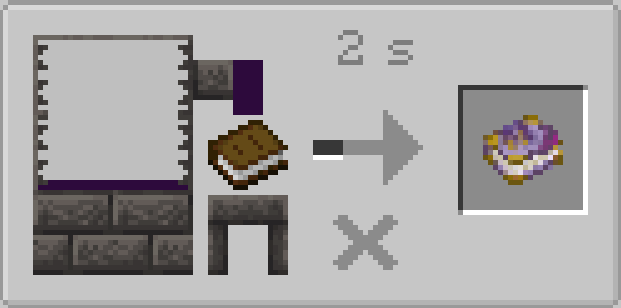
Dream Tinker adds a wide range of TConstruct content, including:
Many materials are not plain stat sticks. Some are built around moon phases, some around soul mechanics, some scale with player statistics, and some interact with curses, death, protection, loot, or specific enemy types.
A special ranged weapon based around explosive arrow behavior, including repeat explosions, forced explosion behavior, and other destructive projectile effects. 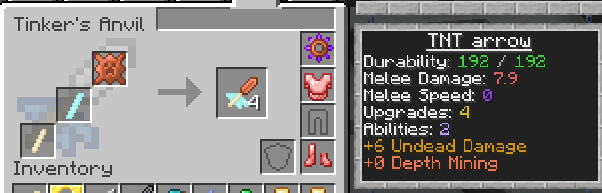
A heavy, long-reach spear weapon designed for powerful melee combat, sweeping attacks, reach-based fighting, and mounted attacks.
A special armor line with transformation-style mechanics, slot-based effects, and unusual defensive behavior.
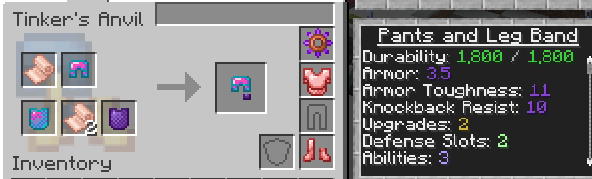 3-part armor has a special weapon transformation modifier to boost stats depending on equipment slots
One of Dream Tinker’s signature ritual weapons. It combines melee, ranged, harvesting, memory, wish, soul, persona, and reason-themed mechanics into a single evolving tool.
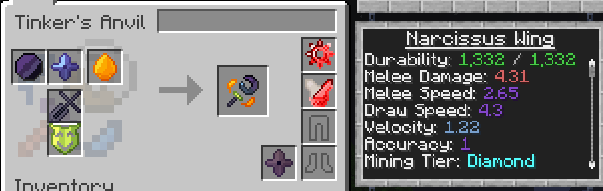
Dream Tinker’s modifiers are designed around special mechanics rather than simple stat bonuses.
They can change how tools fight, defend, survive, harvest, remember kills, interact with souls or curses, and respond to strange conditions such as moonlight, fate, death, or despair.
Many modifiers are conditional or high-risk, high-reward, encouraging players to discover unusual combinations instead of stacking generic upgrades.
Dream Tinker is designed to work well in magic, exploration, bossing, and endgame-focused modpacks.
Its compatibility content helps connect TConstruct with other progression systems, allowing materials, enemies, souls, curses, rituals, and special resources from different mods to become part of tool and armor crafting.
In larger modpacks, Dream Tinker can act as a bridge between TConstruct and broader magical or adventure progression, turning outside resources into meaningful parts of your artifact-building process.
Project description from CurseForge.
Pick your setup
Choose the version and loader you play, then open the matching release.
Check the dependencies, then try the file in a copied instance before changing a world you care about.
Recent files
21 Oct 2026
28 Sept 2026
5 Sept 2026
30 Aug 2026
2 Aug 2026
18 Jul 2026
4 Jul 2026
25 Jun 2026
7 Jun 2026
31 May 2026
dreamtinker-2.2.6.2-1.20.1-SNAPSHOT-all.jar
17 May 2026
9 May 2026
Looking for an older file? The official CurseForge project page is in Resources.