Minecraft version
Back to mods 
CurseForge · Minecraft mod
HolyWrench: Survival Debug Stick
The most holy way of editing your block states in survival!
Choose a version Pick your version below, then grab the matching file.
Quick answer
Which HolyWrench: Survival Debug Stick release should I use?
beta file holywrench-1.1.1+1.21.1.jar
Game version 1.21.1
Loader NeoForge
HolyWrench: Survival Debug Stick holywrench-1.1.1+1.21.1.jar targets 1.21.1 with NeoForge. The project page does not say whether this file belongs on the client, dedicated server, or both. No extra mods listed for this file.
Where it goes
Is HolyWrench: Survival Debug Stick required on the client, server, or both?
The project page does not say whether this file belongs on the client, dedicated server, or both.
Client Source doesn’t say
Dedicated server Source doesn’t say
Loader for this release NeoForge
Required install it here Optional supported, not mandatory Not supported do not install here Source doesn’t say do not assume
The source does not explicitly classify this release as client-only or server-only.
What else does HolyWrench: Survival Debug Stick holywrench-1.1.1+1.21.1.jar need?
holywrench-1.1.1+1.21.1.jar. Change the file and its required mods may change too.
This file does not list any required mods. Do not add a library just because a different file uses it.
This file does not list any required or optional mods.
Before you install it
Add HolyWrench: Survival Debug Stick without breaking your instance.
Built for HolyWrench: Survival Debug Stick holywrench-1.1.1+1.21.1.jar. Pick another file and the loader, install side or required mods may change.
- 01
Stick to this file
Use holywrench-1.1.1+1.21.1.jar. It targets 1.21.1 with NeoForge; another release may have different loader, side or dependency requirements.
- 02
Bring the mods it needs
This file does not list any required mods. Do not add a library just because a different file uses it.
- 03
Put it on the correct side
The project page does not say whether this file belongs on the client, dedicated server, or both.
- 04
Pick the file you checked
Use the “Get this file” button beside holywrench-1.1.1+1.21.1.jar. It opens that exact file at the source.
About this project
What does HolyWrench: Survival Debug Stick add?
HolyWrench
Fantasy Description
Down in the dark and forgotten corners of Minecraft Vanilla, dwells a holy stick going by the name of "Debug Stick". If you possess the strength and are deemed worthy of its grace (If you're OP and in creative), you may access ultimate power over your world and that of others! Changing the shape of stairs and slabs, turning and spinning around pillars and logs, and even make furnaces appear lit without fuel or fences flooded without water.
This mod brings this power to ye, mere mortals. But with great power comes great responsibility, and so we made adjustments so that ye don't have to suffer the weight of these responsibilities.
Technical Description
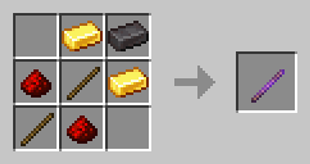
This makes the debug stick available in survival through a (reasonably expensive) craft, and allows you to modify block states properties. Simply left click on a block with the stick to select the property you wish to modify, and right click to cycle through the available states.
Said properties include blocks rotation, stairs and rails shape, fences and walls connections, and much more! But without breaking survival by preventing access to unrealistic/duplication prone states. For example, single slabs can be moved up and down, but not transformed into double slabs as would be possible if the stick were used in creative mode. In the same way, blocks cannot be made waterlogged, and the number of candles cannot be changed.
Acknowledgments
This mod has been made for the special edition of HolyCube Revolution, that started on April 4, 2025. We thank Boitameu and the rest of the HolyCube team.
Credits
Gad - Developer
License
HolyWrench is provided under the zlib license.
Project description from CurseForge.
Pick your setup
HolyWrench: Survival Debug Stick by Minecraft version and loader
Choose the version and loader you play, then open the matching release.
Check the dependencies, then try the file in a copied instance before changing a world you care about.
Recent files
HolyWrench: Survival Debug Stick versions and loaders
holywrench-1.1.1+1.21.1.jar
28 Apr 2025
Client Source doesn’t say Server Source doesn’t say Dependencies No extras listed Listed on Release listing
Check the 1.21.1 · NeoForge setup 1.21.1NeoForge beta
holywrench-1.1.0+1.21.1.jar
holywrench-special-edition-1.1.0+1.21.1.jar
23 Apr 2025
Client Source doesn’t say Server Source doesn’t say Dependencies No extras listed Listed on Release listing
Check the 1.21.1 · NeoForge setup NeoForge1.21.1 beta
holywrench-special-edition-1.0.1.jar
30 Mar 2025
Client Source doesn’t say Server Source doesn’t say Dependencies No extras listed Listed on Release listing
Check the 1.21.1 · NeoForge setup NeoForge1.21.1 beta
Looking for an older file? The official CurseForge project page is in Resources.
 mod
CurseForge · Minecraft
Block Randomizer
Break any block, get a random item. Silk touch friendly, multiplayer ready.
 mod
CurseForge + Modrinth · Minecraft
VanillaHUD
A mod that modifies various vanilla HUD elements, such as the bossbar, action bar, sidebar / scoreboard, hotbar, title / subtitle, and more. By Polyfrost, best with OneClient.
 mod
CurseForge · Minecraft
Tian's Addons
A quality-of-life overhaul for your inventory.