Nirvana Library Needed by What's your build-neoforge-1.21.4-0.3.1.jar
requiredMatching file found Matched file: Nirvana Lib-neoforge-1.21.4-2.2.0.jar
CurseForge · Minecraft mod
Manage your Equipment in a brand-new way!
Quick answer
What's your build-neoforge-1.21.4-0.3.1.jar targets 1.21.4 with NeoForge. The project page does not say whether this file belongs on the client, dedicated server, or both. All 4 required mods have matching files.
Where it goes
The project page does not say whether this file belongs on the client, dedicated server, or both.
The source does not explicitly classify this release as client-only or server-only.
What's your build-neoforge-1.21.4-0.3.1.jar. Change the file and its required mods may change too.
Install Nirvana Library, Common Network, Fzzy Config, Kotlin for Forge first. We found matching files for this game-version and loader setup. 3 come through another mod in the chain.
3 extra mods were pulled in by other dependencies. Indented rows show who needs each one. We only count dependency files that match this setup. A file for another loader does not fill the gap.
Before you install it
Built for What's your build-neoforge-1.21.4-0.3.1.jar. Pick another file and the loader, install side or required mods may change.
Use What's your build-neoforge-1.21.4-0.3.1.jar. It targets 1.21.4 with NeoForge; another release may have different loader, side or dependency requirements.
Install Nirvana Library, Common Network, Fzzy Config, Kotlin for Forge first. We found matching files for this game-version and loader setup. 3 come through another mod in the chain.
The project page does not say whether this file belongs on the client, dedicated server, or both.
Use the “Get this file” button beside What's your build-neoforge-1.21.4-0.3.1.jar. It opens that exact file at the source.
About this project
Inspired by Wynncraft, this mod allows you to check other players' gear. This could be useful in Multiplayer mode, especially when the modpack is heavily gear-driven. For example, when you play on a server that installed Apotheosis, you might want to see your friend's gear because Apotheosis adds many affixes to the gear, in this case this mod can help you by simply middle clicking your friend.
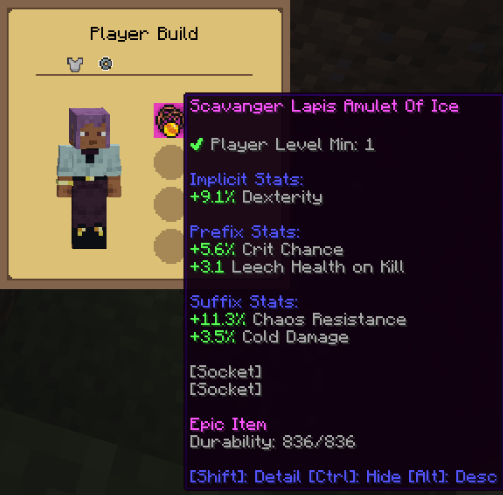
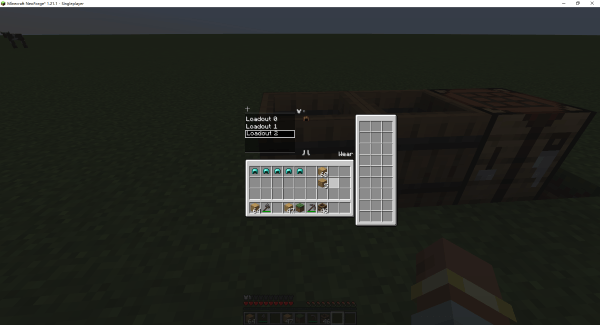 The right container can be used to store your equipment. The middle-left build list allows you to create your own build; the build content will be shown in the middle-right. You can add or remove the equipment in the build without occupying the real equipment. The Wear button allows players to equip the current build by searching for the corresponding equipment in the right-side container.
Project description from CurseForge.
Pick your setup
Choose the version and loader you play, then open the matching release.
Check the dependencies, then try the file in a copied instance before changing a world you care about.
Recent files
31 Jan 2026
31 Jan 2026
31 Jan 2026
30 Jan 2026
30 Jan 2026
30 Jan 2026
19 Oct 2025
19 Oct 2025
19 Oct 2025
6 Oct 2025
6 Oct 2025
6 Oct 2025
Looking for an older file? The official CurseForge project page is in Resources.
 mod
A multiloader fork of Domestication Innovation: improving upon and complimenting tameable mobs!
 mod
Introduces a wide range of features to enhance the gameplay experience. From quality of life improvements to new mob behaviors and random sh*t, this mod offers a little bit of everything. The mod is designed to work on server-side as well!
 mod
A lightweight RPG economy with physical coins, a persistent wallet, player payments, and fully configurable rewards