Cloth Config API (Fabric/Forge/NeoForge) Needed by ZapHosting Server Integration Menu zap_hosting_menu-1.101.1
requiredMatching file found Matched file: [Forge 1.20(.1)] v11.1.136

CurseForge · Minecraft mod
A ZAP-Hosting Server Integration Menu is a custom in-game or web-based UI that promotes your ZAP-Hosting partner link and discount code. It allows players to easily access hosting services while supporting your partnership.
Quick answer
ZapHosting Server Integration Menu zap_hosting_menu-1.101.1 targets 1.20.2, 1.20.3, 1.20.1 with Forge. The project page does not say whether this file belongs on the client, dedicated server, or both. All 1 required mods have matching files.
Where it goes
The project page does not say whether this file belongs on the client, dedicated server, or both.
The source does not explicitly classify this release as client-only or server-only.
zap_hosting_menu-1.101.1 on 1.20.1 Forge. Every mod below is checked against that same setup.
Install Cloth Config API (Fabric/Forge/NeoForge) first. We found matching files for this game-version and loader setup.
We only count dependency files that match this setup. A file for another loader does not fill the gap.
Before you install it
Built for ZapHosting Server Integration Menu zap_hosting_menu-1.101.1 on 1.20.1 Forge. Pick another file and the loader, install side or required mods may change.
Use zap_hosting_menu-1.101.1. It targets 1.20.2, 1.20.3, 1.20.1 with Forge; another release may have different loader, side or dependency requirements.
Install Cloth Config API (Fabric/Forge/NeoForge) first. We found matching files for this game-version and loader setup.
The project page does not say whether this file belongs on the client, dedicated server, or both.
Use the “Get this file” button beside zap_hosting_menu-1.101.1. It opens that exact file at the source.
About this project

This mod provides an in-game configurable menu for integrating ZAP-Hosting directly into your Minecraft Modpack. With this, you can easily add your partner link and discount code to promote your ZAP-Hosting affiliation.
This mod is intended for Zap-Hosting Official Partners.
Apply for the Partnership Program.
Download the mod .jar file.
Place it inside the mods folder of your Modpack.
Your_Modpack_Folder/mods/Launch the modpack or directly execute the .jar file.
This will automatically generate the necessary config files in the following directory:
config/zap_hosting_server_integration_menu/common.json5Modify settings using either:
The in-game Config Menu 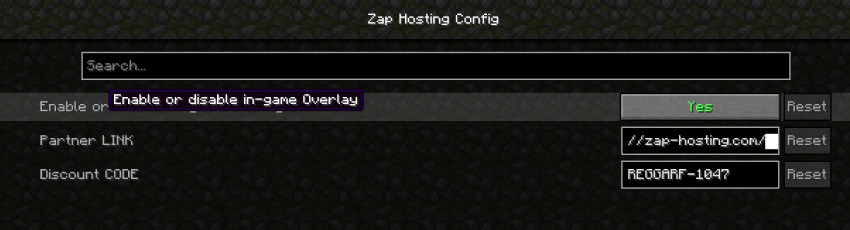
Manually editing the common.json5 file.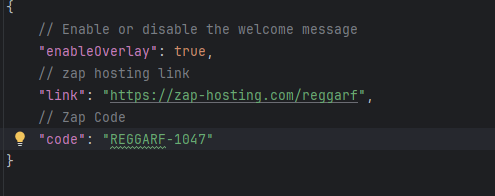
Players can order a Minecraft server directly by clicking on the ZAP-Hosting image in the game.
This provides a seamless way to set up multiplayer worlds with optimized hosting.
When launching a world for the first time, a special one-time popup message will appear.
This message informs players about the ZAP-Hosting integration and how to order a server.
The message will only appear once per world to avoid spam.
Players can adjust settings in common.json5 to:
Enable/disable the popup message.
Customize the ZAP-Hosting image click behavior.

Project description from CurseForge.
Pick your setup
Choose the version and loader you play, then open the matching release.
Check the dependencies, then try the file in a copied instance before changing a world you care about.
Recent files
zap_hosting_server_integration_menu-1.101.1.jar
3 Apr 2025
Looking for an older file? The official CurseForge project page is in Resources.
 mod
((✓ Forge, ✓ Neoforge and ✓ fabric ) Stoneholm is a Forge & Fabric mod adds underground villages to the world. Inspired by Strongholds and Villages.
 mod
A registry for land, contracts, money and a court - it records what players do and never prevents it.
 mod
A comprehensive Fairy Maid expansion: equipment GUI, skins, combat skills, AI chat, affection and evolution. Maids are 50% smaller, and once tamed they'll ask for food, bring flowers, steal food to show off, dance, and respond to what you say.