Minecraft version
Back to mods 
CurseForge · Minecraft mod
Echo Wireless Redstone
Sculk-Powered Wireless Redstone!
Choose a version Pick your version below, then grab the matching file.
Quick answer
Which Echo Wireless Redstone release should I use?
Latest stable file echo-wireless-redstone-1.2.jar
Game version 1.21.5
Loader Fabric, NeoForge, Forge
Echo Wireless Redstone echo-wireless-redstone-1.2.jar targets 1.21.5 with Fabric, NeoForge, Forge. The project page does not say whether this file belongs on the client, dedicated server, or both. No extra mods listed for this file.
Where it goes
Is Echo Wireless Redstone required on the client, server, or both?
The project page does not say whether this file belongs on the client, dedicated server, or both.
Client Source doesn’t say
Dedicated server Source doesn’t say
Loader for this release Fabric, NeoForge, Forge
Required install it here Optional supported, not mandatory Not supported do not install here Source doesn’t say do not assume
The source does not explicitly classify this release as client-only or server-only.
What else does Echo Wireless Redstone echo-wireless-redstone-1.2.jar need?
echo-wireless-redstone-1.2.jar. Change the file and its required mods may change too.
This file does not list any required mods. Do not add a library just because a different file uses it.
This file does not list any required or optional mods.
Before you install it
Add Echo Wireless Redstone without breaking your instance.
Built for Echo Wireless Redstone echo-wireless-redstone-1.2.jar. Pick another file and the loader, install side or required mods may change.
- 01
Stick to this file
Use echo-wireless-redstone-1.2.jar. It targets 1.21.5 with Fabric, NeoForge, Forge; another release may have different loader, side or dependency requirements.
- 02
Bring the mods it needs
This file does not list any required mods. Do not add a library just because a different file uses it.
- 03
Put it on the correct side
The project page does not say whether this file belongs on the client, dedicated server, or both.
- 04
Pick the file you checked
Use the “Get this file” button beside echo-wireless-redstone-1.2.jar. It opens that exact file at the source.
About this project
What does Echo Wireless Redstone add?
⚠️ IMPORTANT: USAGE GUIDELINES If you're planning to use this on a server or modpack, please refer to: https://gamedash43.github.io/dash-mcl-licenses/#usage

🎥Video Overview
Embed Removed: https://www.youtube-nocookie.com/embed/eBsSqkuE4_8
Watch the video for a full demo covering setup, linking, and wireless redstone functionality using Echo Redstone components.
📜How to Use
1. Crafting & Frequency
- Unique Frequency ID:
- Each crafted echo horn gets a unique frequency ID.
- Only components sharing the same ID will interact.
- Check Frequency:
- Hold shift and use the echo horn, or shift right-click an emitter/receiver.
2. Component Setup
- Repeaters Required:
- Place receivers and emitters on repeaters.
3. Linking & Activation
- Linking a Receiver:
- Place the receiver on a repeater and right-click it with the echo horn.
- Using an Emitter:
- Place the emitter on a repeater and right-click with the echo horn.
- Emitters need experience orbs to broadcast.
- Longer repeater delays increase the cooldown between activations.
- Receiver Update:
- Trigger a block update (e.g., place redstone dust in front) to ensure proper function.
4. Creating a Mimic (V1.2+)
- Mimic Echo Horn:
- With an emitter set to the desired frequency and an echo shard in your inventory, shift right-click the emitter using a different echo horn.
- This produces a mimic echo horn that shares the frequency ID but displays "mimic" instead of the original mob name.
🛠️Crafting Recipes
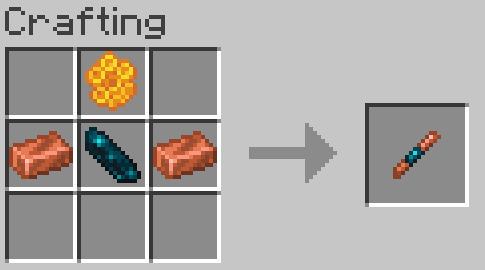
Echo Horn Recipe:
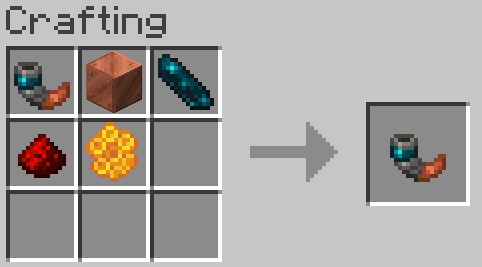
- Use any copper block (oxidized or waxed) to craft the echo horn. If crafting with a waxed copper block honeycomb can be omitted.
Redstone Echo Receiver:
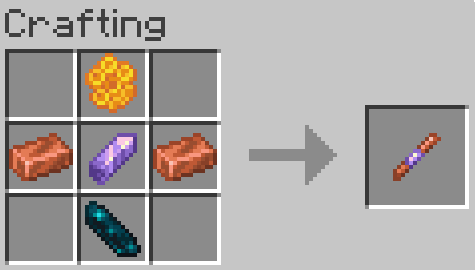
Redstone Echo Emitter:
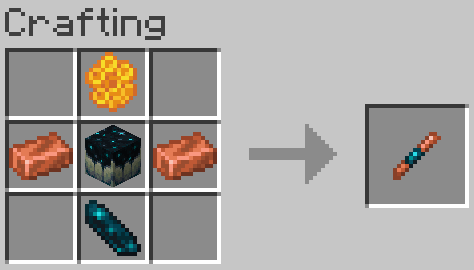
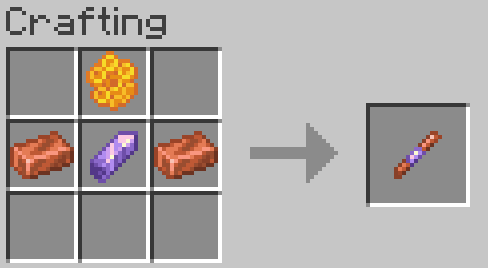
Legacy Recipes (Outdated):
❓FAQ
Something is wrong/Nothing is happening Due to the complexity of this mod, if something isn’t working correctly, join the Discord to ask for help.
How does this mod impact performance? This mod does not include any unnecessary ticking functions for items. However, since redstone mods require block checks, there is a slight performance impact. No noticeable TPS drops were observed until after 1,500 receivers/emitters.
How do I report a bug? Join the Discord and either DM me or post a message in the reports channel.
How do I uninstall this mod? Just run the command "/function dash.wsred:uninstall" (if there are receivers and emitters in unloaded areas, you might need to run it more than once).
Project description from CurseForge.
Pick your setup
Echo Wireless Redstone by Minecraft version and loader
Choose the version and loader you play, then open the matching release.
Check the dependencies, then try the file in a copied instance before changing a world you care about.
Recent files
Echo Wireless Redstone versions and loaders
echo-wireless-redstone-1.2.jar
6 Apr 2025
Client Source doesn’t say Server Source doesn’t say Dependencies No extras listed Listed on Release listing
Check the 1.21.5 · Fabric setup 1.21.5FabricNeoForgeForge release
Looking for an older file? The official CurseForge project page is in Resources.
 mod
Modrinth · Minecraft
AnvilCraft: PigsPlus
This mod is an addon for AnvilCraft, with main content including production-friendly machines
 mod
Modrinth · Minecraft
Record Players - The Jukebox Reimagined
Adds functioning record players that can play 7" singles and 12" LPs containing music within the game.
 mod
CurseForge · Minecraft
AfterCritical
AfterCritical is a tech mod. The main storyline is a complete nuclear industry chain: starting with a hand-hammered iron plate, you build machines, mine uranium, refine fuel, start reactors, generate power with steam, and finally light up the tokamak.