Minecraft version
Back to mods 
CurseForge · Minecraft mod
Not So Hardcore
Semi-Hardcore mod - multiple lives & life regain over time
Choose a version Pick your version below, then grab the matching file.
Quick answer
Which Not So Hardcore release should I use?
Latest stable file notsohardcore-0.2.3_fabric26.2.jar
Game version 26.2
Loader Fabric
Not So Hardcore notsohardcore-0.2.3_fabric26.2.jar targets 26.2 with Fabric. The project page does not say whether this file belongs on the client, dedicated server, or both. No extra mods listed for this file.
Where it goes
Is Not So Hardcore required on the client, server, or both?
The project page does not say whether this file belongs on the client, dedicated server, or both.
Client Source doesn’t say
Dedicated server Source doesn’t say
Loader for this release Fabric
Required install it here Optional supported, not mandatory Not supported do not install here Source doesn’t say do not assume
The source does not explicitly classify this release as client-only or server-only.
What else does Not So Hardcore notsohardcore-0.2.3_fabric26.2.jar need?
notsohardcore-0.2.3_fabric26.2.jar. Change the file and its required mods may change too.
This file does not list any required mods. Do not add a library just because a different file uses it.
This file does not list any required or optional mods.
Before you install it
Add Not So Hardcore without breaking your instance.
Built for Not So Hardcore notsohardcore-0.2.3_fabric26.2.jar. Pick another file and the loader, install side or required mods may change.
- 01
Stick to this file
Use notsohardcore-0.2.3_fabric26.2.jar. It targets 26.2 with Fabric; another release may have different loader, side or dependency requirements.
- 02
Bring the mods it needs
This file does not list any required mods. Do not add a library just because a different file uses it.
- 03
Put it on the correct side
The project page does not say whether this file belongs on the client, dedicated server, or both.
- 04
Pick the file you checked
Use the “Get this file” button beside notsohardcore-0.2.3_fabric26.2.jar. It opens that exact file at the source.
About this project
What does Not So Hardcore add?

Want to play a hardcore game with your friends, but get frustrated when any friend dies and can't play anymore?
Not So Hardcore is here to solve this problem. With its lives that regenerate over time, you'll experience the fear of death like in hardcore mode, while still having the option to revive after a while.
How it works
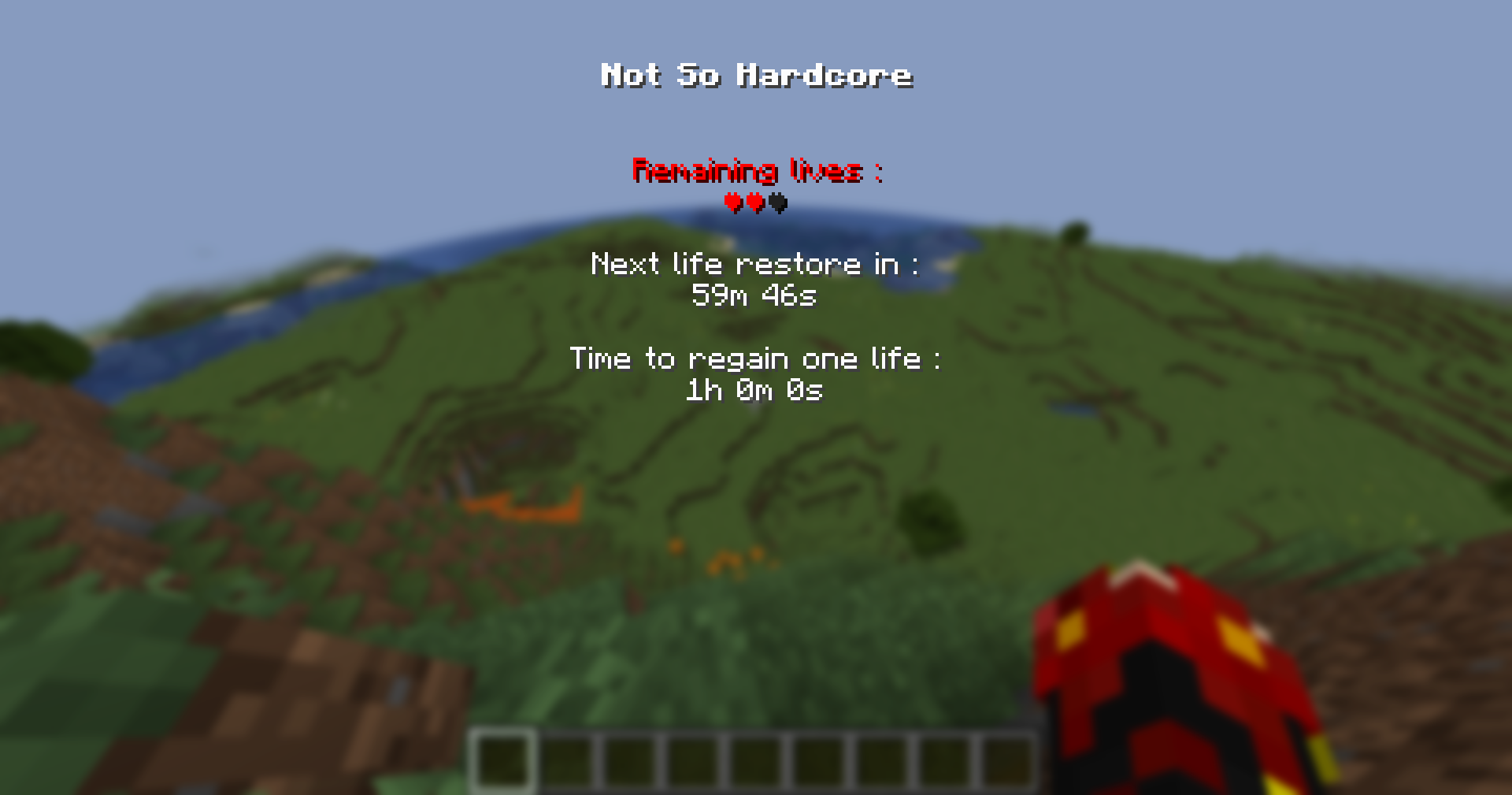
Your (default) maximum number of lives is 3.
Each time you die, you lose a life. But no stress, you can regain one life each 1 hour (by default) !
If a player loses all its lives, it will be switched to Spectator mode (like in vanilla hardcore) while waiting for a life to be regained.
You can see your remaining lives and time to regain one life in the Info Menu (pressing H key, by default).
The maximum number of lives and the regain time of a life are configurable.
For more info, checkout the Not So Hardcore Wiki !
Warning : this mod modifies the normal game mode as well as the vanilla hardcore game mode. Start your world in the mode you want !
Want to use in modpack ?
Go for it ! Check the wiki about config files, commands, and shard of reviving item.
FAQ
Can players get lives back whithout being connected to the server ?
Yes. But there are a few things to be careful about :
- If you are playing in single player, you have to configure the mod to use real time instead of in-game ticks for life regain.
- If you are running the mod on a server, you can use in-game ticks but you will need to set the pause-when-empty-seconds server config parameter to -1.
For more info, click here to see the Wiki's configuration page.
Can I configure the mod in-game ?
Yes. Click here to see the Wiki's commands page.
Suggestion
If a player loses all its lives, it will be switched to Spectator mode. By default, spectators can noclip through walls.
If you want to prevent this, you can use Anti Spectator Noclip.
Project description from CurseForge.
Pick your setup
Not So Hardcore by Minecraft version and loader
Choose the version and loader you play, then open the matching release.
Minecraft version
26.1.2
1 loader buildMinecraft version
26.1
1 loader buildMinecraft version
1.21.11
1 loader buildMinecraft version
1.21.10
1 loader buildMinecraft version
1.21.8
1 loader buildMinecraft version
1.21.5
1 loader buildMinecraft version
1.21.1
1 loader buildCheck the dependencies, then try the file in a copied instance before changing a world you care about.
Recent files
Not So Hardcore versions and loaders
notsohardcore-0.2.3_fabric26.2.jar
30 Aug 2026
Client Source doesn’t say Server Source doesn’t say Dependencies No extras listed Listed on Release listing
Check the 26.2 · Fabric setup Fabric26.2 release
notsohardcore-0.2.3_fabric1.21.11.jar
30 Aug 2026
Client Source doesn’t say Server Source doesn’t say Dependencies No extras listed Listed on Release listing
Check the 1.21.11 · Fabric setup Fabric1.21.11 release
notsohardcore-0.2.3_fabric1.21.1.jar
30 Aug 2026
Client Source doesn’t say Server Source doesn’t say Dependencies No extras listed Listed on Release listing
Check the 1.21.1 · Fabric setup Fabric1.21.1 release
notsohardcore-0.2.2_fabric26.2.jar
25 Jun 2026
Client Source doesn’t say Server Source doesn’t say Dependencies No extras listed Listed on Release listing
Check the 26.2 · Fabric setup Fabric26.2 release
notsohardcore-0.2.2_fabric26.1.2.jar
13 Jun 2026
Client Source doesn’t say Server Source doesn’t say Dependencies No extras listed Listed on Release listing
Check the 26.1.2 · Fabric setup Fabric26.1.2 release
notsohardcore-0.2.1_fabric26.1.2.jar
9 Apr 2026
Client Source doesn’t say Server Source doesn’t say Dependencies No extras listed Listed on Release listing
Check the 26.1.2 · Fabric setup Fabric26.1.2 release
notsohardcore-0.2.1_fabric26.1.jar
8 Apr 2026
Client Source doesn’t say Server Source doesn’t say Dependencies No extras listed Listed on Release listing
Check the 26.1 · Fabric setup Fabric26.1 release
notsohardcore-0.2.1_fabric1.21.1.jar
4 Apr 2026
Client Source doesn’t say Server Source doesn’t say Dependencies No extras listed Listed on Release listing
Check the 1.21.1 · Fabric setup Fabric1.21.1 release
notsohardcore-0.2.1_fabric1.21.11.jar
1 Jan 2026
Client Source doesn’t say Server Source doesn’t say Dependencies No extras listed Listed on Release listing
Check the 1.21.11 · Fabric setup Fabric1.21.11 release
0.1.1
notsohardcore-0.1.1_fabric1.21.1.jar
1 Jan 2026
Client Optional Server Optional Dependencies No extras listed Listed on Release listing
Check the 1.21.1 · Fabric setup 1.21.1Fabric release
notsohardcore-0.2.1_fabric1.21.10.jar
25 Dec 2025
Client Source doesn’t say Server Source doesn’t say Dependencies No extras listed Listed on Release listing
Check the 1.21.10 · Fabric setup Fabric1.21.10 release
notsohardcore-0.2.1_fabric1.21.8.jar
25 Dec 2025
Client Source doesn’t say Server Source doesn’t say Dependencies No extras listed Listed on Release listing
Check the 1.21.8 · Fabric setup Fabric1.21.8 release
Looking for an older file? The official CurseForge project page is in Resources.
 mod
mod CurseForge · Minecraft
PrimeClient
PrimeClient is the custom Client-side Mod made specifically for Pixelmon Prime. It enables the ability to communicate with the server using the PrimeAPI.
 mod
mod CurseForge · Minecraft
[EMF] Entity Model Features [Fabric & Forge]
EMF is an, OptiFine format, Custom Entity Model replacement mod available for Fabric and Forge.
 mod
mod CurseForge + Modrinth · Minecraft
Rune Enchanting
Replace the enchanting system with a rune system. Find runes in the world and apply them to items