Minecraft version
Back to mods 
CurseForge · Minecraft mod
Bluestone Tweaks
Simple redstone additions.
Choose a version Pick your version below, then grab the matching file.
Quick answer
Which Bluestone Tweaks release should I use?
Latest stable file Bluestonetweaks-1.0.4-2-forge-1.20.1.jar
Game version 1.20.1
Loader Forge
Bluestone Tweaks Bluestonetweaks-1.0.4-2-forge-1.20.1.jar targets 1.20.1 with Forge. The project page does not say whether this file belongs on the client, dedicated server, or both. No extra mods listed for this file.
Where it goes
Is Bluestone Tweaks required on the client, server, or both?
The project page does not say whether this file belongs on the client, dedicated server, or both.
Client Source doesn’t say
Dedicated server Source doesn’t say
Loader for this release Forge
Required install it here Optional supported, not mandatory Not supported do not install here Source doesn’t say do not assume
The source does not explicitly classify this release as client-only or server-only.
What else does Bluestone Tweaks Bluestonetweaks-1.0.4-2-forge-1.20.1.jar need?
Bluestonetweaks-1.0.4-2-forge-1.20.1.jar. Change the file and its required mods may change too.
This file does not list any required mods. Do not add a library just because a different file uses it.
This file does not list any required or optional mods.
Before you install it
Add Bluestone Tweaks without breaking your instance.
Built for Bluestone Tweaks Bluestonetweaks-1.0.4-2-forge-1.20.1.jar. Pick another file and the loader, install side or required mods may change.
- 01
Stick to this file
Use Bluestonetweaks-1.0.4-2-forge-1.20.1.jar. It targets 1.20.1 with Forge; another release may have different loader, side or dependency requirements.
- 02
Bring the mods it needs
This file does not list any required mods. Do not add a library just because a different file uses it.
- 03
Put it on the correct side
The project page does not say whether this file belongs on the client, dedicated server, or both.
- 04
Pick the file you checked
Use the “Get this file” button beside Bluestonetweaks-1.0.4-2-forge-1.20.1.jar. It opens that exact file at the source.
About this project
What does Bluestone Tweaks add?
Bluestone Tweaks is a very simple mod that aims to add simple and useful new blocks and functions to the game's basic redstone system.
Remote redstone, valves, block breakers and placers will help you improve your redstone systems.
NEW UPDATE: Bluestone wire and textures rework!
Important: When connecting a new block to a redstone signal, first place the block and then activate the redstone signal, or the block will not activate.** If the mod crashes, it's probably because of Optifine.
If you are heaving trouble with Optifine, try Oculus with Embeddium.
Blue Redstone
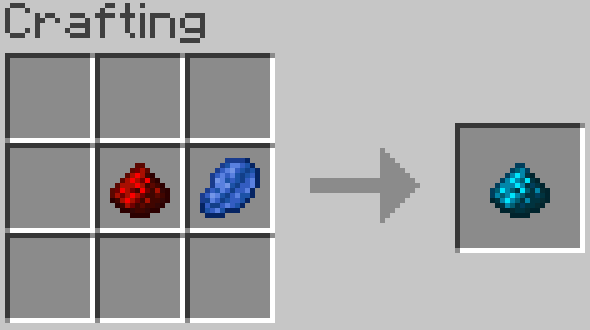
The Blue redstone, or the Bluestone, is one of the basic ingredients for most crafts in Bluestone Tweaks.
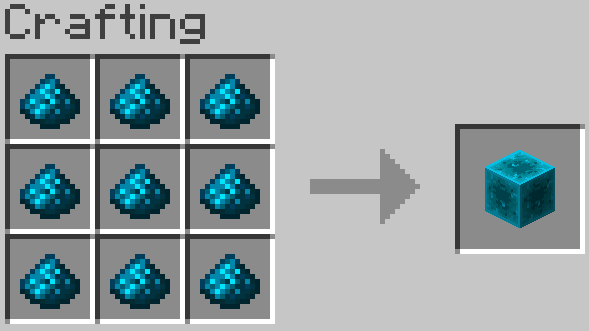
You can also craft a Bluestone Block with 9 Bluestone Dust.
Bluestone Charger
For more advanced recipes you will need some Electric Dust.
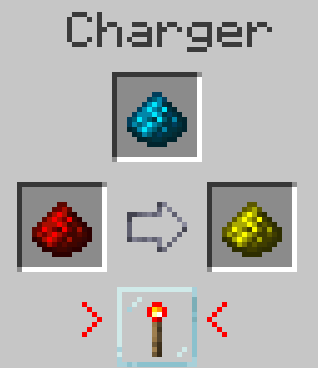
The Bluestone Charger can turn Redstone Dust and Bluestone dust into Electric Dust.
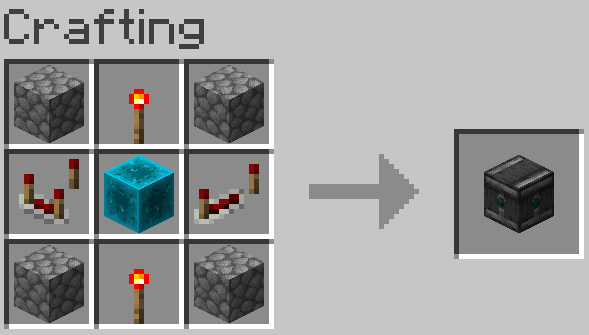
When activated with redstone, the Bluestone Charger GUI can be opened.
Electric Dust
In the Bluestone Charger GUI, you can create some Electric Dust.
Redstone Remote
With Redstone Remotes you can link remote redstone systems.
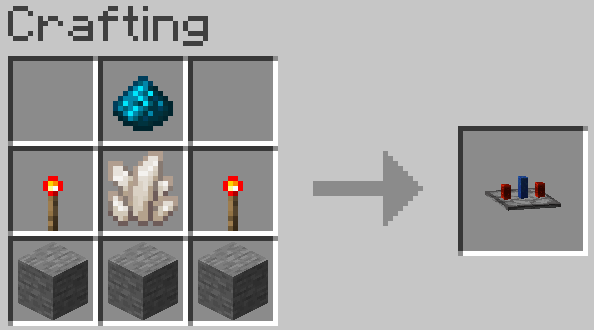
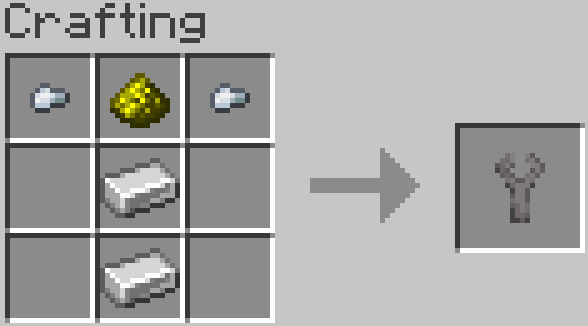
To connect a redstone signal to this block you will first need a Link Controller and a Signal Sender.
The Link Controller can be crafted by this way:
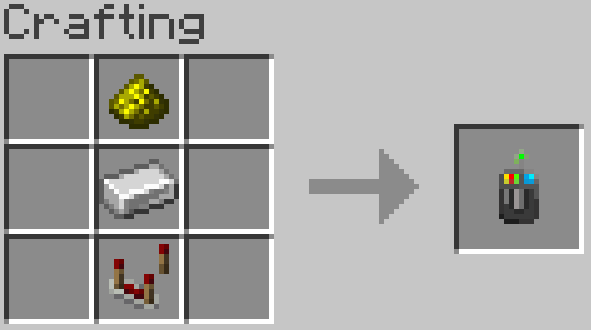
Right-click a Redstone Remote with the controller to save its position, then, right-click a Signal Sender with the same controller to connect both.
The Signal Sender can be crafted like this:
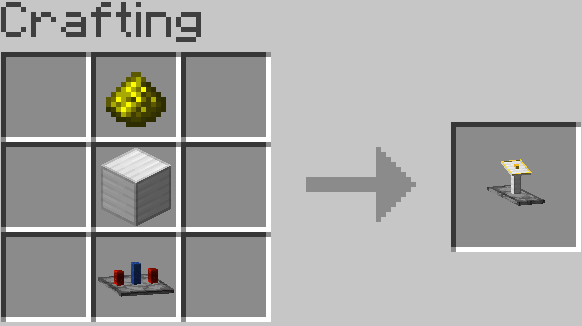
Redstone Valve
When connected to a redstone system, the Redstone Valve can release or block the signal from passing through.
It can be activated via a redstone signal connected to the block's arrow.
Right-click the valve to release or block the signal.
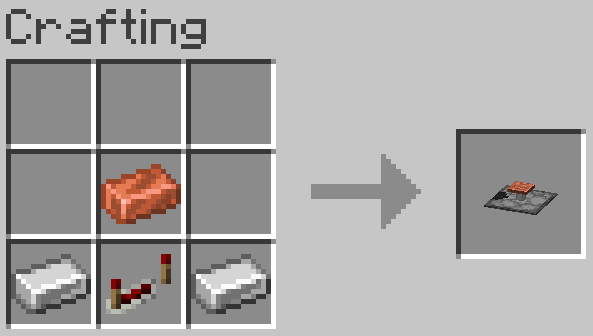
Simple Reader and Modules
The Simple Reader is a machine that can break or place blocks when connected to redstone.
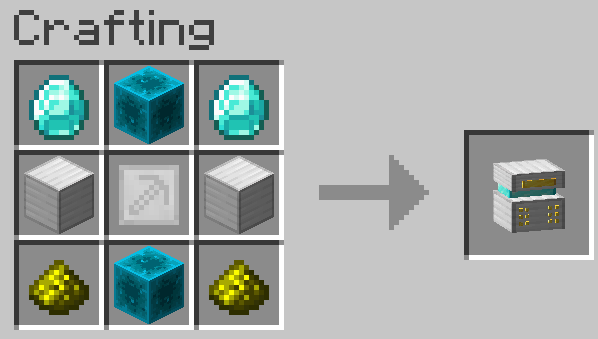
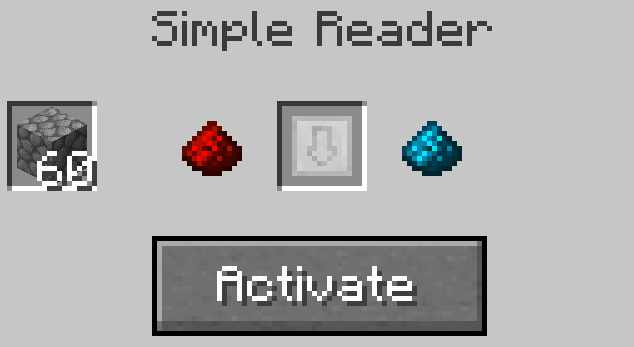
To break blocks, you will need to open the Simple Reader GUI and insert a Break Module, and to place blocks, you will need to insert a Place Module.
To build this modules, you will first need a Module Frame:
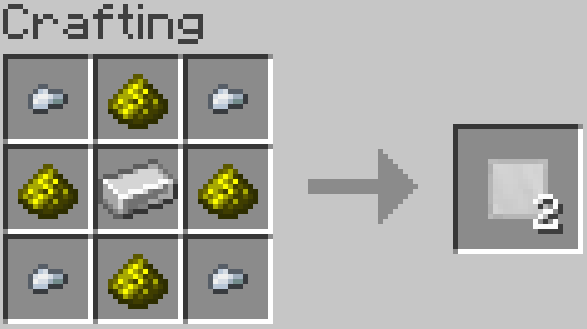
Use the Module Frame to craft the Break Module or the Place Module.
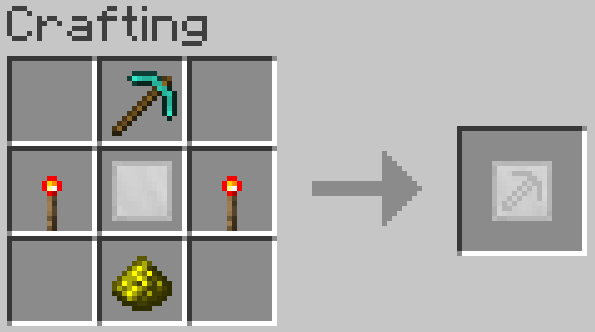
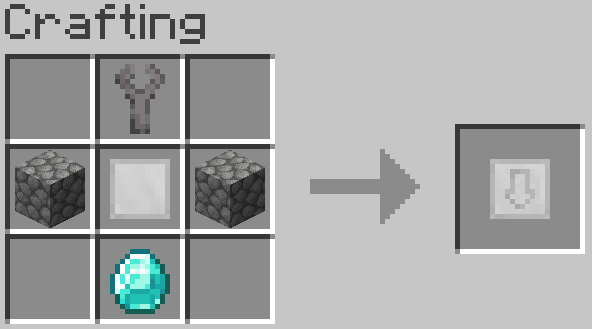
For the Place module, you will also need a Mechanical Hand.
The block you want to place must be in the first slot of the Simple Reader GUI (if you want to only break blocks, insert the Break Module in the center slot and activate the machine).
Both modules have only 3 points of durability (3 activations).
The activation ends when the Simple Reader breaks or when you activate another module.
Don't forget to connect the Simple Reader to an activated redstone system.
Bluestone wiring
Bluestone wire works like normal redstone wire, but do not interact with it directly.
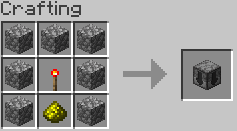
You can craft the Bluestone Adaptor and the Redstone Adaptor like this:
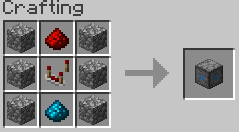
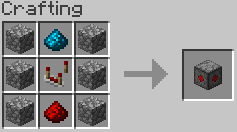
The Bluestone Adaptor converts redstone signals into bluestone signals, and the Redstone Adaptor does the opposite.
Signal Chutes can be used to send redstone signals downwards.
You can't build a vertical line made entirely of these blocks. Leave one block of space.
I hope you like the mod!
-ENZOB23PRO-
Project description from CurseForge.
Pick your setup
Bluestone Tweaks by Minecraft version and loader
Choose the version and loader you play, then open the matching release.
Check the dependencies, then try the file in a copied instance before changing a world you care about.
Recent files
Bluestone Tweaks versions and loaders
Bluestonetweaks-1.0.4-2-forge-1.20.1.jar
bluestonetweaks-1.0.4-2-forge-1.20.1.jar
12 Feb 2026
Client Source doesn’t say Server Source doesn’t say Dependencies No extras listed Listed on Release listing
Check the 1.20.1 · Forge setup 1.20.1Forge release
Bluestonetweaks-1.0.4-forge-1.20.1.jar
bluestonetweaks-1.0.4-forge-1.20.1.jar
11 Feb 2026
Client Source doesn’t say Server Source doesn’t say Dependencies No extras listed Listed on Release listing
Check the 1.20.1 · Forge setup 1.20.1Forge beta
Bluestonetweaks-1.0.3-forge-1.20.1.jar
bluestonetweaks-1.0.3-forge-1.20.1.jar
20 Jan 2026
Client Source doesn’t say Server Source doesn’t say Dependencies No extras listed Listed on Release listing
Check the 1.20.1 · Forge setup 1.20.1Forge release
BluestoneTweaks-1.0.2-forge-1.20.1.jar
16 Apr 2025
Client Source doesn’t say Server Source doesn’t say Dependencies No extras listed Listed on Release listing
Check the 1.20.1 · Forge setup 1.20.1Forge release
BluestoneTweaks-1.0.1-1.20.1.jar
Bluestonetweaks-1.20.1.jar
16 Apr 2025
Client Source doesn’t say Server Source doesn’t say Dependencies No extras listed Listed on Release listing
Check the 1.20.1 · Forge setup 1.20.1Forge alpha
BluestoneTweaks-1.20.1.jar
16 Apr 2025
Client Source doesn’t say Server Source doesn’t say Dependencies No extras listed Listed on Release listing
Check the 1.20.1 · Forge setup 1.20.1Forge alpha
Looking for an older file? The official CurseForge project page is in Resources.
 mod
CurseForge + Modrinth · Minecraft
Euphoria Patches
Euphoria Patches is an add-on for Complementary Shaders, extending it with more optional features and settings.
 mod
CurseForge · Minecraft
Limbus Company Mine section [LCM]
Mod that reproduces Limbus Company
 mod
CurseForge + Modrinth · Minecraft
Immersive Panoramas
Replaces the static vanilla main menu with a panoramic view of your actual in-game locations.