Fabric API Needed by Elite Holograms EliteHolograms-Fabric-1.20.1-1.2.0.jar
requiredMatching file found Matched file: 0.92.11+1.20.1
CurseForge · Minecraft mod
Elite Holograms is a lightweight, server-side or single-player Minecraft mod for creating, managing, and customizing floating text (holograms). Perfect for server info, leaderboards, waypoints, dynamic stats, instructions, and decorative text.
Quick answer
Elite Holograms EliteHolograms-Fabric-1.20.1-1.2.0.jar targets 1.20.1, 1.20.2, 1.20.3 with Fabric. The project page does not say whether this file belongs on the client, dedicated server, or both. All 1 required mods have matching files.
Where it goes
The project page does not say whether this file belongs on the client, dedicated server, or both.
The source does not explicitly classify this release as client-only or server-only.
EliteHolograms-Fabric-1.20.1-1.2.0.jar. Change the file and its required mods may change too.
Install Fabric API first. We found matching files for this game-version and loader setup.
We only count dependency files that match this setup. A file for another loader does not fill the gap.
Before you install it
Built for Elite Holograms EliteHolograms-Fabric-1.20.1-1.2.0.jar. Pick another file and the loader, install side or required mods may change.
Use EliteHolograms-Fabric-1.20.1-1.2.0.jar. It targets 1.20.1, 1.20.2, 1.20.3 with Fabric; another release may have different loader, side or dependency requirements.
Install Fabric API first. We found matching files for this game-version and loader setup.
The project page does not say whether this file belongs on the client, dedicated server, or both.
Use the “Get this file” button beside EliteHolograms-Fabric-1.20.1-1.2.0.jar. It opens that exact file at the source.
About this project

Elite Holograms is a lightweight Minecraft mod for creating, managing, and customizing floating text (holograms) right from in-game commands. Perfect for server info, leaderboards, waypoints, shops, live stats, rules, and decorative text.
Works in single-player worlds, modpacks, and on multiplayer servers. It runs server-side, so on a server your players join with a vanilla client and still see everything. No external placeholder API, no fuss. Just drop it in and start building.
Inspired by Advanced Holograms. Supports Forge (1.19.2, 1.20.1), Fabric (1.20.1) and NeoForge (1.21.1, 26.1, 26.2). The Fabric edition requires Fabric API.
For full setup and command details, see the Wiki.
fixed to any create command (/eh create fixed <id> <text>), aim it with /eh setrotation <id> <yaw> [pitch], or switch an existing hologram over with /eh convert <id> fixed. Player-facing stays the default and nothing you already built changes. Requires Minecraft 1.20.1 or newer - not available on the Forge 1.19.2 edition./eh backlight <id> <on|off|toggle> [height 1-10] raises a column of full-bright minecraft:light blocks behind a hologram so it stays readable at night. Backlights follow the hologram when it moves, persist across restarts, and never overwrite player builds (only air and water cells are lit).default, ocean, blood, mono, gold, and rainbow, all editable in config/eliteholograms/scoreboard_themes.json. Add your own to match your server brand./eh settheme <id> <theme> - re-skin an existing scoreboard instantly, no need to recreate it. Both arguments tab-complete.<objective> argument now suggests every objective registered on the server, and [theme] suggests available theme names./eh reload refreshes scoreboard themes from disk without a server restart.& codes work too)./eh createitem spawns a floating item above the caption, ideal for shops and showcases./eh movevertical./eh near lists holograms around you.Every create command takes an optional fixed or facing keyword immediately after the subcommand. Leave it out and you get a player-facing hologram, which is the default.
Creating
/eh create <id> <text...> - create a hologram at your location/eh createat <id> <x> <y> <z> [text...] - create one at explicit coordinates/eh createitem <id> <item> <text|line|line> - create one with a floating item on top/eh createscoreboard <id> <objective> [topCount] [interval] [theme] - create a leaderboard from a scoreboard objectiveLines
/eh addline, /eh setline, /eh insertline, /eh removeline - manage individual lines/eh animateline <id> <line#> <interval> <frame1|frame2|...> - animate a line on a timerAppearance
/eh settheme <id> <theme> - restyle an existing scoreboard hologram/eh backlight <id> <on|off|toggle> [height 1-10] - toggle a light column behind a hologram/eh convert <id> fixed|face - switch a hologram between fixed and player-facing/eh setrotation <id> <yaw> [pitch] - aim a fixed hologram (yaw 0 south, 90 west, 180 north, 270 east)Position
/eh movehere <id> - move a hologram to you/eh movevertical <id> <up|down> <amount> - nudge it up or down, e.g. up 1.5/eh teleport <id> - teleport to a hologramBrowsing and admin
/eh list, /eh near [page], /eh info <id> - browse and inspect holograms/eh delete <id> - remove a hologram/eh reload - reload holograms and themes from storageNo external API needed. Placeholders update in real time, including per-viewer player values.
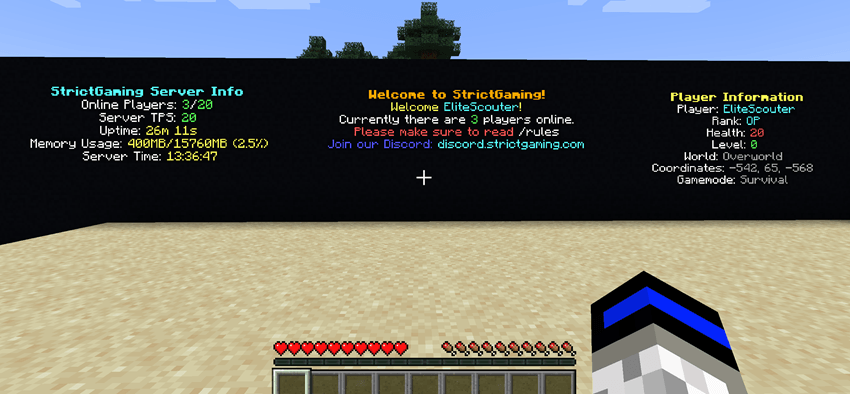
Server-wide: %players%, %maxplayers%, %tps%, %uptime%, %memory%, %server_time%
Player-specific: %player%, %player_rank%, %player_health%, %player_level%, %player_world%, %player_coords%, %player_gamemode%
Example:
/eh create welcome <gradient:#00FFA3:#00B7FF>Welcome %player%!</gradient>
/eh addline welcome &7Your rank: &e%player_rank%
/eh addline welcome &7Online: &a%players%&7/&a%maxplayers%  TPS: &a%tps%
Elite Holograms auto-detects LuckPerms and FTB Ranks, and falls back to OP level 2 when neither is present. Console and command blocks always have full access.
Granular nodes let you hand out exactly what you want without making anyone an operator:
eliteholograms.create, eliteholograms.delete, eliteholograms.edit, eliteholograms.list, eliteholograms.info, eliteholograms.near, eliteholograms.teleport, eliteholograms.backlight, eliteholograms.admin
See the Permissions Guide for group setups and examples.
mods folder - your single-player instance, modpack, or server all work the same way./eh create to get started.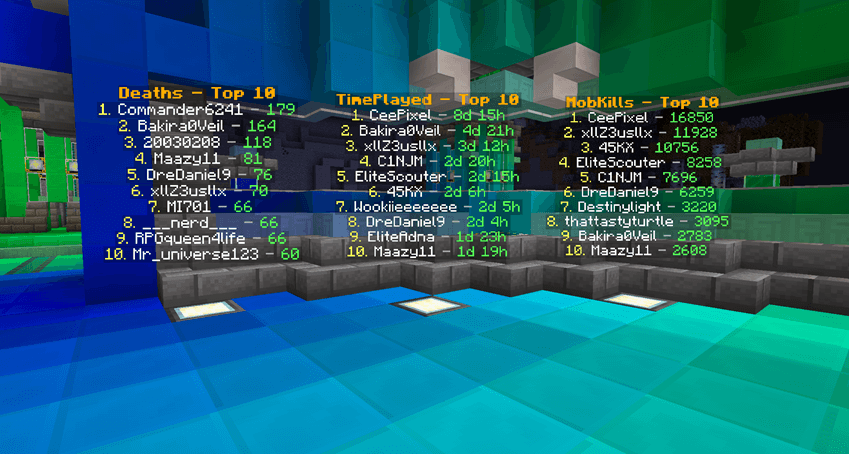
Built for Forge 1.19.2 / 1.20.1, Fabric 1.20.1, and NeoForge 1.21.1 / 26.1 / 26.2.
Project description from CurseForge.
Pick your setup
Choose the version and loader you play, then open the matching release.
Showing the newest 12 of 23 game versions. Older files are in the list below.
Check the dependencies, then try the file in a copied instance before changing a world you care about.
Recent files
29 Aug 2026
29 Aug 2026
29 Aug 2026
29 Aug 2026
29 Aug 2026
29 Aug 2026
20 Jul 2026
20 Jul 2026
20 Jul 2026
20 Jul 2026
2 Jun 2026
2 Jun 2026
Looking for an older file? The official CurseForge project page is in Resources.
 mod
modClient-side fix for TFC food ingredients missing in JEI usage index on dedicated servers
 mod
modCobbleGacha Expanded is a Cobblemon gacha mod featuring rotating limited banners, rate-up Pokémon, pity and 50/50 guarantees, pull history, and configurable server-side banner management.
 mod
modBy modifying the configuration file, the power generation speed of different powah generators in different dimensions can be adjusted.