Minecraft version
Back to mods 
CurseForge · Minecraft mod
Aesthetic Surfaces
The mod is about different decorative surfaces like carpets, ceilings, wallpapers, etc.
Choose a version Pick your version below, then grab the matching file.
Quick answer
Which Aesthetic Surfaces release matches 1.18.2?
Best match for your filters [Forge] Aesthetic Surfaces 1.18.2 v2.0.0
Game version 1.18.2
Loader Forge
Aesthetic Surfaces [Forge] Aesthetic Surfaces 1.18.2 v2.0.0 targets 1.18.2 with Forge. The project page does not say whether this file belongs on the client, dedicated server, or both. No extra mods listed for this file.
Where it goes
Is Aesthetic Surfaces required on the client, server, or both?
The project page does not say whether this file belongs on the client, dedicated server, or both.
Client Source doesn’t say
Dedicated server Source doesn’t say
Loader for this release Forge
Required install it here Optional supported, not mandatory Not supported do not install here Source doesn’t say do not assume
The source does not explicitly classify this release as client-only or server-only.
What else does Aesthetic Surfaces [Forge] Aesthetic Surfaces 1.18.2 v2.0.0 need?
[Forge] Aesthetic Surfaces 1.18.2 v2.0.0 on 1.18.2. Every mod below is checked against that same setup.
This file does not list any required mods. Do not add a library just because a different file uses it.
This file does not list any required or optional mods.
Before you install it
Add Aesthetic Surfaces without breaking your instance.
Built for Aesthetic Surfaces [Forge] Aesthetic Surfaces 1.18.2 v2.0.0 on 1.18.2. Pick another file and the loader, install side or required mods may change.
- 01
Stick to this file
Use [Forge] Aesthetic Surfaces 1.18.2 v2.0.0. It targets 1.18.2 with Forge; another release may have different loader, side or dependency requirements.
- 02
Bring the mods it needs
This file does not list any required mods. Do not add a library just because a different file uses it.
- 03
Put it on the correct side
The project page does not say whether this file belongs on the client, dedicated server, or both.
- 04
Pick the file you checked
Use the “Get this file” button beside [Forge] Aesthetic Surfaces 1.18.2 v2.0.0. It opens that exact file at the source.
About this project
What does Aesthetic Surfaces add?
Aesthetic Surfaces is a decorative Minecraft mod focused on expanding your building and interior design options with a variety of stylish surface blocks.


Whether you're designing a cozy home, a grand palace, or a modern base, this mod adds the perfect finishing touches to make your builds feel complete and immersive.


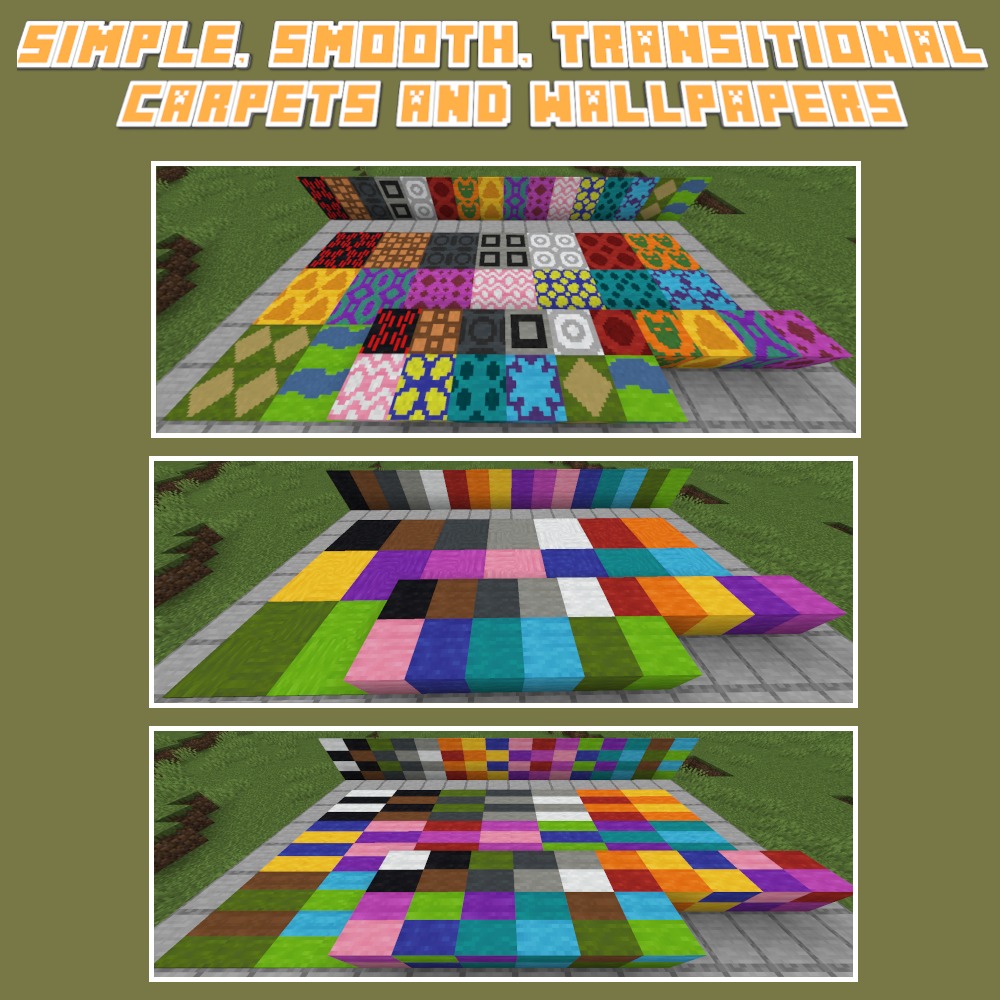
Add flair and personality to your world with new carpets, wallpapers, ceilings, and other surface-themed blocks. Each surface type comes in a wide range of colors, patterns, and textures, allowing you to fully customize your interior spaces to match your creative vision.
From ornate wallpapers that breathe life into dull stone walls to elegant ceiling tiles and soft, patterned carpets for your floors, Aesthetic Surfaces gives you the tools to build spaces that are not only functional but also visually stunning.
Perfect for builders, interior decorators, and anyone who loves making their Minecraft world look beautiful!
Project description from CurseForge.
Pick your setup
Aesthetic Surfaces by Minecraft version and loader
Choose the version and loader you play, then open the matching release.
Minecraft version
1.20.1
2 loader buildsMinecraft version
1.19.4
2 loader buildsMinecraft version
1.19.2
2 loader buildsMinecraft version
1.18.2
2 loader buildsCheck the dependencies, then try the file in a copied instance before changing a world you care about.
Recent files
Aesthetic Surfaces versions and loaders
[Forge] Aesthetic Surfaces 1.18.2 v2.0.0
aestheticsurfaces-1.18.2_forge_v2.0.0.jar
28 Dec 2025
Client Source doesn’t say Server Source doesn’t say Dependencies No extras listed Listed on Release listing
Check the 1.18.2 · Forge setup Forge1.18.2 release
[Fabric] Aesthetic Surfaces 1.18.2 v2.0.0
aestheticsurfaces-1.18.2_fabric_v2.0.0.jar
28 Dec 2025
Client Source doesn’t say Server Source doesn’t say Dependencies 1 required · 1 unchecked Listed on Release listing
Check the 1.18.2 · Fabric setup Fabric1.18.2 release
Aesthetic Surfaces 1.18.2 v0.1.0
aestheticsurfaces-1.18.2_v.0.1.0.jar
20 Apr 2025
Client Source doesn’t say Server Source doesn’t say Dependencies 1 required · 1 unchecked Listed on Release listing
Check the 1.18.2 · Fabric setup Fabric1.18.2 release
Looking for an older file? The official CurseForge project page is in Resources.
 mod
CurseForge + Modrinth · Minecraft
WTHIT
What the hell is that? A fork of Hwyla which is a fork of Waila.
 mod
CurseForge · Minecraft
ArchitectureCraft Reforged
ArchitectureCraft Reforged is a modern reimagining of the Minecraft mod ArchitectureCraft, which allows you to transform ordinary building materials into roofs, arches, columns, railings, and numerous other architectural structures.
 mod
CurseForge · Minecraft
Atmosfera
Adds atmospheric sounds to Minecraft!