Minecraft version
Back to mods 
CurseForge · Minecraft mod
MineChat
A highly customizable entity AI chat mod
Choose a version Pick your version below, then grab the matching file.
Quick answer
Which MineChat release should I use?
Latest stable file minechat-0.1.3-1.20.4.jar
Game version 1.20.4
Loader Forge
minechat-0.1.3-1.20.4.jar targets 1.20.4 with Forge. The project page does not say whether this file belongs on the client, dedicated server, or both. No extra mods listed for this file.
Where it goes
Is MineChat required on the client, server, or both?
The project page does not say whether this file belongs on the client, dedicated server, or both.
Client Source doesn’t say
Dedicated server Source doesn’t say
Loader for this release Forge
Required install it here Optional supported, not mandatory Not supported do not install here Source doesn’t say do not assume
The source does not explicitly classify this release as client-only or server-only.
What else does minechat-0.1.3-1.20.4.jar need?
minechat-0.1.3-1.20.4.jar. Change the file and its required mods may change too.
This file does not list any required mods. Do not add a library just because a different file uses it.
This file does not list any required or optional mods.
Before you install it
Add MineChat without breaking your instance.
Built for minechat-0.1.3-1.20.4.jar. Pick another file and the loader, install side or required mods may change.
- 01
Stick to this file
Use minechat-0.1.3-1.20.4.jar. It targets 1.20.4 with Forge; another release may have different loader, side or dependency requirements.
- 02
Bring the mods it needs
This file does not list any required mods. Do not add a library just because a different file uses it.
- 03
Put it on the correct side
The project page does not say whether this file belongs on the client, dedicated server, or both.
- 04
Pick the file you checked
Use the “Get this file” button beside minechat-0.1.3-1.20.4.jar. It opens that exact file at the source.
About this project
What does MineChat add?

Mine Chat
Now you could chat with villager in minecraft with a simple config, just face to them and texting.
✨ Feature
- Each entity has an independent memory, supporting coherent multi-turn conversations
- Supports both client and server sides.
- Offers a wide range of configurable options
- Integrates chat behavior with vanilla game mechanics
- More features awaiting discovery…
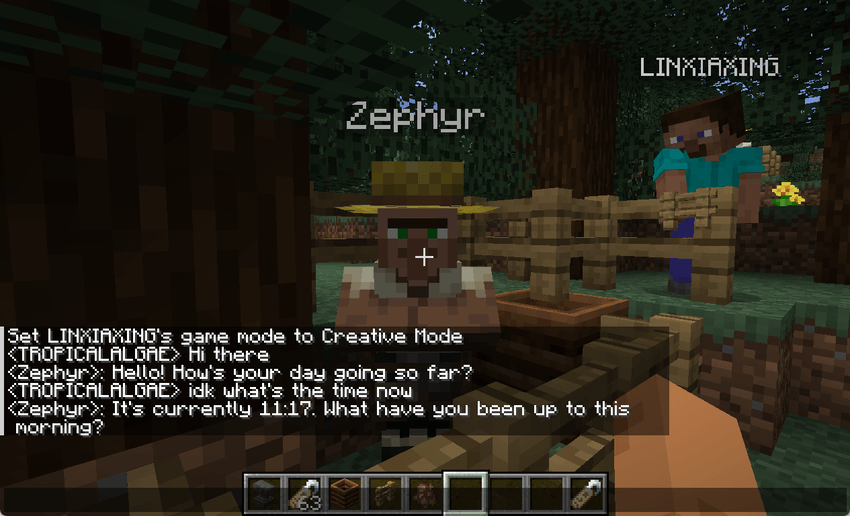
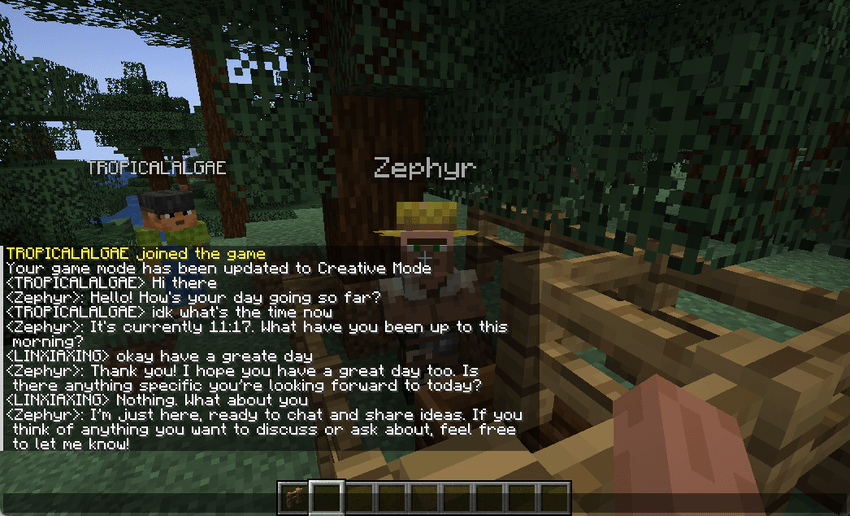
(chat with a villager on the server)
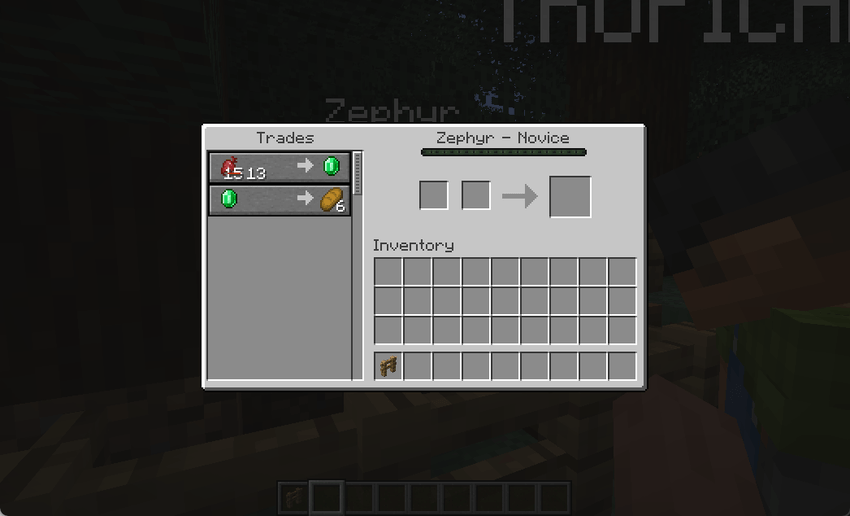
(Villagers may offer you trade discounts in response to your friendly actions.)
⚙️ Basic Configuration
Edit the configuration file located at config/minechat-common.toml. The following parameters are required:
| Name | Description |
|---|---|
gpt_api |
Model URL compatible with the OpenAI API format |
gpt_key |
API key for accessing the model |
gpt_model |
Name of the model to be used |
Additionally, you can define custom prompts for villagers of different professions, or specify a default prompt to be shared among them. Please refer to the comments in the configuration file for available parameters.
💡 Tip: In multiplayer mode, configuring the server alone is sufficient.
🔐 Authorization Manage
You can configure the mod by editing the configuration file, including adding blacklist/whitelist entries, enabling the whitelist, and activating the mod.
#Config for player authorization
[authorization]
    #Allow entities to speak or not. If false, entities will not chat anymore.
    mod_enable = true
    #Use white list or not. If True, only the players who on the white_list can chat with entities (villager).
    use_white_list = false
    #Player white list
    white_list = ["Steve", "Alex"]
    #Player black list. Specify the list of player names to block from interacting with entities (villagers).
    black_list = []
📝 When the
use_white_listis true, only players listed inwhite_listare allowed to use the AI entity chat feature.
🧰 Additional Features
💵 Trade Adjustment
This is an optional feature. When enabled, your behavior will influence villagers’ attitudes toward you, which in turn affects how they adjust their pricing strategies.
The related configuration is as follows:
#Config for villager trade
[trade_adjustment]
    #Enable trade adjustment. If True, the transaction with villagers will be influenced by your actions.
    trade_adjust_enabled = true
    #The required number of conversations triggered by discount detection
    discount_turns = 12
    #Maximum price fluctuation ratio for transaction
    #Range: 0.0 ~ 1.0
    max_cost_adjust_ratio = 0.5
📝 > Take care when configuring
discount_turns:if too low, it may accelerate token consumption for the LLM; if too high, it might slow down the pacing of conversations.
Project description from CurseForge.
Pick your setup
MineChat by Minecraft version and loader
Choose the version and loader you play, then open the matching release.
Check the dependencies, then try the file in a copied instance before changing a world you care about.
Recent files
MineChat versions and loaders
minechat-0.1.3-1.20.4.jar
25 Apr 2025
Client Source doesn’t say Server Source doesn’t say Dependencies No extras listed Listed on Release listing
Check the 1.20.4 · Forge setup Forge1.20.4 release
Looking for an older file? The official CurseForge project page is in Resources.
 mod
mod CurseForge · Minecraft
Firmament Ages Core
The core mod of the Firmament Ages modpack: shared Ages for one team, a global recipe gate, miner and prospecting filters, the Shrine of Caelum with its ceremony, a Draconic reactor controller and The Origin.
 mod
mod CurseForge · Minecraft
Frontier Mode
Amethyst Keepers have invaded the overworld. Defeat them to expand the Frontier and push back the Wild.
 mod
mod CurseForge + Modrinth · Minecraft
No Mans Land
An uncompromising Overworld Overhaul, Enhancing world generation in every biome and environment.