Minecraft version
Back to mods 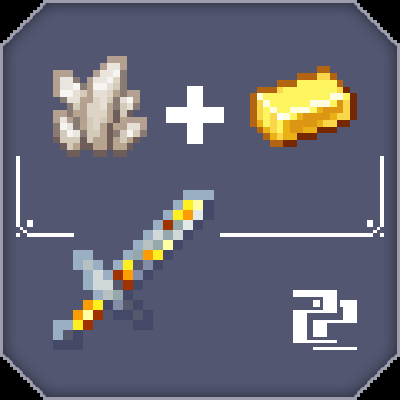
CurseForge · Minecraft mod
Metalmith
A gear-focused MOD that creates alloys using vanilla items without adding new minerals
Choose a version Pick your version below, then grab the matching file.
Quick answer
Which Metalmith release should I use?
Latest stable file metalmith-1.2.jar
Game version 1.20.1
Loader Forge
metalmith-1.2.jar targets 1.20.1 with Forge. The project page does not say whether this file belongs on the client, dedicated server, or both. No extra mods listed for this file.
Where it goes
Is Metalmith required on the client, server, or both?
The project page does not say whether this file belongs on the client, dedicated server, or both.
Client Source doesn’t say
Dedicated server Source doesn’t say
Loader for this release Forge
Required install it here Optional supported, not mandatory Not supported do not install here Source doesn’t say do not assume
The source does not explicitly classify this release as client-only or server-only.
What else does metalmith-1.2.jar need?
metalmith-1.2.jar. Change the file and its required mods may change too.
This file does not list any required mods. Do not add a library just because a different file uses it.
This file does not list any required or optional mods.
Before you install it
Add Metalmith without breaking your instance.
Built for metalmith-1.2.jar. Pick another file and the loader, install side or required mods may change.
- 01
Stick to this file
Use metalmith-1.2.jar. It targets 1.20.1 with Forge; another release may have different loader, side or dependency requirements.
- 02
Bring the mods it needs
This file does not list any required mods. Do not add a library just because a different file uses it.
- 03
Put it on the correct side
The project page does not say whether this file belongs on the client, dedicated server, or both.
- 04
Pick the file you checked
Use the “Get this file” button beside metalmith-1.2.jar. It opens that exact file at the source.
About this project
What does Metalmith add?
Copper
Adds copper weapons, tools, armor, and copper nuggets.
Copper can replace iron ingots/nuggets in some recipes.
Attributes: Lower than iron, higher than stone and leather items.
Silicon Bronze
Crafting: Copper Ingot + Diorite → Raw material, smelted in a Blast Furnace to produce Silicon Bronze Ingot.
Upgrade: Upgrade copper gear to silicon bronze gear via a Smithing Table (no template required).
Repair: Silicon Bronze gear can be repaired with copper ingots.
Recipe Replacement: Silicon Bronze Ingots replace iron in rails, minecarts, and cauldrons. Output doubles when using silicon bronze.
Attributes: Higher than iron, lower than diamond.
Vein Gold
Crafting: Gold Ingot + Nether Quartz → Raw material, smelted in a Blast Furnace to produce Vein Gold Ingot.
Upgrade: Upgrade gold gear to Vein Gold gear via a Smithing Table (no template required).
Repair: Vein Gold gear can be repaired with gold ingots.
Tools: Mining/damage equal to stone tools, mining speed/enchantability equal to gold tools, with higher durability.
Armor: Defense and enchantability equal to gold armor, but with higher toughness, durability, and pacifies Piglins.
Flam Iron
Crafting: Iron Ingot + Obsidian + Magma Block → Raw material, smelted in a Blast Furnace to produce Flam Iron Ingot.
Upgrade: Upgrade iron gear to Flam Iron gear via a Smithing Table (no template required).
Repair: Flam Iron gear can be repaired with iron ingots.
Attributes: Equal to diamond gear, but with higher durability.
MOD Compatibility
When MineColonies is installed:
Blacksmiths and Mechanics use copper and silicon bronze to replace iron in recipes.
Blacksmiths learn copper recipes at level 1, silicon bronze/vein gold at level 3, and flam iron at level 4 (no Blast Furnace required).
Texture Replacement
This MOD automatically replaces armor textures from vanilla and MineColonies to unify the visual style.
Project description from CurseForge.
Pick your setup
Metalmith by Minecraft version and loader
Choose the version and loader you play, then open the matching release.
Check the dependencies, then try the file in a copied instance before changing a world you care about.
Recent files
Metalmith versions and loaders
metalmith-1.2.jar
28 Nov 2025
Client Source doesn’t say Server Source doesn’t say Dependencies No extras listed Listed on Release listing
Check the 1.20.1 · Forge setup 1.20.1Forge release
metalmith-1.1.0.jar
22 Sept 2025
Client Source doesn’t say Server Source doesn’t say Dependencies 1 required · 1 unchecked Listed on Release listing
Check the 1.20.1 · Forge setup 1.20.1Forge release
metalmith-1.0.4.jar
11 Jun 2025
Client Source doesn’t say Server Source doesn’t say Dependencies No extras listed Listed on Release listing
Check the 1.20.1 · Forge setup 1.20.1Forge release
metalmith-1.0.3.jar
31 May 2025
Client Source doesn’t say Server Source doesn’t say Dependencies No extras listed Listed on Release listing
Check the 1.20.1 · Forge setup 1.20.1Forge release
metalmith-1.0.2.jar
3 May 2025
Client Source doesn’t say Server Source doesn’t say Dependencies No extras listed Listed on Release listing
Check the 1.20.1 · Forge setup 1.20.1Forge release
metalmith-1.0.1.jar
1 May 2025
Client Source doesn’t say Server Source doesn’t say Dependencies No extras listed Listed on Release listing
Check the 1.20.1 · Forge setup 1.20.1Forge release
metalmith-1.0.0.jar
29 Apr 2025
Client Source doesn’t say Server Source doesn’t say Dependencies No extras listed Listed on Release listing
Check the 1.20.1 · Forge setup 1.20.1Forge release
Looking for an older file? The official CurseForge project page is in Resources.
 mod
CurseForge · Minecraft
The MacTonight
The mod has blocks to decorate, it has the character of mactonight who is the protagonist of this mod
 mod
CurseForge + Modrinth · Minecraft
Fate/Unlimited Block Works
Bring the holy grail war to minecraft
 mod
CurseForge · Minecraft
Purified And Cursed Diamonds
This was my dream mod, and I finally made it!