Back to mods
Pepsi's Light Machine project artwork

CurseForge · Minecraft mod

Pepsi's Light Machine

Automate torching up your world!

Choose a version Pick your version below, then grab the matching file.

Quick answer

Which Pepsi's Light Machine release should I use?

Updated 1 year ago
Latest stable file light-machine-1.21.5-1.0.1.jar
Game version 1.21.8, 1.21.5, 1.21.6
Loader Fabric, Forge, NeoForge

Pepsi's Light Machine light-machine-1.21.5-1.0.1.jar targets 1.21.8, 1.21.5, 1.21.6 with Fabric, Forge, NeoForge. The project page does not say whether this file belongs on the client, dedicated server, or both. No extra mods listed for this file.

Where it goes

Is Pepsi's Light Machine required on the client, server, or both?

The project page does not say whether this file belongs on the client, dedicated server, or both.

Client Source doesn’t say
Dedicated server Source doesn’t say
Loader for this release Fabric, Forge, NeoForge
Required install it here Optional supported, not mandatory Not supported do not install here Source doesn’t say do not assume

The source does not explicitly classify this release as client-only or server-only.

What else does Pepsi's Light Machine light-machine-1.21.5-1.0.1.jar need?

light-machine-1.21.5-1.0.1.jar. Change the file and its required mods may change too.

No extra mods listed for this file

This file does not list any required mods. Do not add a library just because a different file uses it.

This file does not list any required or optional mods.

Before you install it

Add Pepsi's Light Machine without breaking your instance.

Built for Pepsi's Light Machine light-machine-1.21.5-1.0.1.jar. Pick another file and the loader, install side or required mods may change.

  1. 01

    Stick to this file

    Use light-machine-1.21.5-1.0.1.jar. It targets 1.21.8, 1.21.5, 1.21.6 with Fabric, Forge, NeoForge; another release may have different loader, side or dependency requirements.

  2. 02

    Bring the mods it needs

    This file does not list any required mods. Do not add a library just because a different file uses it.

  3. 03

    Put it on the correct side

    The project page does not say whether this file belongs on the client, dedicated server, or both.

  4. 04

    Pick the file you checked

    Use the “Get this file” button beside light-machine-1.21.5-1.0.1.jar. It opens that exact file at the source.

About this project

What does Pepsi's Light Machine add?

🌟 Light Machine

An autonomous, radius-wide torch placer for painless spawn-proofing.


What It Does

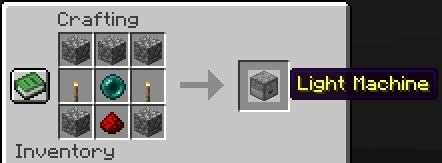
  • Adds a single new block: the Light Machine.
  • Light Machine scans for blocks with a light level ≤ 4 in a 512-block radius (horizontal & vertical).
  • When it finds a dark spot, it automatically places one of its own torches there.

Perfect for lighting vast caves, open fields, or entire bases without manual labor.


Inventory & Torch Supply

| 9 Slots | Vanilla torch item | Machine pauses until torches are supplied |

Torches are consumed one-for-one as they are placed—no duplicates, no infinity.


How to Use

  1. Craft the Light Machine.
  2. Place the block in the world.
  3. Open its GUI and load torches into any slot.
  4. Walk away—the machine quietly lights up the darkness around you over time.

Awaiting content


Ideal For

  • 100 % spawn-proof bases and farms
  • Hassle-free cave illumination before mining
  • Server administrators who want safer spawn areas without world-editing

Happy lighting, and goodbye to surprise creepers! 💡

See my other mods

Project description from CurseForge.

Pick your setup

Pepsi's Light Machine by Minecraft version and loader

Choose the version and loader you play, then open the matching release.

40 available setups

Check the dependencies, then try the file in a copied instance before changing a world you care about.

Recent files

Pepsi's Light Machine versions and loaders

4 of 4 releases match

Looking for an older file? The official CurseForge project page is in Resources.