Minecraft version
Back to mods 
CurseForge · Minecraft mod
Fiber Bench
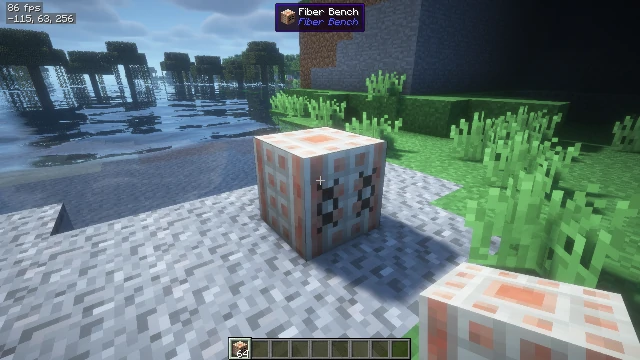
The Fiber Bench is a specialized 4×4 crafting station that allows you to process materials in ways that aren't possible with the standard crafting table. It's perfect for converting and recycling various materials into useful resources.
Choose a version Pick your version below, then grab the matching file.
Quick answer
Which Fiber Bench release should I use?
Latest stable file FiberBench-1.0.jar
Game version 1.12.2
Loader Forge
Fiber Bench FiberBench-1.0.jar targets 1.12.2 with Forge. The project page does not say whether this file belongs on the client, dedicated server, or both. No extra mods listed for this file.
Where it goes
Is Fiber Bench required on the client, server, or both?
The project page does not say whether this file belongs on the client, dedicated server, or both.
Client Source doesn’t say
Dedicated server Source doesn’t say
Loader for this release Forge
Required install it here Optional supported, not mandatory Not supported do not install here Source doesn’t say do not assume
The source does not explicitly classify this release as client-only or server-only.
What else does Fiber Bench FiberBench-1.0.jar need?
FiberBench-1.0.jar. Change the file and its required mods may change too.
This file does not list any required mods. Do not add a library just because a different file uses it.
This file does not list any required or optional mods.
Before you install it
Add Fiber Bench without breaking your instance.
Built for Fiber Bench FiberBench-1.0.jar. Pick another file and the loader, install side or required mods may change.
- 01
Stick to this file
Use FiberBench-1.0.jar. It targets 1.12.2 with Forge; another release may have different loader, side or dependency requirements.
- 02
Bring the mods it needs
This file does not list any required mods. Do not add a library just because a different file uses it.
- 03
Put it on the correct side
The project page does not say whether this file belongs on the client, dedicated server, or both.
- 04
Pick the file you checked
Use the “Get this file” button beside FiberBench-1.0.jar. It opens that exact file at the source.
About this project
What does Fiber Bench add?
Fiber Bench Recipe Guide
Welcome to the official Fiber Bench recipe reference! This guide will help you get the most out of your Fiber Bench by showing you all available recipes.
Note: For a visual guide with actual Minecraft item icons, see
fiber_bench_recipes.htmlin the same directory.
What is the Fiber Bench?
The Fiber Bench is a specialized 4×4 crafting station that allows you to process materials in ways that aren't possible with the standard crafting table. It's perfect for converting and recycling various materials into useful resources.
Crafting the Fiber Bench
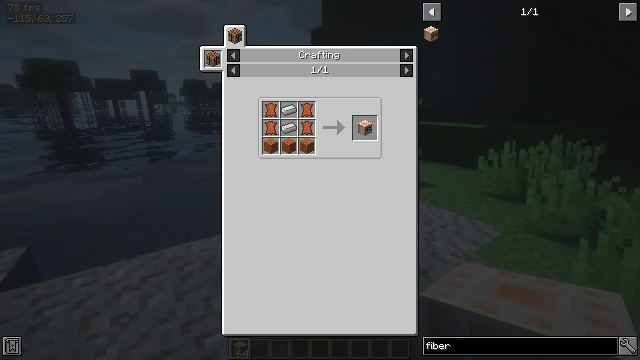
To craft a Fiber Bench, you'll need:
- 4 Leather
- 2 Iron Ingots
- 3 Wooden Planks (any type)
Crafting Pattern:
[L] [I] [L]
[L] [I] [L]
[P] [P] [P]
Where:
- [L] = Leather
- [I] = Iron Ingot
- [P] = Wooden Planks (any type)
Using the Fiber Bench
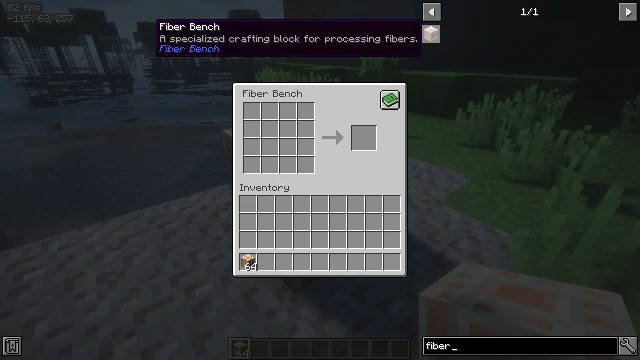
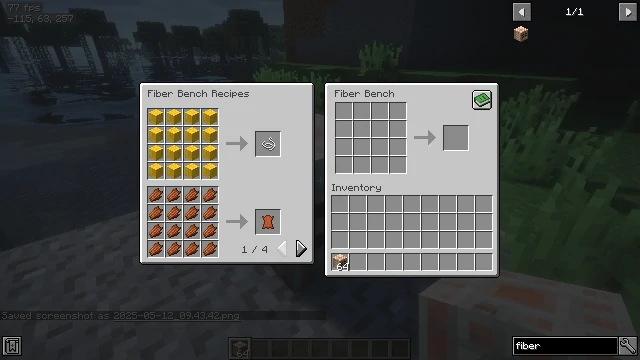
The Fiber Bench features a 4×4 crafting grid and a built-in recipe book that you can toggle with the button in the top-right corner. Each recipe requires specific patterns or quantities of items.
Tips:
- Items are consumed when you take the output
- The quantity of the output may depend on how many items you put in
- You can craft multiple sets at once by adding more ingredients
Available Recipes
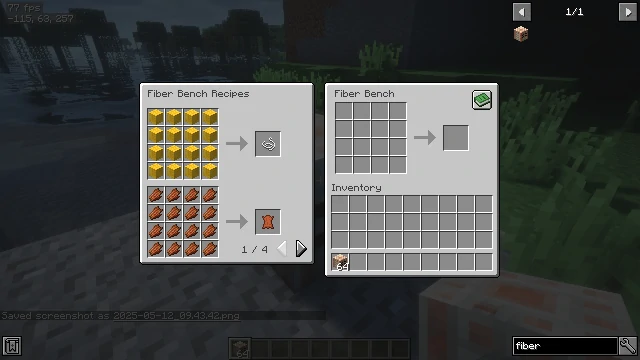
1. Wool to String
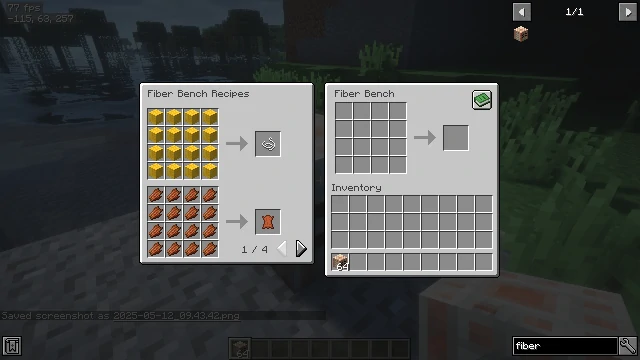
Input: 16 Wool blocks (any color)
Output: 1 String
Fill the entire 4×4 grid with wool blocks (any color).
[Wool] [Wool] [Wool] [Wool]
[Wool] [Wool] [Wool] [Wool]
[Wool] [Wool] [Wool] [Wool]
[Wool] [Wool] [Wool] [Wool]
→ Produces: 1 String
2. Rotten Flesh to Leather
Input: 16 Rotten Flesh
Output: 1 Leather
Fill the entire 4×4 grid with rotten flesh.
[Rotten Flesh] [Rotten Flesh] [Rotten Flesh] [Rotten Flesh]
[Rotten Flesh] [Rotten Flesh] [Rotten Flesh] [Rotten Flesh]
[Rotten Flesh] [Rotten Flesh] [Rotten Flesh] [Rotten Flesh]
[Rotten Flesh] [Rotten Flesh] [Rotten Flesh] [Rotten Flesh]
→ Produces: 1 Leather
3. Dirt and Leaves to Bone Meal
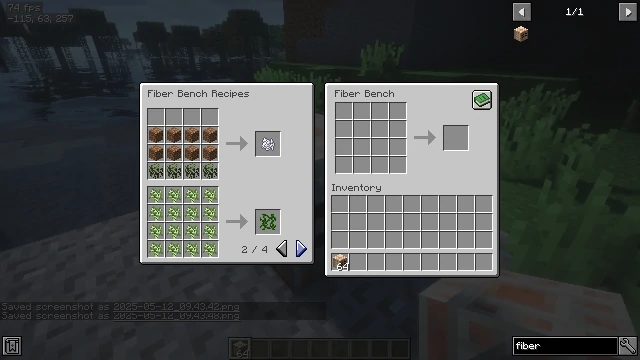
Input:
- 8 Dirt/Grass/Podzol/Mycelium blocks
- 4 Leaves blocks (any type)
Output: 1 Bone Meal
[    ]   [    ]   [    ]   [    ]  (Empty top row)
[Dirt]   [Dirt]   [Dirt]   [Dirt]
[Dirt]   [Dirt]   [Dirt]   [Dirt]
[Leaves] [Leaves] [Leaves] [Leaves]
→ Produces: 1 Bone Meal
4. Saplings to Vines
Input: 16 Saplings (any type)
Output: 1 Vine
Fill the entire 4×4 grid with saplings (any type).
[Sapling] [Sapling] [Sapling] [Sapling]
[Sapling] [Sapling] [Sapling] [Sapling]
[Sapling] [Sapling] [Sapling] [Sapling]
[Sapling] [Sapling] [Sapling] [Sapling]
→ Produces: 1 Vine
5. Stone Variants to Iron Nugget
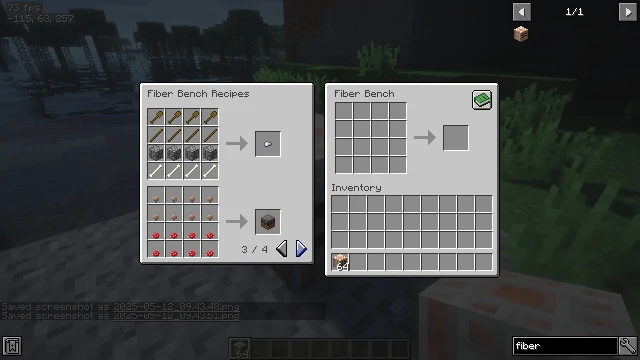
Input:
- 4 Polished Andesite
- 4 Polished Diorite
- 4 Polished Granite
- 4 Baked Stone (Stone obtained by smelting cobblestone)
Output: 1 Iron Nugget
[Polished Andesite] [Polished Andesite] [Polished Andesite] [Polished Andesite]
[Polished Diorite]  [Polished Diorite]  [Polished Diorite]  [Polished Diorite]
[Polished Granite]  [Polished Granite]  [Polished Granite]  [Polished Granite]
[Stone]       [Stone]       [Stone]       [Stone]
→ Produces: 1 Iron Nugget
6. Wooden Tools to Iron Nugget
Input:
- 4 Wooden Tools (any type)
- 4 Sticks
- 4 Cobblestone
- 4 Bone
Output: 1 Iron Nugget
[Wooden Tool] [Wooden Tool] [Wooden Tool] [Wooden Tool]
[Stick]       [Stick]       [Stick]       [Stick]
[Cobblestone] [Cobblestone] [Cobblestone] [Cobblestone]
[Bone]        [Bone]        [Bone]        [Bone]
→ Produces: 1 Iron Nugget
7. Mushrooms to Mycelium
Input:
- 8 Brown Mushrooms
- 8 Red Mushrooms
Output: 1 Mycelium Block
[Brown Mushroom] [Brown Mushroom] [Brown Mushroom] [Brown Mushroom]
[Brown Mushroom] [Brown Mushroom] [Brown Mushroom] [Brown Mushroom]
[Red Mushroom]   [Red Mushroom]   [Red Mushroom]   [Red Mushroom]
[Red Mushroom]   [Red Mushroom]   [Red Mushroom]   [Red Mushroom]
→ Produces: 1 Mycelium Block
8. Gravel and Dirt to Clay Ball
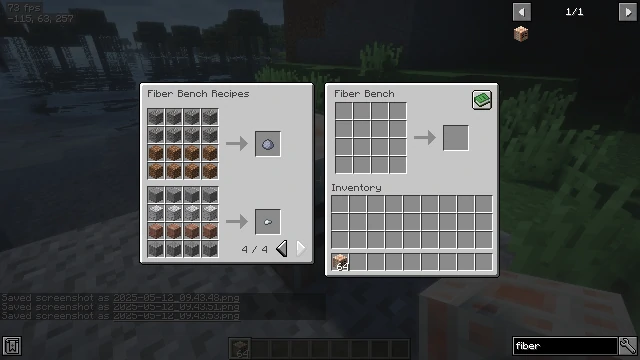
Input:
- 8 Gravel
- 8 Dirt
Output: 1 Clay Ball
[Gravel] [Gravel] [Gravel] [Gravel]
[Gravel] [Gravel] [Gravel] [Gravel]
[Dirt]   [Dirt]   [Dirt]   [Dirt]
[Dirt]   [Dirt]   [Dirt]   [Dirt]
→ Produces: 1 Clay Ball
Mass Crafting
The Fiber Bench is designed for efficient mass crafting! If you place multiple sets of ingredients in each slot, the bench will craft multiple outputs at once.
For example:
- 64 wool blocks (4 in each slot) = 4 string
- 32 rotten flesh (2 in each slot) = 2 leather
Tips and Tricks
- Recipe Book: Click the book icon in the top right corner to browse recipes
- Missing Ingredients: When looking at recipes in the book, missing ingredients will be highlighted in red
- Bulk Processing: Process materials in bulk to save time
- Resource Conservation: Many recipes allow you to convert less useful items into valuable resources
Happy crafting with your Fiber Bench!
This guide was created for Fiber Bench mod version 1.0
Project description from CurseForge.
Pick your setup
Fiber Bench by Minecraft version and loader
Choose the version and loader you play, then open the matching release.
Check the dependencies, then try the file in a copied instance before changing a world you care about.
Recent files
Fiber Bench versions and loaders
FiberBench-1.0.jar
12 May 2025
Client Source doesn’t say Server Source doesn’t say Dependencies No extras listed Listed on Release listing
Check the 1.12.2 · Forge setup Forge1.12.2 release
Looking for an older file? The official CurseForge project page is in Resources.
 mod
mod CurseForge · Minecraft
cc iron's spells sng
please check out work in progress spell maker if you need help let me know
 mod
mod CurseForge · Minecraft
Italian Brainrot - Steal A Brainrot Craft
This Mod Allows You To Make And Play Steal A Brainrot In Minecraft
 mod
mod CurseForge · Minecraft
Changed: Synergy
Turns aggressive latex creatures into neighbors you can actually get along with. An orange or a friendly pat will often get you further than fists and blades. Transfur is not always the end anymore cause sometimes you can even talk your way back out of it!