Minecraft version
Back to mods 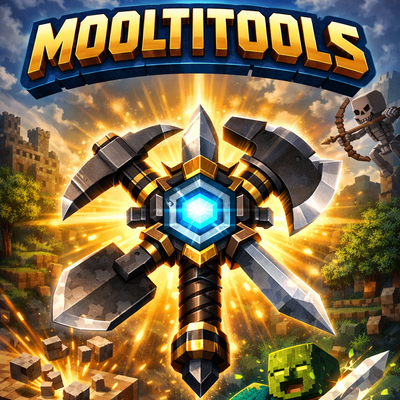
CurseForge · Minecraft mod
Mooltitools
Mooltitools is a mod that adds powerful multifunctional tools combining pickaxe, axe, shovel, and sword in one. Save inventory space and switch less perfect for those who value speed, versatility, and efficiency in every adventure.
Choose a version Pick your version below, then grab the matching file.
Quick answer
Which Mooltitools release should I use?
Latest stable file Mooltitools-1.0.0-fabric-26.1.2.jar
Game version 26.1.2
Loader Fabric
Mooltitools-1.0.0-fabric-26.1.2.jar targets 26.1.2 with Fabric. The project page does not say whether this file belongs on the client, dedicated server, or both. No extra mods listed for this file.
Where it goes
Is Mooltitools required on the client, server, or both?
The project page does not say whether this file belongs on the client, dedicated server, or both.
Client Source doesn’t say
Dedicated server Source doesn’t say
Loader for this release Fabric
Required install it here Optional supported, not mandatory Not supported do not install here Source doesn’t say do not assume
The source does not explicitly classify this release as client-only or server-only.
What else does Mooltitools-1.0.0-fabric-26.1.2.jar need?
Mooltitools-1.0.0-fabric-26.1.2.jar. Change the file and its required mods may change too.
This file does not list any required mods. Do not add a library just because a different file uses it.
This file does not list any required or optional mods.
Before you install it
Add Mooltitools without breaking your instance.
Built for Mooltitools-1.0.0-fabric-26.1.2.jar. Pick another file and the loader, install side or required mods may change.
- 01
Stick to this file
Use Mooltitools-1.0.0-fabric-26.1.2.jar. It targets 26.1.2 with Fabric; another release may have different loader, side or dependency requirements.
- 02
Bring the mods it needs
This file does not list any required mods. Do not add a library just because a different file uses it.
- 03
Put it on the correct side
The project page does not say whether this file belongs on the client, dedicated server, or both.
- 04
Pick the file you checked
Use the “Get this file” button beside Mooltitools-1.0.0-fabric-26.1.2.jar. It opens that exact file at the source.
About this project
What does Mooltitools add?
✨ Mooltitools ✨ is a mod that adds a diverse set of powerful, multi-functional tools designed to streamline gameplay and improve efficiency.
⛏️ Digging, chopping, fighting, building – Mooltitools offers a one-size-fits-all solution.
🛠️ These tools combine the functions of standard equipment into one, helping you save inventory space and reducing the hassle of constantly switching tools.
💎 With a sleek design and practical utility, it’s the perfect addition for anyone who values speed, organization, and versatility in their adventures.
If you enjoy this mod and want to support my work, you can do so here: buymeacoffee.com/quattro ☕✨
Project description from CurseForge.
Pick your setup
Mooltitools by Minecraft version and loader
Choose the version and loader you play, then open the matching release.
Minecraft version
1.21.8
1 loader buildMinecraft version
1.21.4
1 loader buildMinecraft version
1.20.1
1 loader buildCheck the dependencies, then try the file in a copied instance before changing a world you care about.
Recent files
Mooltitools versions and loaders
Mooltitools-1.0.0-fabric-26.1.2.jar
mooltitools-1.0.0-fabric-26.1.2.jar
20 Jul 2026
Client Source doesn’t say Server Source doesn’t say Dependencies No extras listed Listed on Release listing
Check the 26.1.2 · Fabric setup Fabric26.1.2 release
Mooltitools-1.0.0-neoforge-1.21.8.jar
mooltitools-1.0.0-neoforge-1.21.8.jar
7 Jul 2026
Client Source doesn’t say Server Source doesn’t say Dependencies No extras listed Listed on Release listing
Check the 1.21.8 · Forge setup 1.21.8Forge release
Mooltitools-1.0.0-forge-1.20.1.jar
mooltitools-1.0.0-forge-1.20.1.jar
2 Sept 2025
Client Source doesn’t say Server Source doesn’t say Dependencies No extras listed Listed on Release listing
Check the 1.20.1 · Forge setup 1.20.1Forge release
Mooltitools mod 1.21.4 Neoforge
mooltitools-1.0.0-neoforge-1.21.4.jar
19 May 2025
Client Source doesn’t say Server Source doesn’t say Dependencies No extras listed Listed on Release listing
Check the 1.21.4 · NeoForge setup 1.21.4NeoForge release
Mooltitools mod 1.21.4 NeoForge
mooltitools-1.0.0-neoforge-1.21.4.jar
15 May 2025
Client Source doesn’t say Server Source doesn’t say Dependencies No extras listed Listed on Release listing
Check the 1.21.4 · NeoForge setup 1.21.4NeoForge release
Looking for an older file? The official CurseForge project page is in Resources.