Minecraft version
Back to mods 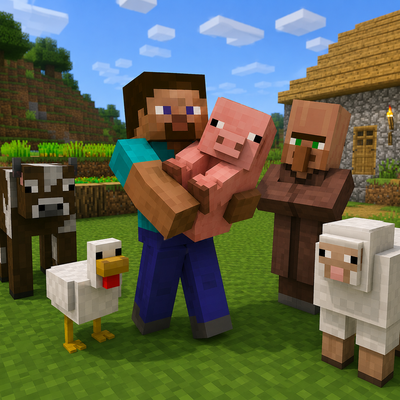
CurseForge · Minecraft mod
Mobs and villager
Pick up and carry friendly mobs, animals, villagers and selected neutral creatures using their real models — no spawn eggs required.
Choose a version Pick your version below, then grab the matching file.
Quick answer
Which Mobs and villager release should I use?
Latest stable file mobs-and-villagers-up-2.0.3-fabric-26.2.jar
Game version 26.2
Loader Fabric
Mobs and villager mobs-and-villagers-up-2.0.3-fabric-26.2.jar targets 26.2 with Fabric. The project page does not say whether this file belongs on the client, dedicated server, or both. No extra mods listed for this file.
Where it goes
Is Mobs and villager required on the client, server, or both?
The project page does not say whether this file belongs on the client, dedicated server, or both.
Client Source doesn’t say
Dedicated server Source doesn’t say
Loader for this release Fabric
Required install it here Optional supported, not mandatory Not supported do not install here Source doesn’t say do not assume
The source does not explicitly classify this release as client-only or server-only.
What else does Mobs and villager mobs-and-villagers-up-2.0.3-fabric-26.2.jar need?
mobs-and-villagers-up-2.0.3-fabric-26.2.jar. Change the file and its required mods may change too.
This file does not list any required mods. Do not add a library just because a different file uses it.
This file does not list any required or optional mods.
Before you install it
Add Mobs and villager without breaking your instance.
Built for Mobs and villager mobs-and-villagers-up-2.0.3-fabric-26.2.jar. Pick another file and the loader, install side or required mods may change.
- 01
Stick to this file
Use mobs-and-villagers-up-2.0.3-fabric-26.2.jar. It targets 26.2 with Fabric; another release may have different loader, side or dependency requirements.
- 02
Bring the mods it needs
This file does not list any required mods. Do not add a library just because a different file uses it.
- 03
Put it on the correct side
The project page does not say whether this file belongs on the client, dedicated server, or both.
- 04
Pick the file you checked
Use the “Get this file” button beside mobs-and-villagers-up-2.0.3-fabric-26.2.jar. It opens that exact file at the source.
About this project
What does Mobs and villager add?
Mobs & Villagers Up!
Transporting animals and villagers has never been easier!
**Mobs & Villagers Up!** allows you to pick up supported creatures, carry their real model in your hands, and safely place them somewhere else.
No spawn eggs, boats, minecarts or complicated transportation systems are required.
Main Features
- Pick up supported creatures using an empty hand.
- Carry the creature's real model instead of a spawn egg.
- See the carried creature in both first-person and third-person view.
- Carry one creature at a time.
- Safely place the creature at another location.
- Prevent placement inside blocked or invalid spaces.
- Pick up creatures without causing damage, knockback or hurt animations.
- Preserve important entity data when the creature is placed again.
- Support animals, villagers, friendly mobs and selected neutral creatures.
- No additional libraries or dependencies required.
How to Use
Picking Up a Creature
- Make sure your main hand is empty.
- Approach a supported creature.
- Hold **Shift**.
- While holding Shift, **right-click the creature**.
- The creature will be picked up and displayed in your hands.
Placing a Creature
- While carrying a creature, look at a valid and unobstructed location.
- Hold **Shift**.
- While holding Shift, **left-click the block or surface** where you want to place the creature.
- The creature will be safely returned to the world with its preserved data.
Only one creature can be carried at a time.
Supported Creatures
The mod supports animals, villagers, friendly creatures and selected neutral mobs, including:
- Villagers
- Wandering Traders
- Regular Piglins
- Cows
- Pigs
- Sheep
- Chickens
- Horses
- Donkeys
- Mules
- Llamas
- Camels
- Wolves
- Cats
- Parrots
- Foxes
- Rabbits
- Goats
- Armadillos
- Turtles
- Frogs
- Axolotls
- Dolphins
- Fish
- Squids
- Glow Squids
- Bees
- Pandas
- Polar Bears
- Bats
- Allays
- Iron Golems
- Snow Golems
- Sniffers
- Most other passive, friendly or appropriate neutral creatures
The following entities cannot be carried:
- Players
- Bosses
- Fully hostile monsters
- Piglin Brutes
- Projectiles
- Items
- Vehicles
- Decorative entities
- Dead or invalid entities
Entity Data Preservation
When a creature is picked up and placed again, the mod preserves its compatible data, including:
- Custom name
- Health
- Adult or baby state
- Texture and variant
- Tamed status
- Owner information
- Equipment
- Villager profession
- Villager level
- Villager trades
- Other compatible entity data
Real Creature Rendering
Carried creatures are displayed using their real in-game models instead of spawn eggs.
The model can be seen:
- In front of the player in first-person view
- Being carried by the player in third-person view
The visual representation automatically adjusts its scale and position according to the creature's size.
Safe Transportation
While being carried, the creature is temporarily stored and is not left active in the world.
The carried visual model:
- Has no artificial intelligence
- Has no collision
- Cannot receive damage
- Produces no sounds
- Does not create a duplicate creature
- Does not interfere with other entities
- Retains its original appearance
Requirements
- Minecraft Java Edition 26.2
- NeoForge/Fabric
- No additional dependencies
Project description from CurseForge.
Pick your setup
Mobs and villager by Minecraft version and loader
Choose the version and loader you play, then open the matching release.
Minecraft version
1.21.5
1 loader buildCheck the dependencies, then try the file in a copied instance before changing a world you care about.
Recent files
Mobs and villager versions and loaders
mobs-and-villagers-up-2.0.3-fabric-26.2.jar
7 Aug 2026
Client Source doesn’t say Server Source doesn’t say Dependencies No extras listed Listed on Release listing
Check the 26.2 · Fabric setup Fabric26.2 release
mobs-and-villagers-up-2.0.2-neoforge-26.2.jar
7 Aug 2026
Client Source doesn’t say Server Source doesn’t say Dependencies No extras listed Listed on Release listing
Check the 26.2 · NeoForge setup NeoForge26.2 release
mobs-and-villagers-up-2.0.1-neoforge-26.2.jar
31 Jul 2026
Client Source doesn’t say Server Source doesn’t say Dependencies No extras listed Listed on Release listing
Check the 26.2 · NeoForge setup NeoForge26.2 release
mobsandvillager-1.0.0.jar
31 Jul 2026
Client Source doesn’t say Server Source doesn’t say Dependencies No extras listed Listed on Release listing
Check the 26.2 · NeoForge setup NeoForge26.2 release
Mobs and villagers
Mobs and villagers up!.jar
16 May 2025
Client Source doesn’t say Server Source doesn’t say Dependencies No extras listed Listed on Release listing
Check the 1.21.5 · Fabric setup Fabric1.21.5 beta
Looking for an older file? The official CurseForge project page is in Resources.
 mod
mod CurseForge + Modrinth · Minecraft
GUI Scaler
Automatically adjusts Minecraft GUI scale based on window resolution. Smart scaling for optimal readability on any screen size.
 mod
mod CurseForge · Minecraft
Disc Jockey Plus
Upgraded "Disc Jockey" to 26.2, and added some features and language support
 mod
mod Modrinth · Minecraft
Perch
Keep parrots on your shoulders!