Minecraft version
Back to mods 
CurseForge · Minecraft mod
NostalgicRadio
adds a radio with which you can listen to various nostalgic music
Choose a version Pick your version below, then grab the matching file.
Quick answer
Which NostalgicRadio release should I use?
beta file radio_mod-1.0.0-forge-1.20.1.jar
Game version 1.20.1
Loader Forge
NostalgicRadio radio_mod-1.0.0-forge-1.20.1.jar targets 1.20.1 with Forge. The project page does not say whether this file belongs on the client, dedicated server, or both. No extra mods listed for this file.
Where it goes
Is NostalgicRadio required on the client, server, or both?
The project page does not say whether this file belongs on the client, dedicated server, or both.
Client Source doesn’t say
Dedicated server Source doesn’t say
Loader for this release Forge
Required install it here Optional supported, not mandatory Not supported do not install here Source doesn’t say do not assume
The source does not explicitly classify this release as client-only or server-only.
What else does NostalgicRadio radio_mod-1.0.0-forge-1.20.1.jar need?
radio_mod-1.0.0-forge-1.20.1.jar. Change the file and its required mods may change too.
This file does not list any required mods. Do not add a library just because a different file uses it.
This file does not list any required or optional mods.
Before you install it
Add NostalgicRadio without breaking your instance.
Built for NostalgicRadio radio_mod-1.0.0-forge-1.20.1.jar. Pick another file and the loader, install side or required mods may change.
- 01
Stick to this file
Use radio_mod-1.0.0-forge-1.20.1.jar. It targets 1.20.1 with Forge; another release may have different loader, side or dependency requirements.
- 02
Bring the mods it needs
This file does not list any required mods. Do not add a library just because a different file uses it.
- 03
Put it on the correct side
The project page does not say whether this file belongs on the client, dedicated server, or both.
- 04
Pick the file you checked
Use the “Get this file” button beside radio_mod-1.0.0-forge-1.20.1.jar. It opens that exact file at the source.
About this project
What does NostalgicRadio add?
Add a radio to your game that will take you back in time with nostalgic melodies! This mod includes a radio that plays slightly modified soundtracks from games like Minecraft, Undertale, Fallout, Silent Hill.
Who is this mod for?
If you miss the music of the past or want to add a cozy retro atmosphere to your game, this is a good choice! Turn on "Nostalgic Radio" and enjoy.
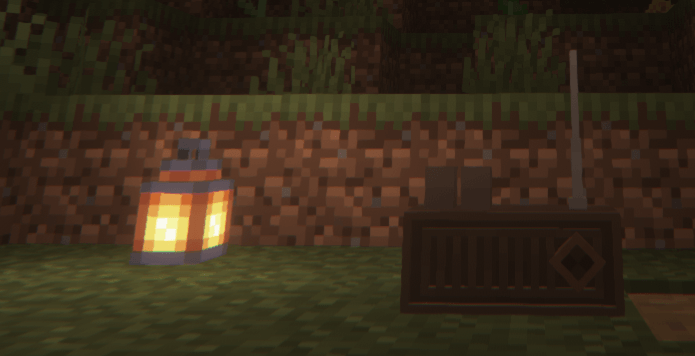
In the future,
we plan to add a radio signal system, add various radio-related events, make it so that players can insert their own music and add more playing soundtracks
Version: 1.0
used soundtracks:
▶C418 - Haggstrom - Minecraft Volume Alpha
▶C418 - Wet Hands - Minecraft Volume Alpha
▶C418 - Subwoofer Lullaby - Minecraft Volume Alpha
SMORT
▶A1 - It's just a burning memory
▶Old Doll, mad father
▶Fallen Down
▶Fallout 1 Soundtrack - Maybe - by the Ink Spots
Project description from CurseForge.
Pick your setup
NostalgicRadio by Minecraft version and loader
Choose the version and loader you play, then open the matching release.
Check the dependencies, then try the file in a copied instance before changing a world you care about.
Recent files
NostalgicRadio versions and loaders
radio_mod-1.0.0-forge-1.20.1.jar
31 May 2025
Client Source doesn’t say Server Source doesn’t say Dependencies No extras listed Listed on Release listing
Check the 1.20.1 · Forge setup 1.20.1Forge beta
Looking for an older file? The official CurseForge project page is in Resources.
 mod
CurseForge · Minecraft
My Base
This mod adds the option for colonies, overhauls and modifies the entire Minecraft world, and introduces features such as recruiting soldiers, having colonists, and more.
 mod
CurseForge · Minecraft
Villagers and Companions Redux
Turns villagers into companions with a life of their own: you can recruit them as civilians, soldiers or guards, rank them up, lead an army, build a settlement they protect and rebuild, and even marry one of them and start a family.
 mod
CurseForge + Modrinth · Minecraft
Mob Lootbags
Mobs drop loot bags in six tiers from Common to Mythic, with loot previews, a Bag Opener, a Loot Recycler and risky Cursed, Hourglass and Locked bags.