Minecraft version
Back to mods 
CurseForge · Minecraft mod
More Barriers
Adds 16 New Barrier Types and a Couple More Map Making Items.
Choose a version Pick your version below, then grab the matching file.
Quick answer
Which More Barriers release should I use?
Latest stable file morebarriers-1.0.0-[Forge]-[1.20.1].jar
Game version 1.20.1
Loader Forge
More Barriers morebarriers-1.0.0-[Forge]-[1.20.1].jar targets 1.20.1 with Forge. The project page does not say whether this file belongs on the client, dedicated server, or both. No extra mods listed for this file.
Where it goes
Is More Barriers required on the client, server, or both?
The project page does not say whether this file belongs on the client, dedicated server, or both.
Client Source doesn’t say
Dedicated server Source doesn’t say
Loader for this release Forge
Required install it here Optional supported, not mandatory Not supported do not install here Source doesn’t say do not assume
The source does not explicitly classify this release as client-only or server-only.
What else does More Barriers morebarriers-1.0.0-[Forge]-[1.20.1].jar need?
morebarriers-1.0.0-[Forge]-[1.20.1].jar. Change the file and its required mods may change too.
This file does not list any required mods. Do not add a library just because a different file uses it.
This file does not list any required or optional mods.
Before you install it
Add More Barriers without breaking your instance.
Built for More Barriers morebarriers-1.0.0-[Forge]-[1.20.1].jar. Pick another file and the loader, install side or required mods may change.
- 01
Stick to this file
Use morebarriers-1.0.0-[Forge]-[1.20.1].jar. It targets 1.20.1 with Forge; another release may have different loader, side or dependency requirements.
- 02
Bring the mods it needs
This file does not list any required mods. Do not add a library just because a different file uses it.
- 03
Put it on the correct side
The project page does not say whether this file belongs on the client, dedicated server, or both.
- 04
Pick the file you checked
Use the “Get this file” button beside morebarriers-1.0.0-[Forge]-[1.20.1].jar. It opens that exact file at the source.
About this project
What does More Barriers add?
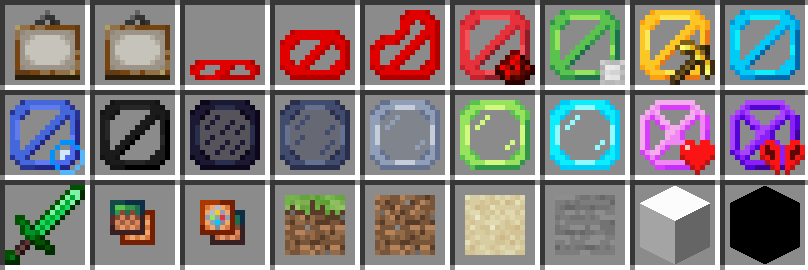
THIS MOD IS FOR MAP MAKERS AND IS FOR CREATIVE PLAYERS, IT BUILDS UPON THE CREATIVE TAB.
THE BARRIERS (UNBREAKABLE, FULL HITBOX, SOLID)
Barrier Pressure Plate: Invisable but acts as a normal pressure plate.
Barrier Slab: Is half as good as a barrier.
Barrier Stairs: Walk up the invisable stairs.
Redstone Barrier: When Off: Acts as a normal barrier.
When On: Can be walked past.
Conecting (Green) Barrier: Connects to blocks, looks weird.
Mineable (Yellow) Barrier: Can be broken in survival (doesn't drop) and be pushed by a piston.
Schrödinger's (Light Blue) Barrier: Can be walked by entities, blocks react if it is solid.
Waterloggable (Dark BLue) Barrier: Can be waterlogged.
Dark (BLack) Barrier: A Solid, unbreakable light blocker.
THE AIRS (CAN BE PLACED OVER, NO HITBOX, PASABLE)
(Shades of Black) Darkness Three/Two/One: Blocks different levels of light.
(Green) Dense Air: Player can float in it (like vines).
(Blue) Solid Air: Acts as an air block, exept when interacting with blocks like sand. (Player build over this block)
THE VOIDS (PASSABLE BUT UNBREAKABLE AND CAN'T BE PLACED OVER)
(Pink) Healing Void: Heals player on contact.
(Purple) Killer Void: Kills player on contact.
ITEMS
One shot sword: For killing entities in an instant in creative.
Game Mode Switchers: Dont like pressing F3 F4? Now you got an item to switch your gamemode.
THE FAKE BLOCKS
Grass, Dirt, Sand and Stone can be placed as fake blocks, which look solid but the player just walks though them, fun for messing with friends!
OTHER BLOCKS
Pure White: A solid pure white block.
Pure Black: A solid pure black block.
Project description from CurseForge.
Pick your setup
More Barriers by Minecraft version and loader
Choose the version and loader you play, then open the matching release.
Check the dependencies, then try the file in a copied instance before changing a world you care about.
Recent files
More Barriers versions and loaders
morebarriers-1.0.0-[Forge]-[1.20.1].jar
morebarriers-1.0.0-[Forge][1.20.1].jar
5 Jun 2025
Client Source doesn’t say Server Source doesn’t say Dependencies No extras listed Listed on Release listing
Check the 1.20.1 · Forge setup 1.20.1Forge release
Looking for an older file? The official CurseForge project page is in Resources.
 mod
CurseForge + Modrinth · Minecraft
Reach Display
A configurable visual representation of your reach and hit distances
 mod
CurseForge · Minecraft
JEI_Commands
Adds commands to open JEI recipe, usage, and effect views directly.
 mod
CurseForge · Minecraft
No Trade Cycling, Just Pick
Stop rerolling villagers. Press Pick trade and select any 2 trades its profession can offer (max-level enchanted books included). Fast trade and saves time.