Minecraft version
Back to mods 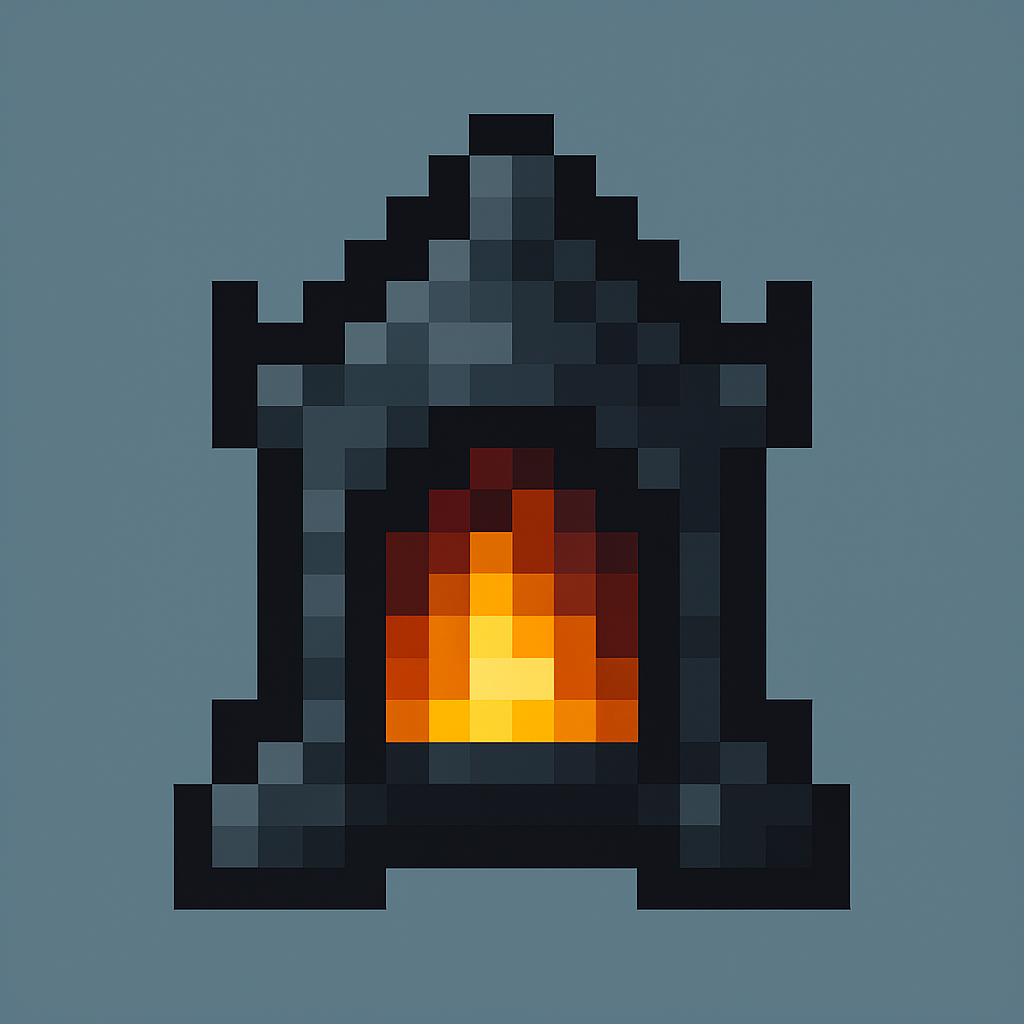
CurseForge · Minecraft mod
PrintCraft
adds a furnace like block that instead of smithing copies items and blocks.
Choose a version Pick your version below, then grab the matching file.
Quick answer
Which PrintCraft release should I use?
Latest stable file printcraft-1.0.0.jar
Game version 26.3
Loader Fabric
printcraft-1.0.0.jar targets 26.3 with Fabric. The project page does not say whether this file belongs on the client, dedicated server, or both. No extra mods listed for this file.
Where it goes
Is PrintCraft required on the client, server, or both?
The project page does not say whether this file belongs on the client, dedicated server, or both.
Client Source doesn’t say
Dedicated server Source doesn’t say
Loader for this release Fabric
Required install it here Optional supported, not mandatory Not supported do not install here Source doesn’t say do not assume
The source does not explicitly classify this release as client-only or server-only.
What else does printcraft-1.0.0.jar need?
printcraft-1.0.0.jar. Change the file and its required mods may change too.
This file does not list any required mods. Do not add a library just because a different file uses it.
This file does not list any required or optional mods.
Before you install it
Add PrintCraft without breaking your instance.
Built for printcraft-1.0.0.jar. Pick another file and the loader, install side or required mods may change.
- 01
Stick to this file
Use printcraft-1.0.0.jar. It targets 26.3 with Fabric; another release may have different loader, side or dependency requirements.
- 02
Bring the mods it needs
This file does not list any required mods. Do not add a library just because a different file uses it.
- 03
Put it on the correct side
The project page does not say whether this file belongs on the client, dedicated server, or both.
- 04
Pick the file you checked
Use the “Get this file” button beside printcraft-1.0.0.jar. It opens that exact file at the source.
About this project
What does PrintCraft add?
Printcraft — The Copier
Printcraft adds the Copier, a furnace-style machine block that duplicates items instead of smelting them.
How it works:
Place any item in the input slot and it stays there forever — it's never consumed. Add fuel, and each burn cycle produces one extra copy of that item in the output slot. Keep feeding it fuel and it keeps printing copies, up to a full stack (64) in the output before it pauses.
Fuel works exactly like a vanilla furnace — coal, charcoal, lava buckets, blaze rods, and anything else that burns will do. Better fuel doesn't make individual copies faster (each copy always takes the same time), but it burns for longer, so you get more copies before you need to refuel — a lava bucket will run the Copier far longer unattended than a lump of coal.
for those using 1.21.1 this is the recipe

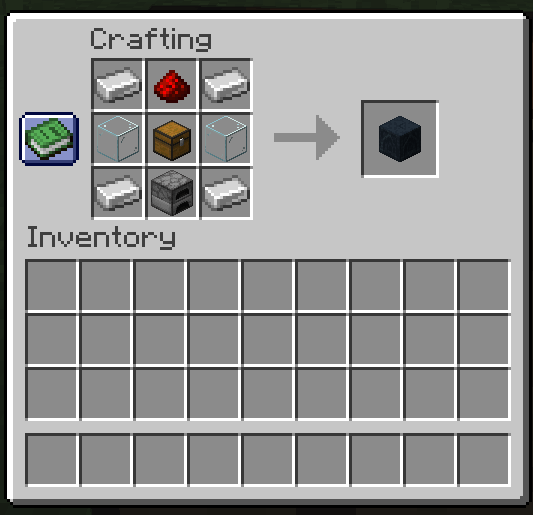
for those using 1.21.9 there is a new recipe and more fuel sources.
new recipe for 26.2:
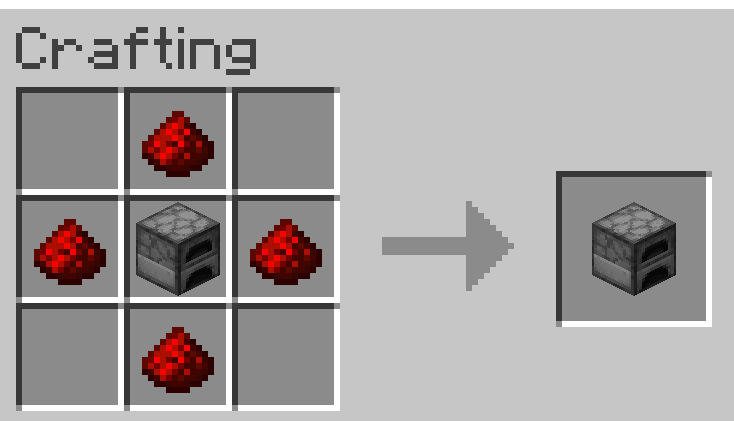
Project description from CurseForge.
Pick your setup
PrintCraft by Minecraft version and loader
Choose the version and loader you play, then open the matching release.
Minecraft version
26.2
1 loader buildMinecraft version
1.21.11
1 loader buildMinecraft version
1.21.10
1 loader buildMinecraft version
1.21.9
1 loader buildMinecraft version
1.21.1
1 loader buildCheck the dependencies, then try the file in a copied instance before changing a world you care about.
Recent files
PrintCraft versions and loaders
printcraft-1.0.0.jar
30 Sept 2026
Client Source doesn’t say Server Source doesn’t say Dependencies No extras listed Listed on Release listing
Check the 26.3 · Fabric setup Fabric26.3 release
printcraft-1.0.0.jar
19 Sept 2026
Client Source doesn’t say Server Source doesn’t say Dependencies No extras listed Listed on Release listing
Check the 26.3 · Fabric setup Fabric26.3 release
printcraft-1.0.0.jar
17 Sept 2026
Client Source doesn’t say Server Source doesn’t say Dependencies No extras listed Listed on Release listing
Check the 26.3 · Fabric setup Fabric26.3 release
printcraft-1.0.0.jar
1 Sept 2026
Client Source doesn’t say Server Source doesn’t say Dependencies No extras listed Listed on Release listing
Check the 26.2 · Fabric setup Fabric26.2 release
printcraft-1.0.0.jar
19 Jul 2026
Client Source doesn’t say Server Source doesn’t say Dependencies No extras listed Listed on Release listing
Check the 26.2 · Fabric setup Fabric26.2 release
printcraft-1.0.0.jar
16 Jul 2026
Client Source doesn’t say Server Source doesn’t say Dependencies No extras listed Listed on Release listing
Check the 26.2 · Fabric setup Fabric26.2 release
printcraft-1.0.0.jar
19 Dec 2025
Client Source doesn’t say Server Source doesn’t say Dependencies No extras listed Listed on Release listing
Check the 1.21.11 · Fabric setup Fabric1.21.11 release
printcraft-1.0.0.jar
10 Nov 2025
Client Source doesn’t say Server Source doesn’t say Dependencies No extras listed Listed on Release listing
Check the 1.21.10 · Fabric setup Fabric1.21.10 release
printcraft-1.0.0.jar
10 Nov 2025
Client Source doesn’t say Server Source doesn’t say Dependencies No extras listed Listed on Release listing
Check the 1.21.9 · Fabric setup Fabric1.21.9 release
printcraft-1.0.0.jar
15 Oct 2025
Client Source doesn’t say Server Source doesn’t say Dependencies No extras listed Listed on Release listing
Check the 1.21.9 · Fabric setup Fabric1.21.9 release
print-craft-1.0.0.jar
11 Jul 2025
Client Source doesn’t say Server Source doesn’t say Dependencies No extras listed Listed on Release listing
Check the 1.21.1 · Fabric setup Fabric1.21.1 release
Looking for an older file? The official CurseForge project page is in Resources.
 mod
CurseForge · Minecraft
MLog
Mindustry's logic system, rebuilt for Minecraft — a graphical statement canvas, a graphical statement editor, and the instruction set that goes with them.
 mod
GitHub · Minecraft
modpacks-ch-github-test
Disposable public fixture for testing the Modpacks.ch GitHub catalogue flow
 mod
Modrinth · Minecraft
Create: Radars
Adding Radars (& more) to Create!