Minecraft version
Back to mods 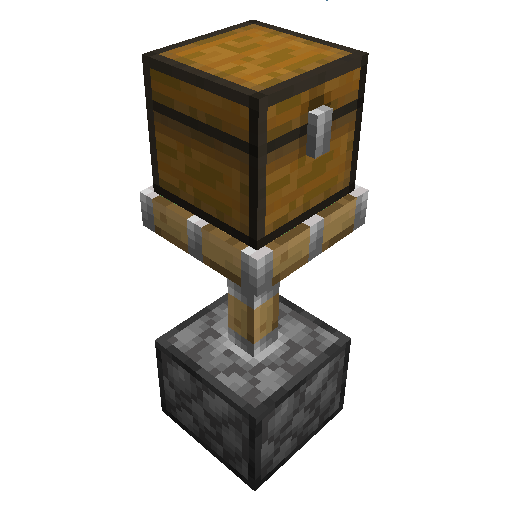
CurseForge · Minecraft mod
Piston Command
Push block entities like on Bedrock and make pistons work the way you want with tags
Choose a version Pick your version below, then grab the matching file.
Quick answer
Which Piston Command release matches 1.21.1 NeoForge?
Best match for your filters 2.0.1 for NeoForge 1.21.1
Game version 1.21.1
Loader NeoForge
Piston Command 2.0.1 for NeoForge 1.21.1 targets 1.21.1 with NeoForge. The project page does not say whether this file belongs on the client, dedicated server, or both. No extra mods listed for this file.
Where it goes
Is Piston Command required on the client, server, or both?
The project page does not say whether this file belongs on the client, dedicated server, or both.
Client Source doesn’t say
Dedicated server Source doesn’t say
Loader for this release NeoForge
Required install it here Optional supported, not mandatory Not supported do not install here Source doesn’t say do not assume
The source does not explicitly classify this release as client-only or server-only.
What else does Piston Command 2.0.1 for NeoForge 1.21.1 need?
2.0.1 for NeoForge 1.21.1 on 1.21.1 NeoForge. Every mod below is checked against that same setup.
This file does not list any required mods. Do not add a library just because a different file uses it.
This file does not list any required or optional mods.
Before you install it
Add Piston Command without breaking your instance.
Built for Piston Command 2.0.1 for NeoForge 1.21.1 on 1.21.1 NeoForge. Pick another file and the loader, install side or required mods may change.
- 01
Stick to this file
Use 2.0.1 for NeoForge 1.21.1. It targets 1.21.1 with NeoForge; another release may have different loader, side or dependency requirements.
- 02
Bring the mods it needs
This file does not list any required mods. Do not add a library just because a different file uses it.
- 03
Put it on the correct side
The project page does not say whether this file belongs on the client, dedicated server, or both.
- 04
Pick the file you checked
Use the “Get this file” button beside 2.0.1 for NeoForge 1.21.1. It opens that exact file at the source.
About this project
What does Piston Command add?
Inspired by Piston Control from the_will_bl
This mod gives you control over the way pistons move blocks with four new data pack tags:
pistoncommand:piston_behavior_normal- pistons can push and pull the block like normalpistoncommand:piston_behavior_block- blocks pistons like obsidian or bedrockpistoncommand:piston_behavior_destroy- gets destroyed like beds and torchespistoncommand:piston_behavior_push_only- can be pushed but not pulled with a sticky piston, like glazed terracotta
Also lets you move block entities like chests and furnaces. You can turn this on for all blocks in the mod config (Mods > Piston Command > Config) or by setting push_block_entities to true in your server's config/pistoncommand-server.toml.
You can match Bedrock behavior by installing the Bedrock Pistons data pack and turning on Push Block Entities. This makes all block entities pushable other than campfires, signs, banners and broken modded blocks.
Works with vanilla and Fabric clients when installed on the server. We're trying to be compatible with as many other mods as possible. If you notice any problems like blocks not updating or visual bugs please report them on GitHub.
Incompatible Blocks
Some modded blocks can stop working when pushed. You should never add these to piston_behavior_normal or piston_behavior_push_only:
- Create mechanical belt - separates from other belt blocks, stops moving items even if pulled back and plays a broken animation
- Create fluid tank - breaks the multiblock structure
- Create mechanical piston - leaves behind useless and visually broken extension poles
- Anything tagged as
#c:relocation_not_supported. Other mods use this tag for blocks that can trigger gamebreaking bugs or even crash the server when moved with a piston.
Project description from CurseForge.
Pick your setup
Piston Command by Minecraft version and loader
Choose the version and loader you play, then open the matching release.
Check the dependencies, then try the file in a copied instance before changing a world you care about.
Recent files
Piston Command versions and loaders
2.0.1 for NeoForge 1.21.1
pistoncommand-neoforge-2.0.1+mc1.21.1.jar
24 Jun 2025
Client Source doesn’t say Server Source doesn’t say Dependencies No extras listed Listed on Release listing
Check the 1.21.1 · NeoForge setup NeoForge1.21.1 release
1.2.0 for NeoForge 1.21.1
pistoncommand-neoforge-1.2.0+mc1.21.1.jar
16 Jun 2025
Client Source doesn’t say Server Source doesn’t say Dependencies No extras listed Listed on Release listing
Check the 1.21.1 · NeoForge setup NeoForge1.21.1 release
1.1.0 for NeoForge 1.21.1
pistoncommand-neoforge-1.1.0+mc1.21.1.jar
9 Jun 2025
Client Source doesn’t say Server Source doesn’t say Dependencies No extras listed Listed on Release listing
Check the 1.21.1 · NeoForge setup NeoForge1.21.1 release
1.0.0 for NeoForge 1.21.1
pistoncommand-neoforge-1.0.0+mc1.21.1.jar
8 Jun 2025
Client Source doesn’t say Server Source doesn’t say Dependencies No extras listed Listed on Release listing
Check the 1.21.1 · NeoForge setup NeoForge1.21.1 release
Looking for an older file? The official CurseForge project page is in Resources.
 mod
CurseForge · Minecraft
OG Core
The shared library of the OG mods (Chiseleded, Graves, Tweaks, Timber, Sort, Magnet, Hammers, Trash & Crates, Elevator, Portable). Adds nothing on its own.
 mod
CurseForge + Modrinth · Minecraft
Modest Meals
A vanilla enhancing mod that aims to expand the food system with dynamic meals, while also adding stamina.
 mod
CurseForge + Modrinth · Minecraft
Reliable Remover
A lightweight utility for completely removing items via simple JSON configuration.