Kotlin for Forge Needed by mcllm-neoforge-1.4.0.jar
requiredMatching file found Matched file: Kotlin for Forge 6.5.0

CurseForge · Minecraft mod
MCLLM is a fork of MCChatGPT for players who want to use non-OpenAI LLM servers. You are not locked into OpenAI's service and can use alternatives like DeepSeek, Claude, Gemini, among others.
Quick answer
mcllm-neoforge-1.4.0.jar targets 26.1.2 with NeoForge. The project page does not say whether this file belongs on the client, dedicated server, or both. All 2 required mods have matching files.
Where it goes
The project page does not say whether this file belongs on the client, dedicated server, or both.
The source does not explicitly classify this release as client-only or server-only.
mcllm-neoforge-1.4.0.jar. Change the file and its required mods may change too.
Install Kotlin for Forge, Architectury API first. We found matching files for this game-version and loader setup.
We only count dependency files that match this setup. A file for another loader does not fill the gap.
Before you install it
Built for mcllm-neoforge-1.4.0.jar. Pick another file and the loader, install side or required mods may change.
Use mcllm-neoforge-1.4.0.jar. It targets 26.1.2 with NeoForge; another release may have different loader, side or dependency requirements.
Install Kotlin for Forge, Architectury API first. We found matching files for this game-version and loader setup.
The project page does not say whether this file belongs on the client, dedicated server, or both.
Use the “Get this file” button beside mcllm-neoforge-1.4.0.jar. It opens that exact file at the source.
About this project
If you like this project, please consider giving it a ⭐ on GitHub!
This is a fork of MCChatGPT.
Unlike the original, the base URI is no longer hardcoded—you can now configure it via a file, making it compatible with nearly any LLM service, not just OpenAI.
Download the JAR file compatible with your Minecraft version from GitHub or here, and place it in your mods folder.
(Make sure the appropriate mod loader is installed.)
Download the required dependencies from the same source and also place them in the mods folder.
Launch the game once to generate the configuration file.
Open config/mcllm.json and edit the following fields:
baseurl: Set this to the endpoint of your preferred LLM service, e.g. https://api.deepseek.com/v1model: Specify the model name, e.g. deepseek-chatRe-launch the game, then run:/mcllm-auth YourToken
This securely stores your token (it will be encrypted in the config file).
Use /ask YourQuestion to send a message to the LLM.
The LLM’s reply will appear in your local chat—only you can see it.
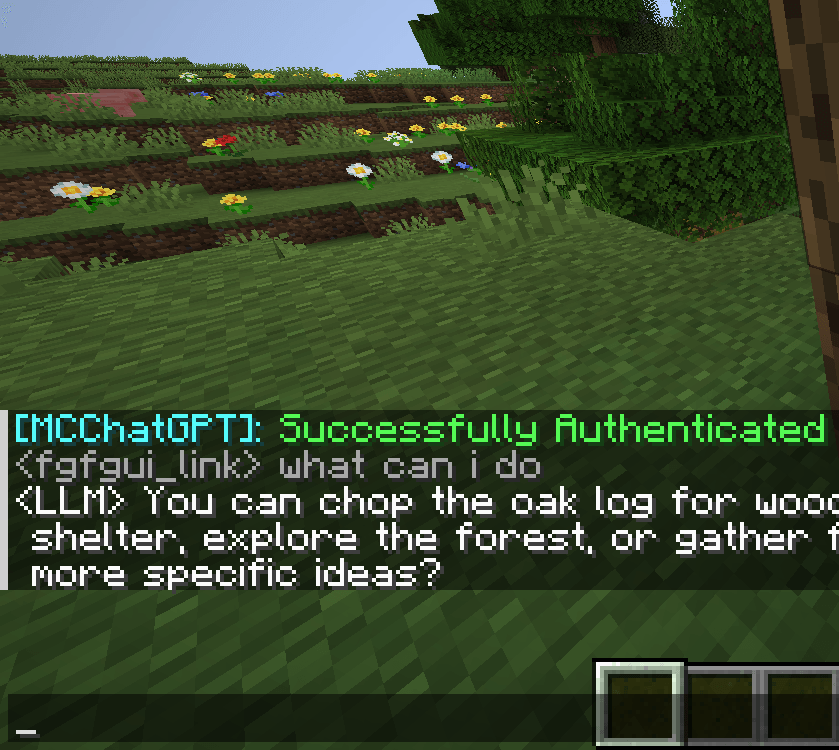
Project description from CurseForge.
Pick your setup
Choose the version and loader you play, then open the matching release.
Check the dependencies, then try the file in a copied instance before changing a world you care about.
Recent files
4 Jun 2026
4 Jun 2026
8 Mar 2026
8 Mar 2026
17 Jun 2025
17 Jun 2025
12 Jun 2025
12 Jun 2025
12 Jun 2025
11 Jun 2025
11 Jun 2025
10 Jun 2025
Looking for an older file? The official CurseForge project page is in Resources.
 mod
Additional shapes for any block, including modded ones
 mod
A map mod focused on ease of use, api strength, and beautiful aspects of your world.
 mod
Automatic chunk generation extension. Generates a buffer zone around online players, and generates around recent player activity when no players are online.