Minecraft version
Back to mods 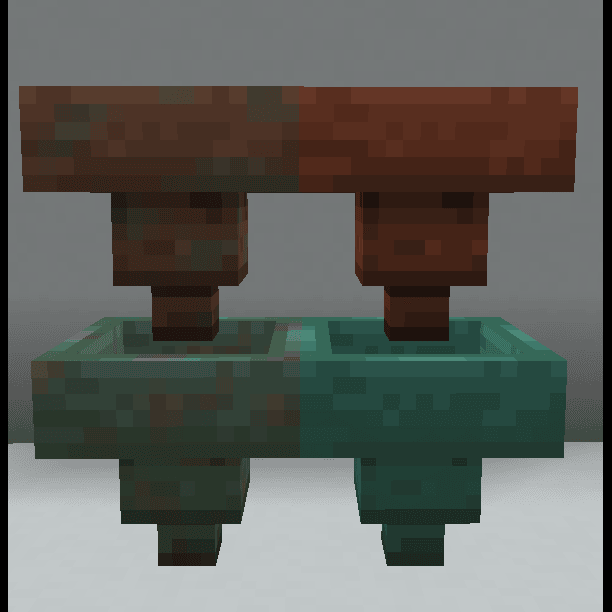
CurseForge · Minecraft mod
Chrono Circuits
Adds some restone vanilla+ blocks and items.
Choose a version Pick your version below, then grab the matching file.
Quick answer
Which Chrono Circuits release should I use?
Latest stable file chrono_circuits-21.4-2.0.5.jar
Game version 1.21.4, 1.21.4-Snapshot
Loader NeoForge
Chrono Circuits chrono_circuits-21.4-2.0.5.jar targets 1.21.4, 1.21.4-Snapshot with NeoForge. The project page does not say whether this file belongs on the client, dedicated server, or both. No extra mods listed for this file.
Where it goes
Is Chrono Circuits required on the client, server, or both?
The project page does not say whether this file belongs on the client, dedicated server, or both.
Client Source doesn’t say
Dedicated server Source doesn’t say
Loader for this release NeoForge
Required install it here Optional supported, not mandatory Not supported do not install here Source doesn’t say do not assume
The source does not explicitly classify this release as client-only or server-only.
What else does Chrono Circuits chrono_circuits-21.4-2.0.5.jar need?
chrono_circuits-21.4-2.0.5.jar. Change the file and its required mods may change too.
This file does not list any required mods. Do not add a library just because a different file uses it.
This file does not list any required or optional mods.
Before you install it
Add Chrono Circuits without breaking your instance.
Built for Chrono Circuits chrono_circuits-21.4-2.0.5.jar. Pick another file and the loader, install side or required mods may change.
- 01
Stick to this file
Use chrono_circuits-21.4-2.0.5.jar. It targets 1.21.4, 1.21.4-Snapshot with NeoForge; another release may have different loader, side or dependency requirements.
- 02
Bring the mods it needs
This file does not list any required mods. Do not add a library just because a different file uses it.
- 03
Put it on the correct side
The project page does not say whether this file belongs on the client, dedicated server, or both.
- 04
Pick the file you checked
Use the “Get this file” button beside chrono_circuits-21.4-2.0.5.jar. It opens that exact file at the source.
About this project
What does Chrono Circuits add?
Blocks and items added are as follows:
The Gold Hopper transfers items fast, though has lower inventory space
The Copper Hopper has a high inventory space, but transfers items slowly. There are no functional differences between oxidation variants
The Iron Pipe has a single slot and can only transfer items straight down, but transfers 16 items at a time
Copper Pressure Plates are player only pressure plates, and oxidation increases the time the pressure plate stays down
Light Detectors are a more specialized daylight detector that has three modes
- Sky light detects sky light levels and outputs that level of redstone signal
- Block light detects block light levels and also outputs that level of redstone signal
- The third state detects both types of light levels and outputs the higher light level as the redstone signal
Copper Grated Redstone Components are grounded against water. In-game this means that these components don't get washed away by liquids like water or lava, and can be waterlogged. These components are otherwise functional to the same degree as their base components, and can additionally be oxidized.
- The components that can be copper grated are the redstone torch, redstone repeater, and redstone comparator
Project description from CurseForge.
Pick your setup
Chrono Circuits by Minecraft version and loader
Choose the version and loader you play, then open the matching release.
Minecraft version
1.21.6-snapshot
1 loader buildMinecraft version
1.21.6
1 loader buildMinecraft version
1.21.5-Snapshot
1 loader buildMinecraft version
1.21.5
1 loader buildMinecraft version
1.21.4-Snapshot
1 loader buildMinecraft version
1.21.4
1 loader buildCheck the dependencies, then try the file in a copied instance before changing a world you care about.
Recent files
Chrono Circuits versions and loaders
chrono_circuits-21.4-2.0.5.jar
28 Oct 2025
Client Source doesn’t say Server Source doesn’t say Dependencies No extras listed Listed on Release listing
Check the 1.21.4-Snapshot · NeoForge setup 1.21.4NeoForge1.21.4-Snapshot release
chrono_circuits-21.4-2.0.3.jar
23 Oct 2025
Client Source doesn’t say Server Source doesn’t say Dependencies No extras listed Listed on Release listing
Check the 1.21.4-Snapshot · NeoForge setup 1.21.4NeoForge1.21.4-Snapshot release
chrono_circuits-21.4-2.0.2.jar
23 Oct 2025
Client Source doesn’t say Server Source doesn’t say Dependencies No extras listed Listed on Release listing
Check the 1.21.4-Snapshot · NeoForge setup 1.21.4NeoForge1.21.4-Snapshot release
chrono_circuits-21.4-2.0.1.jar
6 Oct 2025
Client Source doesn’t say Server Source doesn’t say Dependencies No extras listed Listed on Release listing
Check the 1.21.4-Snapshot · NeoForge setup 1.21.4NeoForge1.21.4-Snapshot release
chrono_circuits-21.4-2.0.0.jar
3 Oct 2025
Client Source doesn’t say Server Source doesn’t say Dependencies No extras listed Listed on Release listing
Check the 1.21.4-Snapshot · NeoForge setup 1.21.4NeoForge1.21.4-Snapshot release
chrono_circuits-21.6-1.2.1.jar
1 Jul 2025
Client Source doesn’t say Server Source doesn’t say Dependencies No extras listed Listed on Release listing
Check the 1.21.7 · NeoForge setup 1.21.6-snapshotNeoForge1.21.71.21.6 release
chrono_circuits-21.5-1.2.0.jar
1 Jul 2025
Client Source doesn’t say Server Source doesn’t say Dependencies No extras listed Listed on Release listing
Check the 1.21.5-Snapshot · NeoForge setup 1.21.51.21.5-SnapshotNeoForge release
chrono_circuits-21.4-1.2.0.jar
1 Jul 2025
Client Source doesn’t say Server Source doesn’t say Dependencies No extras listed Listed on Release listing
Check the 1.21.4-Snapshot · NeoForge setup 1.21.4NeoForge1.21.4-Snapshot release
chrono_circuits-21.6-1.1.0.jar
19 Jun 2025
Client Source doesn’t say Server Source doesn’t say Dependencies No extras listed Listed on Release listing
Check the 1.21.6-snapshot · NeoForge setup 1.21.6-snapshotNeoForge1.21.6 release
chrono_circuits-21.5-1.1.0.jar
19 Jun 2025
Client Source doesn’t say Server Source doesn’t say Dependencies No extras listed Listed on Release listing
Check the 1.21.5-Snapshot · NeoForge setup 1.21.51.21.5-SnapshotNeoForge release
21.4-1.0.0
chrono_circuits-21.4-1.0.0.jar
12 Jun 2025
Client Source doesn’t say Server Source doesn’t say Dependencies No extras listed Listed on Release listing
Check the 1.21.4-Snapshot · NeoForge setup 1.21.4NeoForge1.21.4-Snapshot release
Looking for an older file? The official CurseForge project page is in Resources.
 mod
CurseForge + Modrinth · Minecraft
Inventory Slots
A Fabric Minecraft mod for viewing container slot index's at the click of a button! Useful for development/configuration!
 mod
CurseForge · Minecraft
Mini Me
Have you ever been playing minecraft and thought to yourself "I could really use with an extra pair of hands" then this is the mod for you. Mini Mes can mine, farm, cut down tress and kill mobs for you!
 mod
CurseForge · Minecraft
Starter Wolf
Starter Wolf is a Minecraft Forge 1.20.1 mod giving players an auto-tamed pet on first join. It features an RPG leveling system where wolves gain health, damage, and size via combat. It also adds visual collar tiers and an auto-hunting Berserk mode.