

CurseForge · Minecraft mod
Coordinates HUD
An advanced Minecraft coordinate display mod that provides a customizable HUD showing coordinates, biome information, and much more!
Quick answer
Which Coordinates HUD release should I use?
Coordinates HUD coordhud-neoforge-1.21.5-1.0.0.jar targets 1.21.5 with NeoForge. The project page does not say whether this file belongs on the client, dedicated server, or both. No extra mods listed for this file.
Where it goes
Is Coordinates HUD required on the client, server, or both?
The project page does not say whether this file belongs on the client, dedicated server, or both.
The source does not explicitly classify this release as client-only or server-only.
What else does Coordinates HUD coordhud-neoforge-1.21.5-1.0.0.jar need?
coordhud-neoforge-1.21.5-1.0.0.jar. Change the file and its required mods may change too.
This file does not list any required mods. Do not add a library just because a different file uses it.
This file does not list any required or optional mods.
Before you install it
Add Coordinates HUD without breaking your instance.
Built for Coordinates HUD coordhud-neoforge-1.21.5-1.0.0.jar. Pick another file and the loader, install side or required mods may change.
- 01
Stick to this file
Use coordhud-neoforge-1.21.5-1.0.0.jar. It targets 1.21.5 with NeoForge; another release may have different loader, side or dependency requirements.
- 02
Bring the mods it needs
This file does not list any required mods. Do not add a library just because a different file uses it.
- 03
Put it on the correct side
The project page does not say whether this file belongs on the client, dedicated server, or both.
- 04
Pick the file you checked
Use the “Get this file” button beside coordhud-neoforge-1.21.5-1.0.0.jar. It opens that exact file at the source.
About this project
What does Coordinates HUD add?
Coordinates HUD
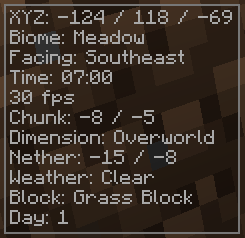
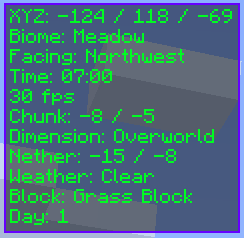
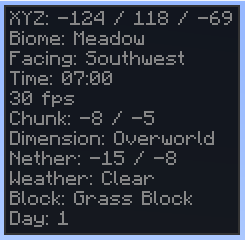
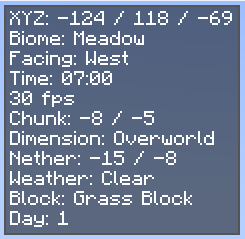
Coordinates HUD is a clean and highly customizable HUD for Minecraft. It displays essential data like coordinates, biome, direction, and more — without clutter. Perfect for explorers, builders, and technical players alike.
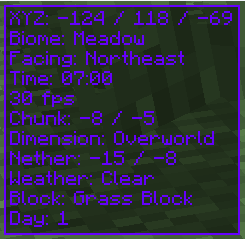
Theme Previews

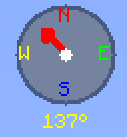
Compass

Features
- Real-time XYZ coordinates
- Biome and dimension display
- Cardinal direction compass
- Real-world & in-game clocks
- Weather, light levels, slime chunk check
- Speed, FPS, chunk and motion tracking
- Health, hunger, armor, target block info
Customization
- Built-in themes: Default, Dark, Rainbow, Minimal
- Custom colors and background options
- Adjustable position and scale
- Smooth animations, toggleable sections
Keybinds
- C: Toggle HUD
- G: Toggle Compass
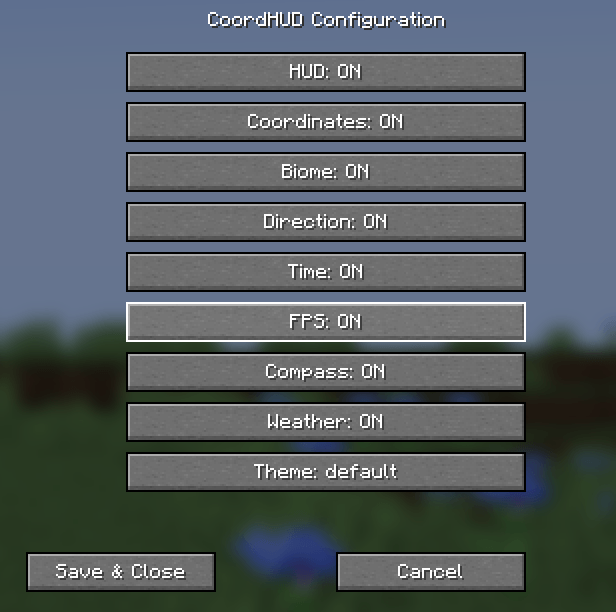
- H: Open Config Menu
Configuration Interface:

Installation
- Download for Fabric, Forge, NeoForge, or Quilt
- Place the
.jarfile into yourmodsfolder - Launch Minecraft — it auto-loads!
Requirements
- Minecraft 1.21.5
- Java 21 or higher
- Fabric Loader 0.15.11+ with Fabric API
- Forge 52.0.17+
- NeoForge 21.1.42+
- Quilt Loader (fully compatible)
Support & Source
Report bugs, request features, or view the code on GitHub.
Project description from CurseForge.
Pick your setup
Coordinates HUD by Minecraft version and loader
Choose the version and loader you play, then open the matching release.
1.21.4
1 loader build1.21.3
1 loader build1.21.2
1 loader build1.21.1
1 loader buildCheck the dependencies, then try the file in a copied instance before changing a world you care about.
Recent files
Coordinates HUD versions and loaders
coordhud-neoforge-1.21.5-1.0.0.jar
14 Jun 2025
CoordHUD-forge-1.21.5-1.0.0.jar
14 Jun 2025
coordhud-fabric-1.21.5-1.0.0.jar
14 Jun 2025
Looking for an older file? The official CurseForge project page is in Resources.