Fabric API Needed by Game Rules 2.0.1 for 26.3 Fabric
requiredMatching file found Matched file: 0.160.7+26.3

CurseForge · Minecraft mod
Modify game rules in your existing worlds.
Quick answer
Game Rules 2.0.1 for 26.3 Fabric targets 26.3 with Fabric. The project page does not say whether this file belongs on the client, dedicated server, or both. All 1 required mods have matching files.
Where it goes
The project page does not say whether this file belongs on the client, dedicated server, or both.
The source does not explicitly classify this release as client-only or server-only.
2.0.1 for 26.3 Fabric. Change the file and its required mods may change too.
Install Fabric API first. We found matching files for this game-version and loader setup.
We only count dependency files that match this setup. A file for another loader does not fill the gap.
Before you install it
Built for Game Rules 2.0.1 for 26.3 Fabric. Pick another file and the loader, install side or required mods may change.
Use 2.0.1 for 26.3 Fabric. It targets 26.3 with Fabric; another release may have different loader, side or dependency requirements.
Install Fabric API first. We found matching files for this game-version and loader setup.
The project page does not say whether this file belongs on the client, dedicated server, or both.
Use the “Get this file” button beside 2.0.1 for 26.3 Fabric. It opens that exact file at the source.
About this project

Modify game rules in your existing worlds, all without enabling cheats/commands! Open the game rule edit screen through Mod Menu or with the special keybinding created for the mod (by default not bound to any key).
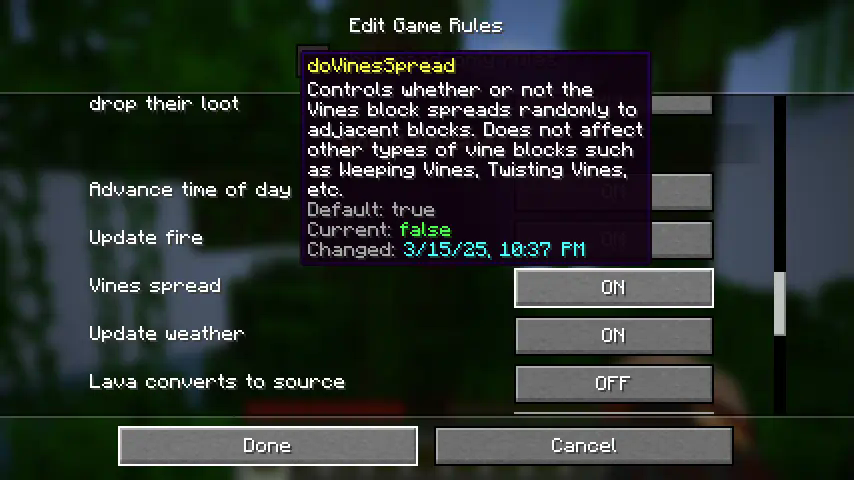
Every game rule in your world is available to edit. For multiplayer servers, editing game rules through the mod requires OP permissions.
An extra restriction exists for hardcore worlds - game rules in hardcore worlds can only be changed once! This was added as a balancing mechanism to allow long-running hardcore worlds to change settings like vine spreading (which may not have been an option years ago at world creation) without feeling too cheaty. The mod will show you the changed date and the exact time and date you changed each of the rules in your world, so that other folks might be able to hold you accountable!
The rules and behavior are still under evaluation (especially in relation to multiplayer servers), so if you have any thoughts or questions, feel free to open an issue on the mod's GitHub repo (https://github.com/Roundaround/mc-fabric-game-rules/issues).
Game rules have evolved over time, so earlier versions of this mod may look or behave a bit differently. Previous versions also included multiple variants that caused some rules to be immutable; variants have since been cut for simplicity, so every game rule is now editable.
Also on Modrinth · Source on GitHub · Report an issue

Project description from CurseForge.
Pick your setup
Choose the version and loader you play, then open the matching release.
Showing the newest 12 of 17 game versions. Older files are in the list below.
Check the dependencies, then try the file in a copied instance before changing a world you care about.
Recent files
gamerulesmod-fabric-2.0.1+26.3.jar
18 Sept 2026
gamerulesmod-neoforge-2.0.1+26.3.jar
18 Sept 2026
gamerulesmod-fabric-2.0.0+26.2.jar
20 Jun 2026
gamerulesmod-neoforge-2.0.0+26.2.jar
20 Jun 2026
gamerulesmod-forge-2.0.0+26.2.jar
20 Jun 2026
gamerulesmod-fabric-2.0.0+26.1.jar
9 Jun 2026
gamerulesmod-neoforge-2.0.0+26.1.jar
9 Jun 2026
gamerulesmod-forge-2.0.0+26.1.jar
9 Jun 2026
gamerulesmod-1.1.0+1.21.11.jar
8 Jun 2026
gamerulesmod-1.0.1+1.21.9.jar
2 Oct 2025
gamerulesmod-1.0.1+1.21.9-hardcore.jar
2 Oct 2025
gamerulesmod-1.0.1+1.21.9-technical.jar
2 Oct 2025
Looking for an older file? The official CurseForge project page is in Resources.
 mod
modAdds an assortment of new storage to Minecraft
 mod
modContains an assorted group of additions based around technology, machines, and logic.
 mod
modA random assortment of tools to add to your Minecraft world.