Minecraft version
Back to mods 
CurseForge · Minecraft mod
Utils Adder
Adds a lot of useful features related to the interface, gameplay and more
Choose a version Pick your version below, then grab the matching file.
Quick answer
Which Utils Adder release matches 1.21.5 Fabric?
Best match for your filters utilsmod-1.0+1.21.5.jar
Game version 1.21.5
Loader Fabric
Utils Adder utilsmod-1.0+1.21.5.jar targets 1.21.5 with Fabric. The project page does not say whether this file belongs on the client, dedicated server, or both. No extra mods listed for this file.
Where it goes
Is Utils Adder required on the client, server, or both?
The project page does not say whether this file belongs on the client, dedicated server, or both.
Client Source doesn’t say
Dedicated server Source doesn’t say
Loader for this release Fabric
Required install it here Optional supported, not mandatory Not supported do not install here Source doesn’t say do not assume
The source does not explicitly classify this release as client-only or server-only.
What else does Utils Adder utilsmod-1.0+1.21.5.jar need?
utilsmod-1.0+1.21.5.jar on 1.21.5 Fabric. Every mod below is checked against that same setup.
This file does not list any required mods. Do not add a library just because a different file uses it.
This file does not list any required or optional mods.
Before you install it
Add Utils Adder without breaking your instance.
Built for Utils Adder utilsmod-1.0+1.21.5.jar on 1.21.5 Fabric. Pick another file and the loader, install side or required mods may change.
- 01
Stick to this file
Use utilsmod-1.0+1.21.5.jar. It targets 1.21.5 with Fabric; another release may have different loader, side or dependency requirements.
- 02
Bring the mods it needs
This file does not list any required mods. Do not add a library just because a different file uses it.
- 03
Put it on the correct side
The project page does not say whether this file belongs on the client, dedicated server, or both.
- 04
Pick the file you checked
Use the “Get this file” button beside utilsmod-1.0+1.21.5.jar. It opens that exact file at the source.
About this project
What does Utils Adder add?
This mod adds a lot of useful features, such as:
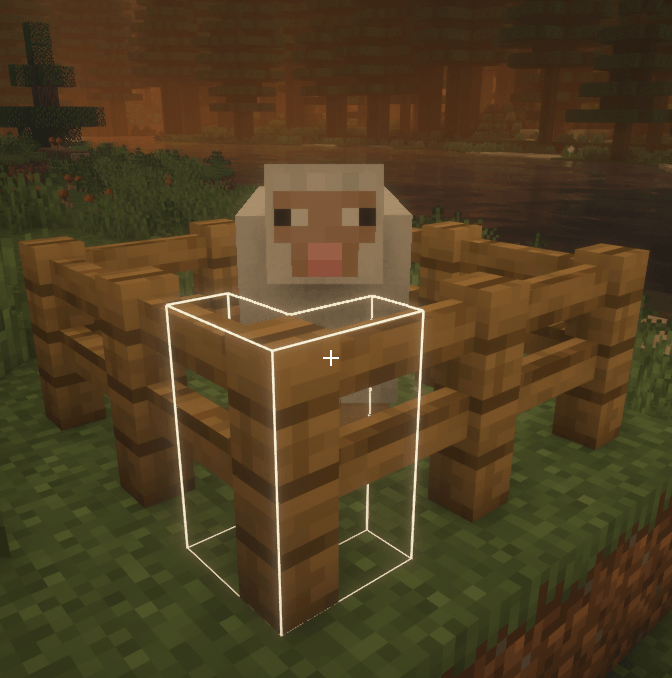
Changing the color and opacity of the block outline
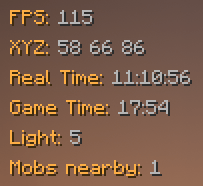
Some HUD elements that you can move anywhere on the screen
Current HUD elements list
- FPS
- Coordinates
- Real time
- Game time
- Level of lighting in the current block
- Number of mobs nearby
Simplified debug screen

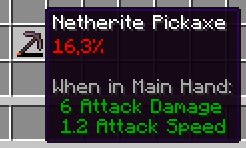
Showing durability in percentage
Autototem (automatically place an existing totem in your hand after you just used another one)
Autosprint (you dont have to press sprint key to sprint)
There are the following features in the mod, but they are in beta:
- Set a different crosshair instead of the standard one
- Disabling the armor rendering for all players (useful for screenshots)
To open settings screen, press U,
to drag items to another place on the screen, press F6
Dependency for UtilsMod mod is YACL
Other info
I'm going to add more features to this mod later, now I just ran out of ideas.
Now, UtilsMod is available for only two versions of the game (1.21.4 and 1.21.5), in the future, perhaps the mod will be released for older versions, like 1.20.1.
I have not completed the development of this mod to the end, one of the consequences of this is that now it has ARR license.
I really hope you enjoy this mod!
Project description from CurseForge.
Pick your setup
Utils Adder by Minecraft version and loader
Choose the version and loader you play, then open the matching release.
Minecraft version
1.21.4
1 loader buildCheck the dependencies, then try the file in a copied instance before changing a world you care about.
Recent files
Utils Adder versions and loaders
utilsmod-1.0+1.21.5.jar
23 Jun 2025
Client Source doesn’t say Server Source doesn’t say Dependencies No extras listed Listed on Release listing
Check the 1.21.5 · Fabric setup 1.21.5Fabric release
Looking for an older file? The official CurseForge project page is in Resources.
 mod
CurseForge · Minecraft
NeroEconomy
Buy, sell, haul and bid — a player-driven economy that turns a Neroland server from sixteen solo grinds into one living market.
 mod
CurseForge · Minecraft
No Trade Cycling, Just Pick
Stop rerolling villagers. Press Pick trade and select any 2 trades its profession can offer (max-level enchanted books included). Fast trade and saves time.
 mod
CurseForge · Minecraft
NeroSpace
Mine alien ore, build machines to refine it, and craft tiered rockets to blast off to new planet-dimensions full of exotic ores. A space-exploration tech mod that turns survival into a journey from your first pickaxe to interstellar travel.