Minecraft version
Back to mods 
CurseForge · Minecraft mod
Inventory Management Deluxe
Yet another inventory sorting mod — but this time, it's built to be the best.
Choose a version Pick your version below, then grab the matching file.
Quick answer
Which Inventory Management Deluxe release should I use?
Latest stable file inventorymanagement-1.21.1-NeoForge-1.0.7.jar
Game version 1.21.1
Loader NeoForge
Inventory Management Deluxe inventorymanagement-1.21.1-NeoForge-1.0.7.jar targets 1.21.1 with NeoForge. The project page does not say whether this file belongs on the client, dedicated server, or both. No extra mods listed for this file.
Where it goes
Is Inventory Management Deluxe required on the client, server, or both?
The project page does not say whether this file belongs on the client, dedicated server, or both.
Client Source doesn’t say
Dedicated server Source doesn’t say
Loader for this release NeoForge
Required install it here Optional supported, not mandatory Not supported do not install here Source doesn’t say do not assume
The source does not explicitly classify this release as client-only or server-only.
What else does Inventory Management Deluxe inventorymanagement-1.21.1-NeoForge-1.0.7.jar need?
inventorymanagement-1.21.1-NeoForge-1.0.7.jar. Change the file and its required mods may change too.
This file does not list any required mods. Do not add a library just because a different file uses it.
This file does not list any required or optional mods.
Before you install it
Add Inventory Management Deluxe without breaking your instance.
Built for Inventory Management Deluxe inventorymanagement-1.21.1-NeoForge-1.0.7.jar. Pick another file and the loader, install side or required mods may change.
- 01
Stick to this file
Use inventorymanagement-1.21.1-NeoForge-1.0.7.jar. It targets 1.21.1 with NeoForge; another release may have different loader, side or dependency requirements.
- 02
Bring the mods it needs
This file does not list any required mods. Do not add a library just because a different file uses it.
- 03
Put it on the correct side
The project page does not say whether this file belongs on the client, dedicated server, or both.
- 04
Pick the file you checked
Use the “Get this file” button beside inventorymanagement-1.21.1-NeoForge-1.0.7.jar. It opens that exact file at the source.
About this project
What does Inventory Management Deluxe add?
Inventory Management Deluxe
This is a NeoForge port of the Fabric version by the great Roundaround, support him on Ko-fi !! Discord <--
It has many improvements over the regular Fabric version. Such as Sorting modes, Stack Refill, etc..
Sort and transfer items with the click of a button! Adds several buttons to your inventory and containers that let you sort, transfer, and automatically stack your items. Works in single player by installing on your client, and in multiplayer by installing on both your client AND the server. There's middle-click sorting btw :3
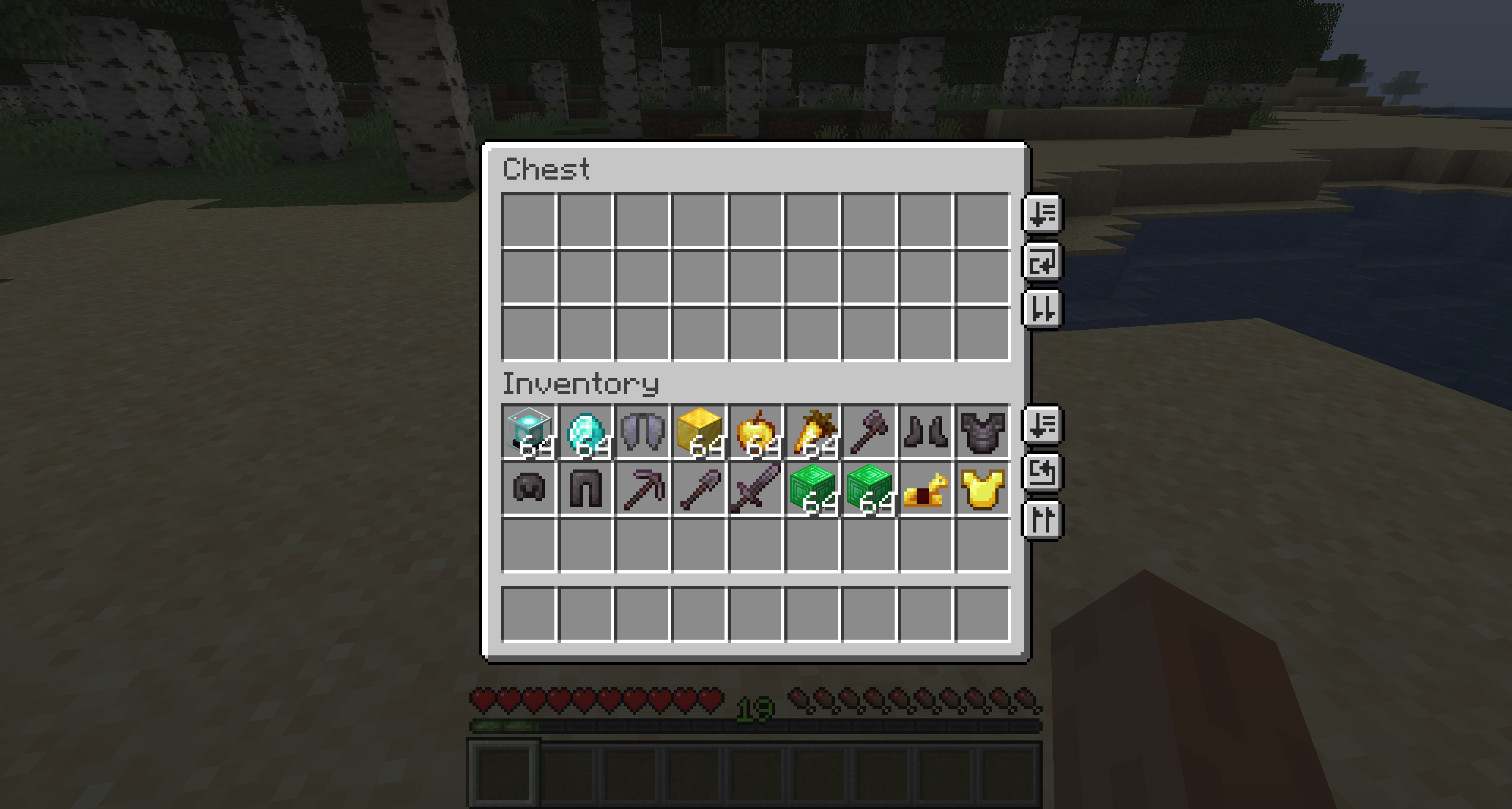
Features
Sort
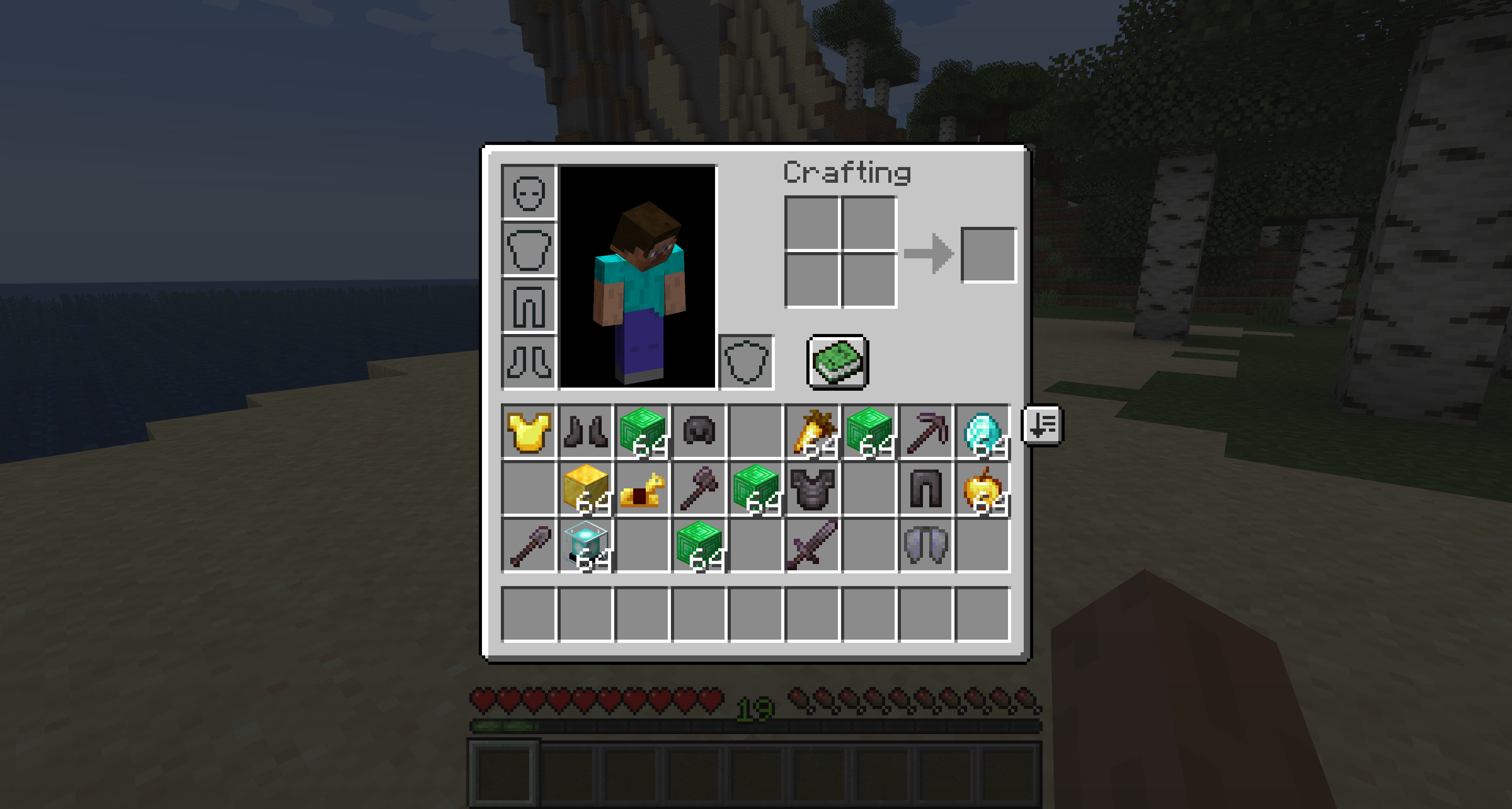
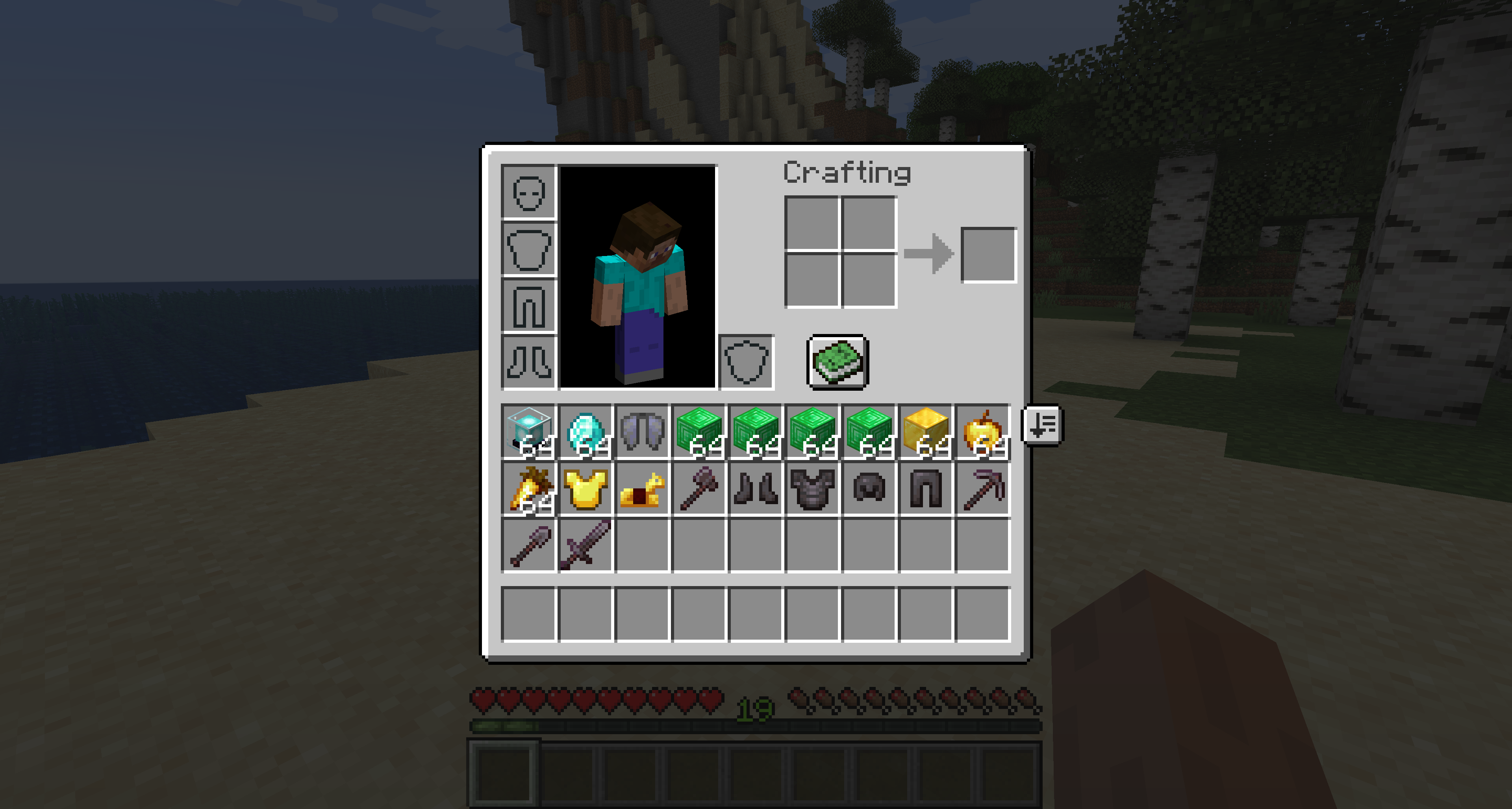
A sort button appears in all supported containers and your inventory. Clicking this button will sort everything automatically! You can choose from different sorting styles:
- Alphabetical - Groups similar items together (default)
- By Amount - Items you have more of appear first
- By Mod - Groups items by which mod they come from
Don't worry - sorting ignores your hotbar so it won't mess up your main tools!
Before
After
Transfer All
The place/take all buttons move everything from one inventory to another! Perfect for quickly emptying out your inventory into a chest or grabbing everything from a container. It's smart enough to skip your hotbar and equipped items.
Auto-Stack
These buttons fill up your partial stacks without moving entire stacks around. Great for cleaning up messy inventories where you have cobblestone scattered across multiple slots!
Before
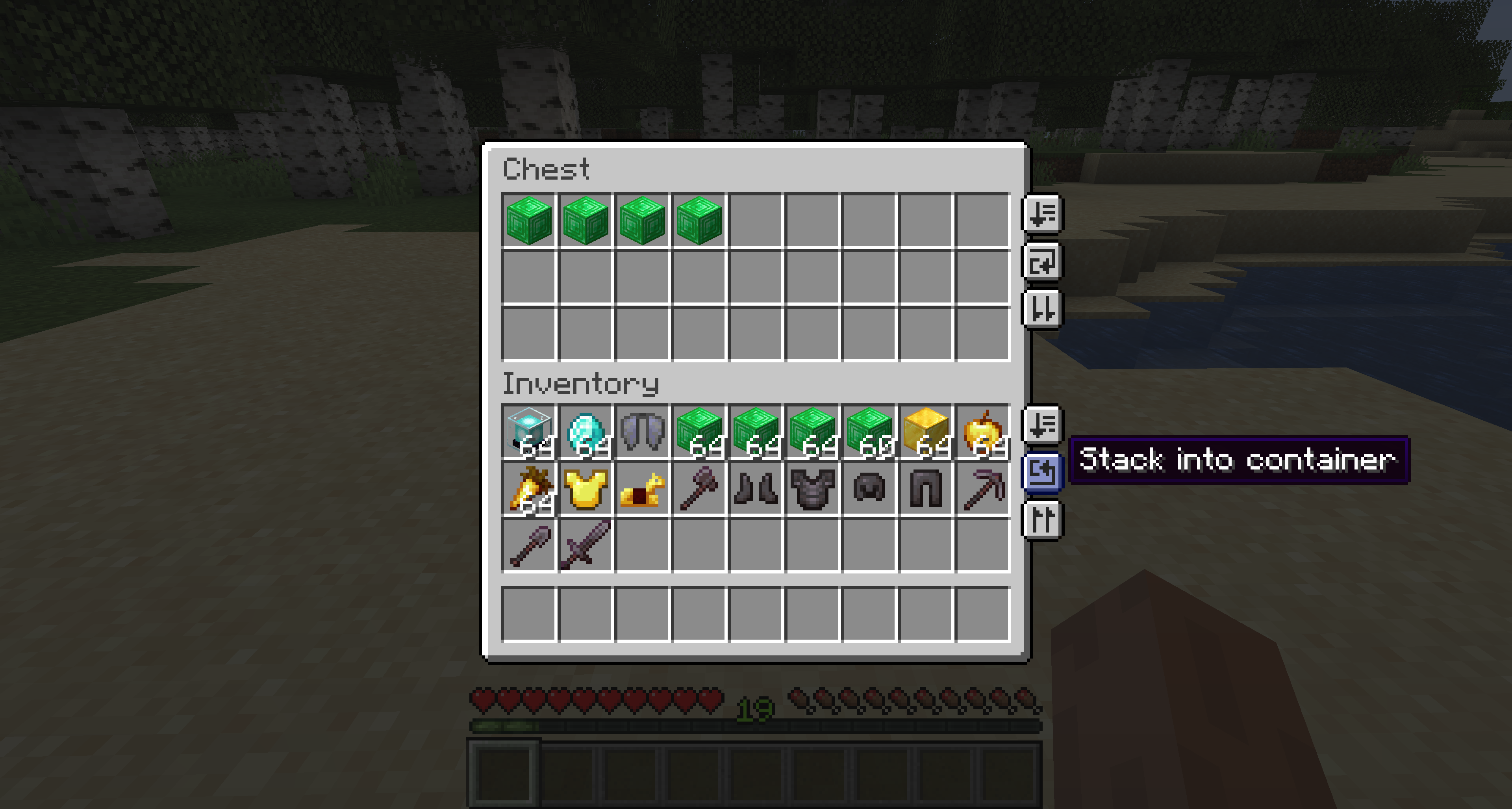
After
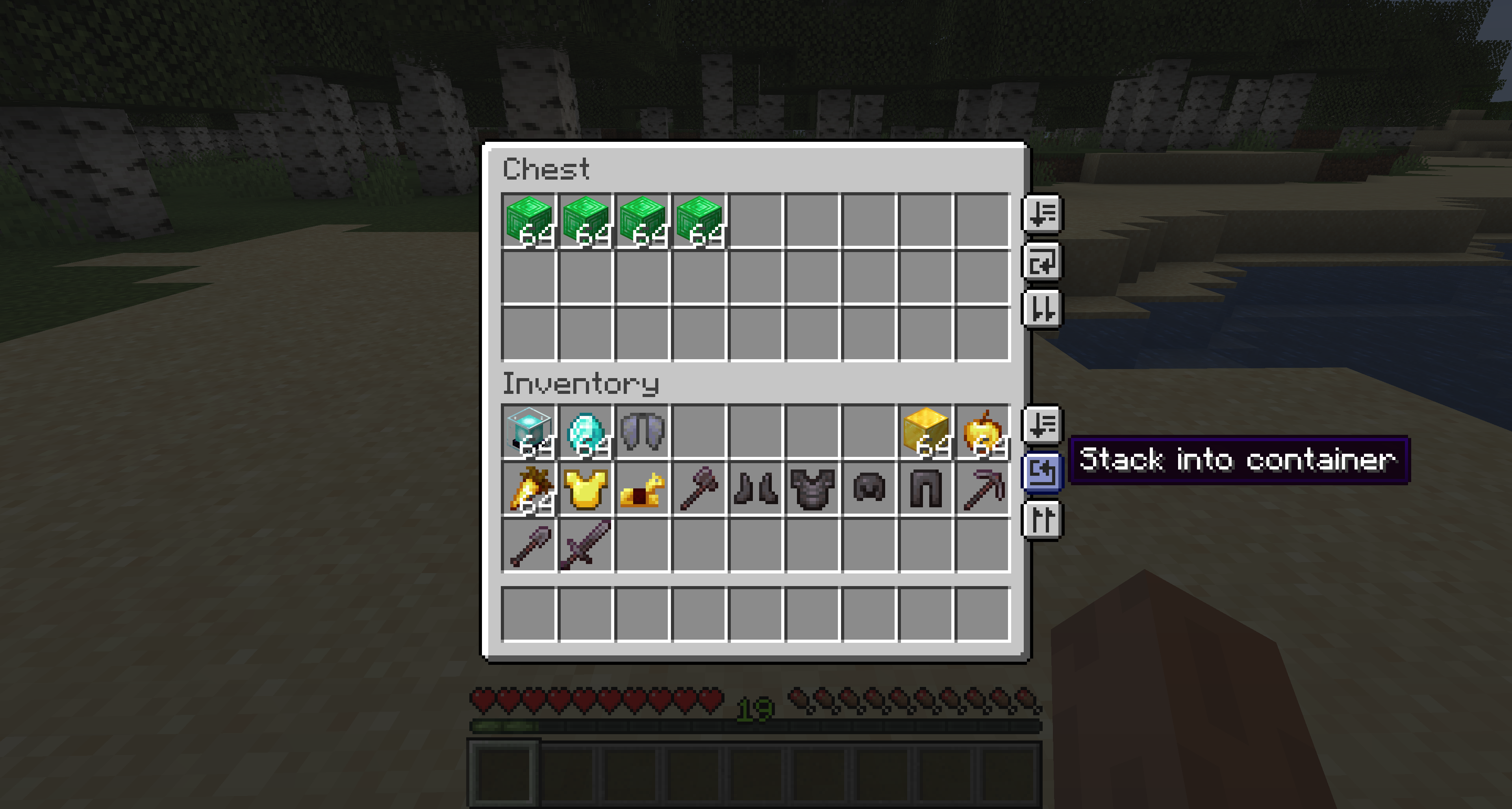
Works with Modded Containers
This mod plays nice with pretty much every storage mod out there! It automatically figures out which containers are safe to use and which ones to avoid:
Supported Mods
- Iron Chests, Expanded Storage, Metal Barrels - Works perfectly
- Create mod storage - Depots, vaults, etc.
- Quark storage improvements
- Most other storage mods - If it stores items, it probably works!
Smart Enough to Stay Away From
- ME Systems (Applied Energistics, Refined Storage) - Won't interfere with your auto-crafting
- Machine inputs/outputs - Knows not to mess with your furnace fuel slots
- Crafting grids - Leaves your crafting recipes alone
Auto-Refill
Ever run out of blocks while building a massive project? The auto-refill feature has your back! When you use up an item in your hand, it automatically grabs more from your inventory:
- Replaces broken tools with fresh ones
- Refills blocks while you're building
- Swaps in new items when you throw or consume something
- Works with potions, food, arrows - basically everything!
You can turn this off in the config if you don't want it.
Easy Customization
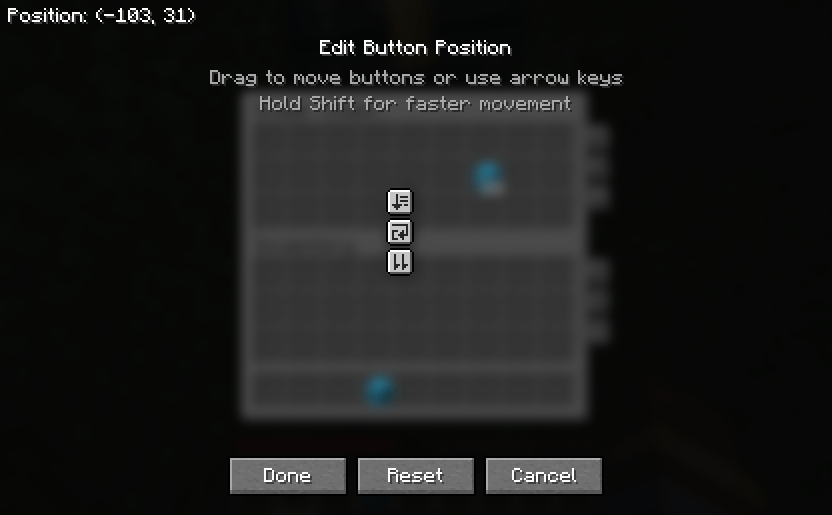
Button Positioning
Don't like where the buttons show up? Easy to fix:
- Hold Ctrl + click any button to move them around for that specific GUI
- Change the default position in the config for all containers
- Preview changes as you drag them around
Configuration
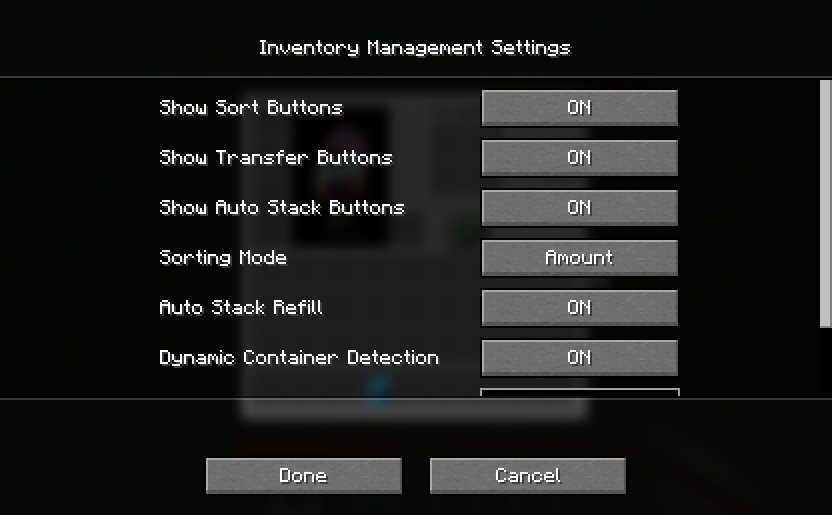
Simple config file lets you:
- Turn individual button types on/off
- Pick your preferred sorting style
- Enable/disable auto-refill
- Fix compatibility with specific mods if needed
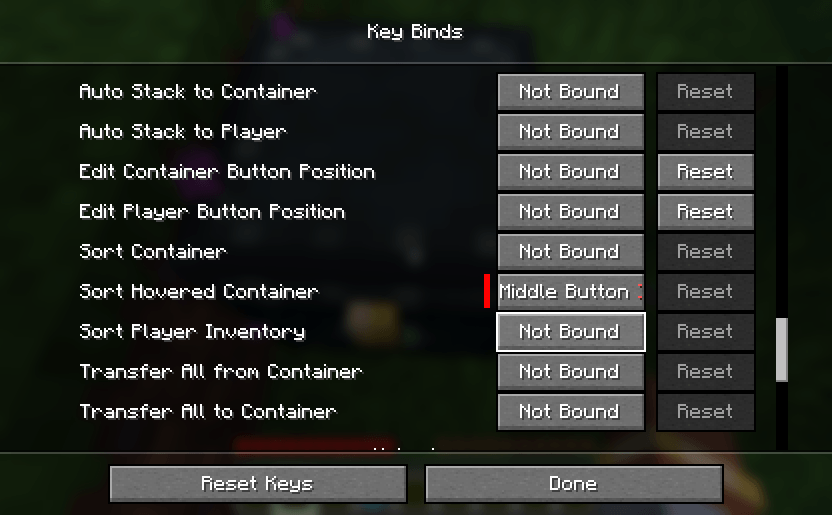
Keybinds
Prefer keyboard shortcuts? You can bind keys for:
- Sorting your inventory or containers
- Transferring items back and forth
- Auto-stacking
- Middle-click sorting - just middle-click any inventory to sort it!
If you'd like to support me and the development of my mods, I recommend trying out BisectHosting. Use code "project8gbderam" to get 25% off your first month of a gaming server for new customers. They offer 24/7 support and lightning-fast response times, ensuring you're in great hands and providing exceptional assistance for all your gaming needs.

Project description from CurseForge.
Pick your setup
Inventory Management Deluxe by Minecraft version and loader
Choose the version and loader you play, then open the matching release.
Minecraft version
1.20.1
1 loader buildCheck the dependencies, then try the file in a copied instance before changing a world you care about.
Recent files
Inventory Management Deluxe versions and loaders
inventorymanagement-1.21.1-NeoForge-1.0.7.jar
13 May 2026
Client Source doesn’t say Server Source doesn’t say Dependencies No extras listed Listed on Release listing
Check the 1.21.1 · NeoForge setup 1.21.1NeoForge release
inventorymanagement-1.20.1-Forge-1.0.7.jar
13 May 2026
Client Source doesn’t say Server Source doesn’t say Dependencies No extras listed Listed on Release listing
Check the 1.20.1 · Forge setup 1.20.1Forge release
inventorymanagement-1.21.1-NeoForge-1.0.5.jar
10 May 2026
Client Source doesn’t say Server Source doesn’t say Dependencies No extras listed Listed on Release listing
Check the 1.21.1 · NeoForge setup 1.21.1NeoForge release
inventorymanagement-1.20.1-Forge-1.0.5.jar
10 May 2026
Client Source doesn’t say Server Source doesn’t say Dependencies No extras listed Listed on Release listing
Check the 1.20.1 · Forge setup 1.20.1Forge release
inventorymanagement-1.21.1-NeoForge-1.0.4.jar
4 May 2026
Client Source doesn’t say Server Source doesn’t say Dependencies No extras listed Listed on Release listing
Check the 1.21.1 · NeoForge setup 1.21.1NeoForge release
inventorymanagement-1.20.1-Forge-1.0.4.jar
4 May 2026
Client Source doesn’t say Server Source doesn’t say Dependencies No extras listed Listed on Release listing
Check the 1.20.1 · Forge setup 1.20.1Forge release
Inventory Management Deluxe-1.21.1-NeoForge-1.0.3.jar
20 Jul 2025
Client Source doesn’t say Server Source doesn’t say Dependencies No extras listed Listed on Release listing
Check the 1.21.1 · NeoForge setup NeoForge1.21.1 release
Inventory Management Deluxe-1.20.1-Forge-1.0.3.jar
20 Jul 2025
Client Source doesn’t say Server Source doesn’t say Dependencies No extras listed Listed on Release listing
Check the 1.20.1 · Forge setup 1.20.1Forge release
Inventory Management Deluxe-1.21.1-NeoForge-1.0.2.jar
29 Jun 2025
Client Source doesn’t say Server Source doesn’t say Dependencies No extras listed Listed on Release listing
Check the 1.21.1 · NeoForge setup NeoForge1.21.1 release
Inventory Management Deluxe-1.20.1-Forge-1.0.3.jar
29 Jun 2025
Client Source doesn’t say Server Source doesn’t say Dependencies No extras listed Listed on Release listing
Check the 1.20.1 · Forge setup 1.20.1Forge release
Inventory Management Deluxe-1.20.1-Forge-1.0.2.jar
28 Jun 2025
Client Source doesn’t say Server Source doesn’t say Dependencies No extras listed Listed on Release listing
Check the 1.20.1 · Forge setup 1.20.1Forge release
Inventory Management Deluxe-1.20.1-Forge-1.0.1.jar
27 Jun 2025
Client Source doesn’t say Server Source doesn’t say Dependencies No extras listed Listed on Release listing
Check the 1.20.1 · Forge setup 1.20.1Forge release
Looking for an older file? The official CurseForge project page is in Resources.
 mod
CurseForge + Modrinth · Minecraft
Asymmetric Battles API
Expand the capabilities of Cobblemon's battle engine!
 mod
CurseForge · Minecraft
Touhou Little Maid: Beacon
A addon mod for Touhou Little Maid which makes your maid a mobile beacon.
 mod
CurseForge · Minecraft
Sparrow's Homestead Chronicles
Standalone adventure journal featuring quests, XP progression, a customizable HUD, and an adventure library for Minecraft 1.21.1.