Minecraft version
Back to mods 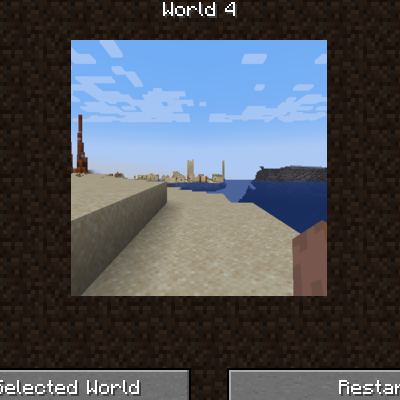
CurseForge · Minecraft mod
PS1 World Select Screen
Changes world select screen to resemble retro systems
Choose a version Pick your version below, then grab the matching file.
Quick answer
Which PS1 World Select Screen release should I use?
Latest stable file ps1worldselectscreen-1.18.2-11.jar
Game version 1.18.2
Loader Forge
PS1 World Select Screen ps1worldselectscreen-1.18.2-11.jar targets 1.18.2 with Forge. The project page does not say whether this file belongs on the client, dedicated server, or both. No extra mods listed for this file.
Where it goes
Is PS1 World Select Screen required on the client, server, or both?
The project page does not say whether this file belongs on the client, dedicated server, or both.
Client Source doesn’t say
Dedicated server Source doesn’t say
Loader for this release Forge
Required install it here Optional supported, not mandatory Not supported do not install here Source doesn’t say do not assume
The source does not explicitly classify this release as client-only or server-only.
What else does PS1 World Select Screen ps1worldselectscreen-1.18.2-11.jar need?
ps1worldselectscreen-1.18.2-11.jar. Change the file and its required mods may change too.
This file does not list any required mods. Do not add a library just because a different file uses it.
This file does not list any required or optional mods.
Before you install it
Add PS1 World Select Screen without breaking your instance.
Built for PS1 World Select Screen ps1worldselectscreen-1.18.2-11.jar. Pick another file and the loader, install side or required mods may change.
- 01
Stick to this file
Use ps1worldselectscreen-1.18.2-11.jar. It targets 1.18.2 with Forge; another release may have different loader, side or dependency requirements.
- 02
Bring the mods it needs
This file does not list any required mods. Do not add a library just because a different file uses it.
- 03
Put it on the correct side
The project page does not say whether this file belongs on the client, dedicated server, or both.
- 04
Pick the file you checked
Use the “Get this file” button beside ps1worldselectscreen-1.18.2-11.jar. It opens that exact file at the source.
About this project
What does PS1 World Select Screen add?
This mod overhauls the World Selection screen to have a more retro feel, note that this has most functionality disabled including the ability to add or delete worlds, but can be temporarily restored by changing the config.
After selecting a world, there are 2 options, Play Selected World and Restart. Play Selected World functions as normal, but Restart will load a backup of the world stored in the /restarts folder (must place backups manually)
The mod includes functionality that refreshes the preview image after it's played.
Clientside only, will have no function on servers.
Note: this mod was made for PS1 Edition but can be used in any pack.
Project description from CurseForge.
Pick your setup
PS1 World Select Screen by Minecraft version and loader
Choose the version and loader you play, then open the matching release.
Check the dependencies, then try the file in a copied instance before changing a world you care about.
Recent files
PS1 World Select Screen versions and loaders
ps1worldselectscreen-1.18.2-11.jar
29 Oct 2025
Client Source doesn’t say Server Source doesn’t say Dependencies No extras listed Listed on Release listing
Check the 1.18.2 · Forge setup 1.18.2Forge release
ps1worldselectscreen-1.18.2-8.jar
22 Sept 2025
Client Source doesn’t say Server Source doesn’t say Dependencies No extras listed Listed on Release listing
Check the 1.18.2 · Forge setup 1.18.2Forge release
ps1worldselectscreen-1.18.2-7.jar
13 Sept 2025
Client Source doesn’t say Server Source doesn’t say Dependencies No extras listed Listed on Release listing
Check the 1.18.2 · Forge setup 1.18.2Forge release
ps1worldselectscreen-1.18.2-6.jar
26 Jun 2025
Client Source doesn’t say Server Source doesn’t say Dependencies No extras listed Listed on Release listing
Check the 1.18.2 · Forge setup 1.18.2Forge release
ps1worldselectscreen-1.18.2-5.jar
24 Jun 2025
Client Source doesn’t say Server Source doesn’t say Dependencies No extras listed Listed on Release listing
Check the 1.18.2 · Forge setup 1.18.2Forge release
Looking for an older file? The official CurseForge project page is in Resources.
 mod
CurseForge · Minecraft
AliveCombat
AliveCombat makes Minecraft combat more alive by refining vanilla mechanics with smoother attacks and smarter targeting in a lightweight, fully client-side mod.
 mod
CurseForge · Minecraft
No Nametags (Hidden nametags)
Automatically hides player nametags upon joining a world or server for better immersion, PvP, and roleplay.
 mod
CurseForge · Minecraft
FW Paint
Client first mod, paint block gradients and 3D-noise fills from your inventory.