Curios API Optional for Player Statues PlayerStatues-1.21.1-2.0.1.jar
optionalMatching file found Matched file: curios-neoforge-9.6.0+1.21.1.jar
CurseForge · Minecraft mod
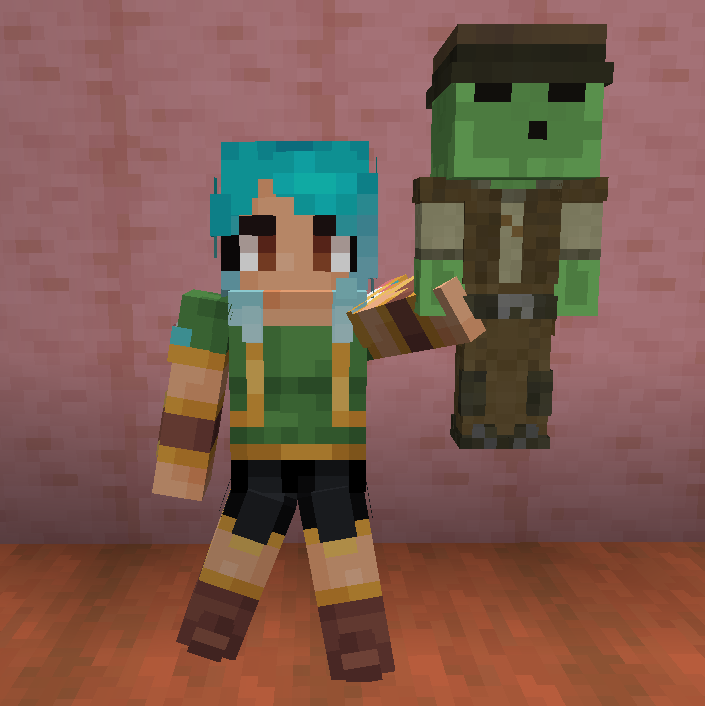
Adds a armor stand like entity with player skins
Quick answer
Player Statues PlayerStatues-1.21.1-2.0.1.jar targets 1.21.1 with NeoForge. The project page does not say whether this file belongs on the client, dedicated server, or both. No extra mods listed for this file.
Where it goes
The project page does not say whether this file belongs on the client, dedicated server, or both.
The source does not explicitly classify this release as client-only or server-only.
PlayerStatues-1.21.1-2.0.1.jar. Change the file and its required mods may change too.
This file does not list any required mods. Do not add a library just because a different file uses it.
We only count dependency files that match this setup. A file for another loader does not fill the gap.
Before you install it
Built for Player Statues PlayerStatues-1.21.1-2.0.1.jar. Pick another file and the loader, install side or required mods may change.
Use PlayerStatues-1.21.1-2.0.1.jar. It targets 1.21.1 with NeoForge; another release may have different loader, side or dependency requirements.
This file does not list any required mods. Do not add a library just because a different file uses it.
The project page does not say whether this file belongs on the client, dedicated server, or both.
Use the “Get this file” button beside PlayerStatues-1.21.1-2.0.1.jar. It opens that exact file at the source.
About this project
The Player Statue is a block you can place down which looks like a little player, if it has no player name attached it'll take the skin of the user that placed them. You can rename the Player Statue in an anvil to attach a username (Shift clicking does not work).
If you right-click your Player Statue with Phantom membrane it'll become a bigger variant which behaves like an armor stand with the ability to pose them, perfect to make your Minecraft worlds feel more alive.
This mod is a standalone version of the Player Statue feature from Statues.

Need a server? Get 20% off your first month by using promo code "mrbysco"
For questions feel free to join my Discord.

 -Mrbysco
-ShyNieke
Project description from CurseForge.
Pick your setup
Choose the version and loader you play, then open the matching release.
Check the dependencies, then try the file in a copied instance before changing a world you care about.
Recent files
PlayerStatues-26.2-4.0.0.jar
1 Sept 2026
1 Sept 2026
1 Sept 2026
PlayerStatues-1.21.1-2.0.1.jar
1 Sept 2026
PlayerStatues-26.1.2-3.0.0.jar
19 Jul 2026
19 Jul 2026
PlayerStatues-1.21.1-2.0.0.jar
23 Dec 2025
23 Dec 2025
PlayerStatues-1.20.1-1.0.3.jar
30 Jun 2025
30 Jun 2025
PlayerStatues-1.20.1-1.0.2.jar
28 Jun 2025
28 Jun 2025
Looking for an older file? The official CurseForge project page is in Resources.
 mod
Adds pokemon cities, gyms and structures!
 mod
The ultimate performance mod designed with heavy modpacks in mind!
 mod
Restores the classic look of Minecraft's achievement interface, with new additions and quality-of-life improvements. Brings back the nostalgic feel of the old days while making achievements more convenient to use.