Minecraft version
Back to mods 
CurseForge · Minecraft mod
BlockExporter - Icon Export Tool
Export item icon renders as they appear in inventory slots.
Choose a version Pick your version below, then grab the matching file.
Quick answer
Which BlockExporter - Icon Export Tool release should I use?
Latest stable file mc1.20.1-0.1.0-forge
Game version 1.20.1
Loader Forge
BlockExporter - Icon Export Tool mc1.20.1-0.1.0-forge targets 1.20.1 with Forge. The project page does not say whether this file belongs on the client, dedicated server, or both. No extra mods listed for this file.
Where it goes
Is BlockExporter - Icon Export Tool required on the client, server, or both?
The project page does not say whether this file belongs on the client, dedicated server, or both.
Client Source doesn’t say
Dedicated server Source doesn’t say
Loader for this release Forge
Required install it here Optional supported, not mandatory Not supported do not install here Source doesn’t say do not assume
The source does not explicitly classify this release as client-only or server-only.
What else does BlockExporter - Icon Export Tool mc1.20.1-0.1.0-forge need?
mc1.20.1-0.1.0-forge. Change the file and its required mods may change too.
This file does not list any required mods. Do not add a library just because a different file uses it.
This file does not list any required or optional mods.
Before you install it
Add BlockExporter - Icon Export Tool without breaking your instance.
Built for BlockExporter - Icon Export Tool mc1.20.1-0.1.0-forge. Pick another file and the loader, install side or required mods may change.
- 01
Stick to this file
Use mc1.20.1-0.1.0-forge. It targets 1.20.1 with Forge; another release may have different loader, side or dependency requirements.
- 02
Bring the mods it needs
This file does not list any required mods. Do not add a library just because a different file uses it.
- 03
Put it on the correct side
The project page does not say whether this file belongs on the client, dedicated server, or both.
- 04
Pick the file you checked
Use the “Get this file” button beside mc1.20.1-0.1.0-forge. It opens that exact file at the source.
About this project
What does BlockExporter - Icon Export Tool add?
BlockExporter - Icon Export Tool
A Minecraft mod that exports item icon renders as they appear in inventory slots.
Supported Platforms
- Modern Minecraft with:
- Fabric
- NeoForge
- Forge
- Minecraft Beta 1.7.3 & Alpha 1.1.2_01 (with ModLoader)
Requirements
- One of the supported mod loaders mentioned above
Usage
- Install the mod along with the required API for your mod loader
- Launch Minecraft
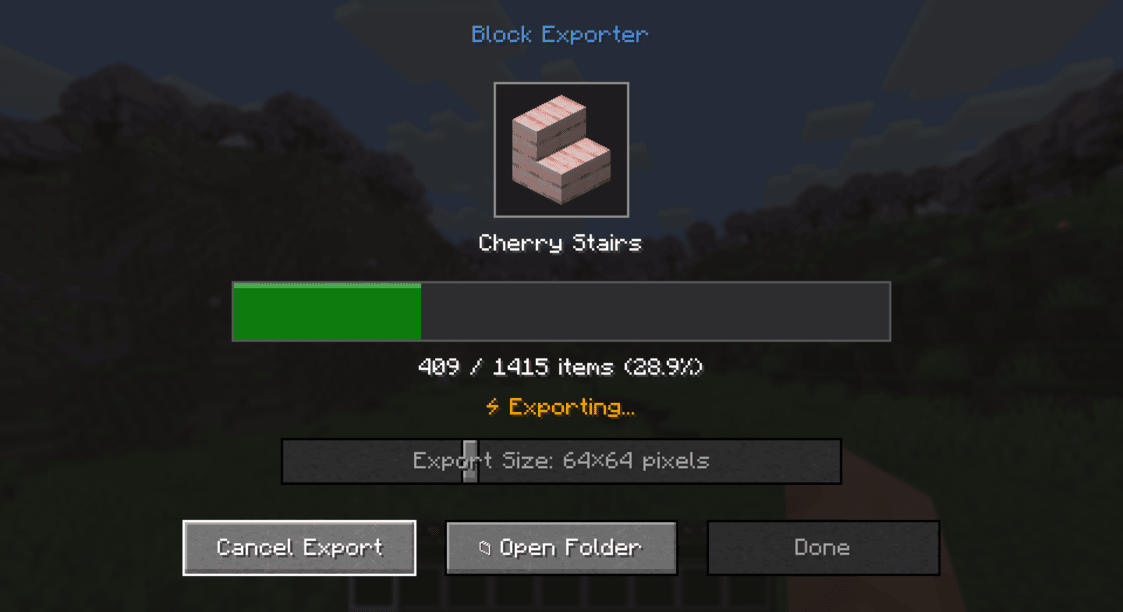
- Press the "i" key to open the export menu
- Find the exported textures in the
item_exportsfolder inside your Minecraft directory
Output Format
- Each texture is saved as a PNG file
- File naming format:
namespace_itemid.png(e.g.,minecraft_diamond.png) - Available output sizes: 16x16, 32x32, 64x64, 128x128, 512x512, 1024x1024 pixels
- Images include transparency where applicable
License
This project is licensed under the MIT License - see the LICENSE file for details.
Project description from CurseForge.
Pick your setup
BlockExporter - Icon Export Tool by Minecraft version and loader
Choose the version and loader you play, then open the matching release.
Minecraft version
a1.1.2_01
1 loader buildMinecraft version
26.1.2
1 loader buildMinecraft version
1.21.10
1 loader buildMinecraft version
1.21.7
2 loader buildsMinecraft version
1.20.1
1 loader buildMinecraft version
1.13.2
1 loader buildCheck the dependencies, then try the file in a copied instance before changing a world you care about.
Recent files
BlockExporter - Icon Export Tool versions and loaders
mc1.20.1-0.1.0-forge
blockexporter-forge-0.1.0+mc1.20.1.jar
20 May 2026
Client Source doesn’t say Server Source doesn’t say Dependencies No extras listed Listed on Release listing
Check the 1.20.1 · Forge setup 1.20.1Forge release
mc26.1.2-0.1.0-fabric
blockexporter-fabric-0.1.0+mc26.1.2.jar
20 May 2026
Client Source doesn’t say Server Source doesn’t say Dependencies No extras listed Listed on Release listing
Check the 26.1.2 · Fabric setup Fabric26.1.2 release
mc1.21.10-0.1.0-fabric
blockexporter-fabric-0.1.0+mc1.21.10.jar
3 Nov 2025
Client Source doesn’t say Server Source doesn’t say Dependencies No extras listed Listed on Release listing
Check the 1.21.10 · Fabric setup Fabric1.21.10 release
mca1.1.2_01-0.1.0
blockexporter-0.1.0+mca1.1.2_01.jar
4 Jul 2025
Client Optional Server Optional Dependencies No extras listed Listed on Release listing
Check the a1.1.2_01 · modloader setup a1.1.2_01modloader release
mc1.21.7-0.1.0-fabric
blockexporter-fabric-0.1.0+mc1.21.7.jar
2 Jul 2025
Client Source doesn’t say Server Source doesn’t say Dependencies No extras listed Listed on Release listing
Check the 1.21.7 · Fabric setup Fabric1.21.7 release
mc1.21.7-0.1.0-neoforge
blockexporter-neoforge-0.1.0+mc1.21.7.jar
2 Jul 2025
Client Source doesn’t say Server Source doesn’t say Dependencies No extras listed Listed on Release listing
Check the 1.21.7 · NeoForge setup NeoForge1.21.7 release
mc1.13.2-0.1.0-forge
blockexporter-forge-0.1.0+mc1.13.2.jar
2 Jul 2025
Client Source doesn’t say Server Source doesn’t say Dependencies No extras listed Listed on Release listing
Check the 1.13.2 · Forge setup Forge1.13.2 release
mcb1.7.3-0.1.0
blockexporter-0.1.0+mcb1.7.3.jar
2 Jul 2025
Client Source doesn’t say Server Source doesn’t say Dependencies No extras listed Listed on Release listing
Check the b1.7.3 · modloader setup b1.7.3modloader release
Looking for an older file? The official CurseForge project page is in Resources.
 mod
mod CurseForge + Modrinth · Minecraft
Panda Genetics
Lets user check the genes of panda by Shift+RMB
 mod
mod CurseForge · Minecraft
Redstone Debugger
A Minecraft redstone troubleshooting tool that helps players understand why their machines fail.
 mod
mod CurseForge · Minecraft
CS:2 Lootbox
CS2-inspired cases, 3D rewards and music kits for Forge 1.20.1, with KubeJS customization and jukebox support.