Minecraft version
Back to mods 
CurseForge · Minecraft mod
Stuff 'n Things
A compilation of new blocks and recipes for Minecraft. Layered Blocks, Slab Blocks, Light Blocks and Thatch / Mulch blocks to be used in custom Recipes.
Choose a version Pick your version below, then grab the matching file.
Quick answer
Which Stuff 'n Things release should I use?
Latest stable file Stuff and Things - 1.21.1 - 1.1.0
Game version 1.21.1
Loader NeoForge
Stuff 'n Things Stuff and Things - 1.21.1 - 1.1.0 targets 1.21.1 with NeoForge. The project page does not say whether this file belongs on the client, dedicated server, or both. No extra mods listed for this file.
Where it goes
Is Stuff 'n Things required on the client, server, or both?
The project page does not say whether this file belongs on the client, dedicated server, or both.
Client Source doesn’t say
Dedicated server Source doesn’t say
Loader for this release NeoForge
Required install it here Optional supported, not mandatory Not supported do not install here Source doesn’t say do not assume
The source does not explicitly classify this release as client-only or server-only.
What else does Stuff 'n Things Stuff and Things - 1.21.1 - 1.1.0 need?
Stuff and Things - 1.21.1 - 1.1.0. Change the file and its required mods may change too.
This file does not list any required mods. Do not add a library just because a different file uses it.
This file does not list any required or optional mods.
Before you install it
Add Stuff 'n Things without breaking your instance.
Built for Stuff 'n Things Stuff and Things - 1.21.1 - 1.1.0. Pick another file and the loader, install side or required mods may change.
- 01
Stick to this file
Use Stuff and Things - 1.21.1 - 1.1.0. It targets 1.21.1 with NeoForge; another release may have different loader, side or dependency requirements.
- 02
Bring the mods it needs
This file does not list any required mods. Do not add a library just because a different file uses it.
- 03
Put it on the correct side
The project page does not say whether this file belongs on the client, dedicated server, or both.
- 04
Pick the file you checked
Use the “Get this file” button beside Stuff and Things - 1.21.1 - 1.1.0. It opens that exact file at the source.
About this project
What does Stuff 'n Things add?
Stuff and Things
Blocks Minecraft probably should have shipped with. 829 of them: 328 layers, 214 slabs, 222 stairs and 192 colored light variants, plus some optional Create recipes.
NeoForge 1.21.1.
Layered Blocks
Take almost any block and stack it like snow. Seven layers, and the eighth turns into the full block. They can be waterlogged.
Break one with any tool and the whole stack comes down. Use the Chisel to take off a single layer instead.
328 blocks have a layer version: stone and its bricks, every plank, the whole wood family — logs, stems, wood, hyphae, bamboo blocks and mangrove roots, stripped or not — ores and metal blocks, copper at all four weathering stages, coral, wool, concrete, terracotta, froglights, sculk, sponge.
They behave like the block they copy, not just look like it. Slime bounces and drags at you, honey slows you and lets you slide down it, ice is slippery, tinted glass still blocks light, and grass and podzol drop dirt unless you use Silk Touch.
Glass, ice, glowstone, sea lantern and sculk need Silk Touch, our Chisel, or a Create Wrench. Everything else drops normally.
Missing a block? Tell us and we'll add it.
Slabs
Vanilla has no grass slab. No dirt, obsidian, netherrack, ice or sand slab either. This adds 171 of them, including froglights, basalt and bone block, which rotate to keep their column running the right way.
Plants still grow on grass and dirt slabs, but only the top half.
Stairs
179 of them, for every block we add layers to that vanilla has no stairs for. Wool, terracotta, concrete, copper at every stage, ores, coral, mushroom blocks, sculk, froglights and the dirt family.
Blocks with a distinctive top, like podzol, mycelium and both nyliums, keep that face pointing up whichever way you lay the stair, so flipping one never leaves dirt on the surface you walk on.
Place a dirt-type stair upside down and it holds plants like any full block, so you can terrace a garden without flat ledges. Mushrooms grow on inverted podzol and mycelium too. Grass, farmland and dirt path stairs are all here too. Upright they edge a field or a track; upside down the flat top is tilled soil you can actually plant. Both are built a pixel shorter, like the blocks they copy, so they sit flush with a real field.
Colored Lights
192 in total: all 16 colors as solid or glass, in full blocks, slabs and layers. 64 full blocks, 64 slabs, 64 layers.
Every one also comes in a redstone version that switches on and off with a signal, so you can wire up lighting without command blocks or hidden torches.
Craft them from Glow Ink Sacs and Concrete, or Stained Glass for the see-through kind. Ring one with Redstone to make it switchable.
Shovel and Hoe
They work on our blocks the way they do on the full ones. Take a shovel to a grass, dirt, podzol or mycelium layer, slab or stair and it becomes a path; take a hoe to it and it becomes farmland.
The shape carries across, so a stair stays facing the way you laid it. It is also the only way to get a farmland or dirt path slab, since neither block has an item to craft from.
Recipes you already know
Every layer, slab and stair can be cut from the block it copies on the Stonecutter — 8 layers, 2 slabs or 1 stair at a time.
Slabs and stairs also craft the ordinary way: three blocks in a row for six slabs, a staircase for four stairs.
Grate Blocks
Industrial Iron, Iron and Andesite, cut on the Stonecutter.
Grates can be waterlogged, which lets water reach farmland through them the way leaves do.
Copper Bulbs
Layers, slabs and stairs of copper bulbs at every weathering stage. They keep the vanilla bulb's behavior, so a redstone pulse toggles them and they stay that way until the next pulse.
Iron Plating
Like Create's Industrial Iron Block, with a lighter iron texture.
The Chisel
Our own tool, and the reason layers and slabs are practical to build with.
Sneak and right-click a stack to take exactly one layer off, or one half off a double slab. Break it with anything else and the whole stack comes down.
Sneak and right-click a stack of layers to take exactly one off. Do it to a double slab and you get one half back. Anything else it can pick up whole.
It counts as Silk Touch, so glass, ice and the rest come back as themselves rather than shattering. Every layered block, slab and stair answers to it, so you never need Create just to pick your own blocks back up.
A Create Wrench works on the same blocks, but it always picks the whole thing up. Only the Chisel takes one layer at a time.
Netherite Dust (requires Create)
Build a Netherite factory by making Netherite Dust from Obsidian Powder and Cinder Flour.
Other Recipes (require Create)
These all mix materials, which vanilla has no way to do, so they only exist with Create installed.
- Calcite: mix Diorite and Quartz Blocks with Lava
- Tuff: mix Andesite and Diorite with Lava
- Lapis Lazuli: mix Quartz and Blue Dye
- Cobblestone: lag-friendly cobblestone from Lava and Water
- Magma Blocks: a Create Sequenced Assembly with Lava and Presses
About the Create recipes
Create is NOT required. Every block above works on its own, and the Chisel means you never need Create to recover a layer or slab.
The recipes here and below are the optional extra: without Create they simply do not exist, and nothing breaks. Install Create if you want them.
Renewable Coal
Step 1: Create Thatch from 9 dead bushes
Step 2: Place Thatch in the world and wait for it to age into Aged Thatch, then into Old Thatch (or deploy Create Experience Nuggets to manually age them!)
Step 3: Create Mulch from Old Thatch and Mud
Step 4: Compact 4x Mulch to Compressed Mulch
Step 5: Deploy a Create Experience Nugget on the Compressed Mulch to age it to Aged Compressed Mulch
Step 6: Spout 500mb of Lava on the Aged Compressed Mulch and Press it 2x (repeat 5x)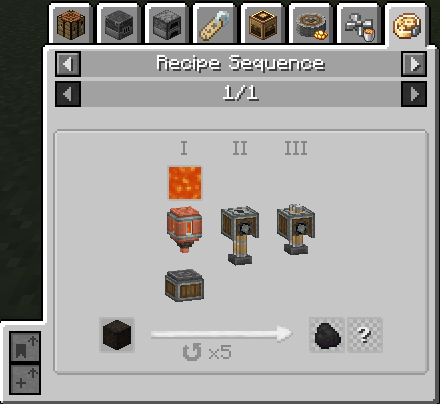
Renewable Diamond
Step 1: Create Compressed Coal blocks by super heating Compressed Coal
Step 2: Spout 500mb of Lava on the Compressed Coal Block and Press it 2x (repeat 5x)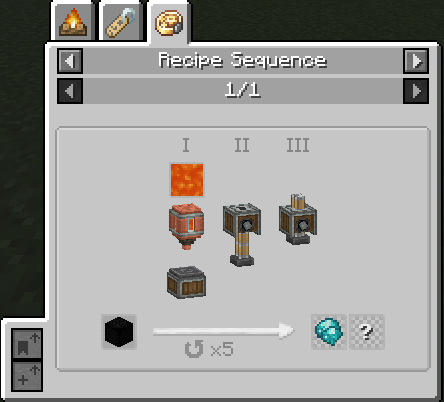
Renewable Netherite Scrap
Step 1: Create Netherite Dust from Powdered Obsidian and Cinder Flour
Step 2: Deploy a Nugget of Experience, 500mb of Lava and press (repeat 5x)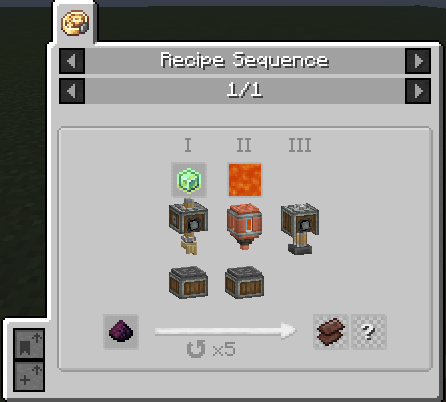
Intermediate Items
These items are the byproduct of sequenced assembly and not obtainable directly in-game.
- Hot Aged Compressed Mulch

- Hot Compressed Coal Block

- Unprocessed Netherite Dust

Need Help?
If you have any questions, suggestions, or would like to share your creations,
join us on Discord — we'd love to see what you're building!
Project description from CurseForge.
Pick your setup
Stuff 'n Things by Minecraft version and loader
Choose the version and loader you play, then open the matching release.
Check the dependencies, then try the file in a copied instance before changing a world you care about.
Recent files
Stuff 'n Things versions and loaders
Stuff and Things - 1.21.1 - 1.1.0
stuff_and_things-neoforge-1.21.1-1.1.0.jar
6 Aug 2026
Client Source doesn’t say Server Source doesn’t say Dependencies No extras listed Listed on Release listing
Check the 1.21.1 · NeoForge setup 1.21.1NeoForge release
stuff_and_things-neoforge-1.21.1-1.0.7.jar
14 Jul 2025
Client Source doesn’t say Server Source doesn’t say Dependencies No extras listed Listed on Release listing
Check the 1.21.1 · NeoForge setup NeoForge1.21.1 release
stuff_and_things-neoforge-1.21.1-1.0.6.jar
9 Jul 2025
Client Source doesn’t say Server Source doesn’t say Dependencies No extras listed Listed on Release listing
Check the 1.21.1 · NeoForge setup NeoForge1.21.1 release
stuff_and_things-neoforge-1.21.1-1.0.5.jar
9 Jul 2025
Client Source doesn’t say Server Source doesn’t say Dependencies No extras listed Listed on Release listing
Check the 1.21.1 · NeoForge setup NeoForge1.21.1 release
stuff_and_things-neoforge-1.21.1-1.0.4.jar
8 Jul 2025
Client Source doesn’t say Server Source doesn’t say Dependencies No extras listed Listed on Release listing
Check the 1.21.1 · NeoForge setup NeoForge1.21.1 release
stuff_and_things-neoforge-1.21.1-1.0.3.jar
6 Jul 2025
Client Source doesn’t say Server Source doesn’t say Dependencies No extras listed Listed on Release listing
Check the 1.21.1 · NeoForge setup NeoForge1.21.1 release
Looking for an older file? The official CurseForge project page is in Resources.
 mod
mod CurseForge + Modrinth · Minecraft
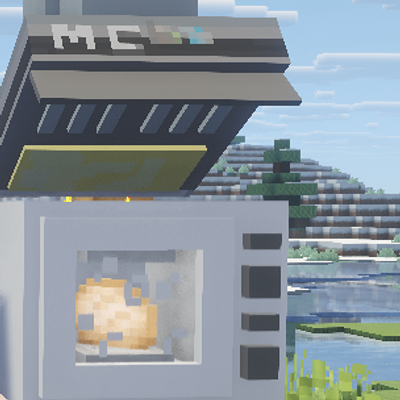
XiaoShi's Furniture
A Minecraft furniture mod that adds interactive furnishings with GeckoLib 3D animations, bringing life to players' kitchens and laundry rooms.
 mod
mod CurseForge + Modrinth · Minecraft
Crashy!
What if your house could become a weapon?
 mod
mod CurseForge + Modrinth · Minecraft
Glow Ink Plus
Add more functions to the glow ink, in this mod you can make the wool and carpets glow