Minecraft version
Back to mods 
CurseForge · Minecraft mod
Client Dynamic Light
Lightweight and multithreaded client-side dynamic lighting from held items, armor worn and nearby entities. Smooth and fully configurable.
Choose a version Pick your version below, then grab the matching file.
Quick answer
Which Client Dynamic Light release should I use?
Latest stable file [1.20.1] Client Dynamic Light 3.2.1
Game version 1.20.1
Loader Forge
Client Dynamic Light [1.20.1] Client Dynamic Light 3.2.1 targets 1.20.1 with Forge. The project page does not say whether this file belongs on the client, dedicated server, or both. No extra mods listed for this file.
Where it goes
Is Client Dynamic Light required on the client, server, or both?
The project page does not say whether this file belongs on the client, dedicated server, or both.
Client Source doesn’t say
Dedicated server Source doesn’t say
Loader for this release Forge
Required install it here Optional supported, not mandatory Not supported do not install here Source doesn’t say do not assume
The source does not explicitly classify this release as client-only or server-only.
What else does Client Dynamic Light [1.20.1] Client Dynamic Light 3.2.1 need?
[1.20.1] Client Dynamic Light 3.2.1. Change the file and its required mods may change too.
This file does not list any required mods. Do not add a library just because a different file uses it.
This file does not list any required or optional mods.
Before you install it
Add Client Dynamic Light without breaking your instance.
Built for Client Dynamic Light [1.20.1] Client Dynamic Light 3.2.1. Pick another file and the loader, install side or required mods may change.
- 01
Stick to this file
Use [1.20.1] Client Dynamic Light 3.2.1. It targets 1.20.1 with Forge; another release may have different loader, side or dependency requirements.
- 02
Bring the mods it needs
This file does not list any required mods. Do not add a library just because a different file uses it.
- 03
Put it on the correct side
The project page does not say whether this file belongs on the client, dedicated server, or both.
- 04
Pick the file you checked
Use the “Get this file” button beside [1.20.1] Client Dynamic Light 3.2.1. It opens that exact file at the source.
About this project
What does Client Dynamic Light add?

Client Dynamic Light v3.1 is entirely client sided and add the abilityto configure which held items, worn armor, dropped items, and entities emit light... The goal is to achieve a smooth Dynamic Lighting without affecting performance, while being entirely client sided.
By default, the mod will create 2 config files inside config/clientdynamiclight directory: config_items.json and config_entities.json. It will create the basic configuration of items that should shine in hands/dropped/weared(armor), and what entities should shine if they're burning. See the showcase video below!
What makes it different ?
This mod is meant to be as lightweight and as performent as possible. It is completely multi threaded and fully client-sided. All items, entities and armor light levels are configurable. Feel free to contribute or make issues on github!
There's also some kind of unique smooth transitions when switching wielded item / when an entity die or stop burning (fade-out / fade-in). It will be configurable in the future.
It is now available forge 1.20.1! It will be ported to more versions in the future!

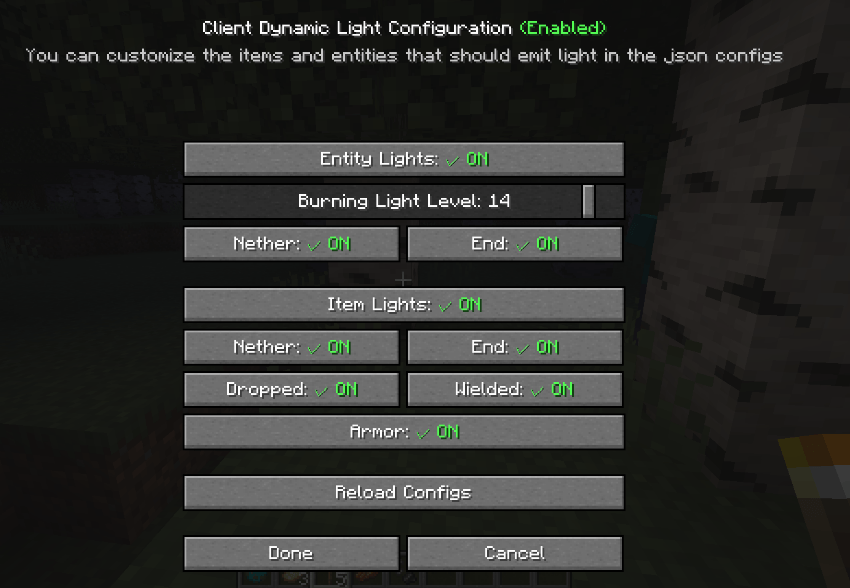
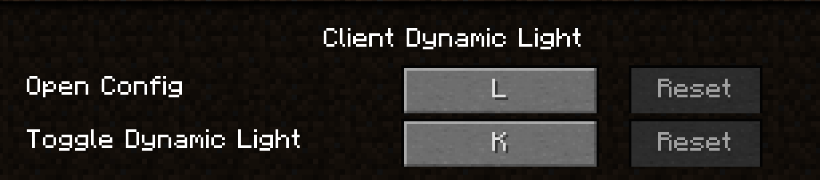
The ingame Configuration interface that you can open with by default the key "L". You can hover the items to get more informations (tooltips). You can also access it on main menu "config/mod/...".
Configurable keybinds to open config/toggle the mod:
The GUI config may evolve in future versions to allow an easy confiuration for users! See "Advanced" section below to know how to configure the json config!

Very quick demo of the mod: (1.20.1, showcasing 2 features out of many more!)

The mod has translation for English, French and Chinese for the GUI. Thanks to @MayIHaveK for the Chinese translation.
Feel free to suggest/make more translations! You can also do a merge request or an issue on github.

The default configuration in the json looks like that:
config_entities.json and config_items.json
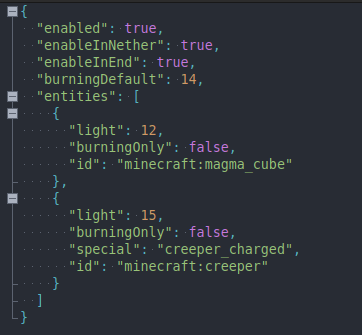
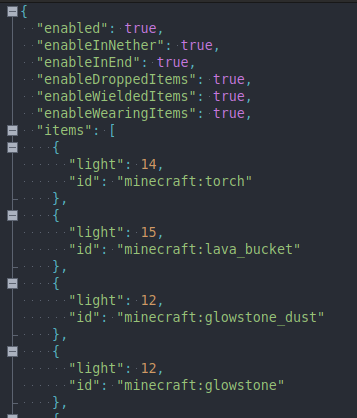
You can freely customize the entities and the items/nodes in hand that should shine, in the json configs.
There are some special parameters:
- "burningDefault" : The the amount of light/brightness that an entity should make when it's burning. It's a global parameter and will affect every entities that are burning.
- "disableInNether/ender" : Wether you want to disable entities light or helded items light when you are, or the player is in the target dimension.
- "disabeEntities/disablesNodes" : To disable the dynamic light from entities or from helded/dropped items (if both are at true, the mod will be disabled).
- "special": "creeper_charged": Special case for charged creeper. If you specific "creeper_charged" in the special key, only a charged creeper will shine. More special cases like this are likely to be added.
-> Don't hesitate to join our discord server or make an issue on github if you didn't understand how to configure the mod!
Feel free to include this mod in any modpack published on curseforge! The source code if publicly available under the MPL-2.0 license at github: https://github.com/AwesomeHippo/ClientDynamicLight
Project description from CurseForge.
Pick your setup
Client Dynamic Light by Minecraft version and loader
Choose the version and loader you play, then open the matching release.
Minecraft version
1.7.10
1 loader buildCheck the dependencies, then try the file in a copied instance before changing a world you care about.
Recent files
Client Dynamic Light versions and loaders
[1.20.1] Client Dynamic Light 3.2.1
clientdynamiclight-1.20.1-3.2.1.jar
11 Aug 2026
Client Source doesn’t say Server Source doesn’t say Dependencies No extras listed Listed on Release listing
Check the 1.20.1 · Forge setup 1.20.1Forge release
[1.20.1] Client Dynamic Light 3.2.0
clientdynamiclight-1.20.1-3.2.0.jar
29 Jul 2026
Client Source doesn’t say Server Source doesn’t say Dependencies No extras listed Listed on Release listing
Check the 1.20.1 · Forge setup 1.20.1Forge release
[1.20.1] Client Dynamic Light 3.1.0
clientdynamiclight-1.20.1-3.1.0.jar
23 Jun 2026
Client Source doesn’t say Server Source doesn’t say Dependencies No extras listed Listed on Release listing
Check the 1.20.1 · Forge setup 1.20.1Forge release
[1.7.10] Client Dynamic Light 3.0
[1.7.10] Client Dynamic Light-3.0.jar
23 Jun 2026
Client Source doesn’t say Server Source doesn’t say Dependencies No extras listed Listed on Release listing
Check the 1.7.10 · Forge setup Forge1.7.10 release
[1.7.10] Client Dynamic Light 2.0
[1.7.10] Client Dynamic Light-2.0.jar
21 Jul 2025
Client Source doesn’t say Server Source doesn’t say Dependencies No extras listed Listed on Release listing
Check the 1.7.10 · Forge setup Forge1.7.10 release
[1.7.10] Client Dynamic Light 1.1
[1.7.10] Client Dynamic Light-1.1.jar
16 Jul 2025
Client Source doesn’t say Server Source doesn’t say Dependencies No extras listed Listed on Release listing
Check the 1.7.10 · Forge setup Forge1.7.10 release
Looking for an older file? The official CurseForge project page is in Resources.
 mod
mod CurseForge · Minecraft
Caio's Climates
A mod that turns the Minecraft Overworld's biomes' climates realistic.
 mod
mod CurseForge · Minecraft
Custom Disenchanter
Precision enchantment removal - keep what you want, remove what you don't.
 mod
mod CurseForge · Minecraft
RandomAddon
Add CrT compat for champions mod and other features.